
Connecting TV Squared on Clarisights
TVSquared (now part of Innovid) is the cross-platform TV ad measurement platform that attributes spots and sessions for linear, addressable, and CTV / OTT campaigns. Connecting TVSquared to Clarisights lets you analyze cost, audience impressions, sessions, acquisitions, and orders per TV channel, spot, and hour of airing side by side with your other paid channels.
⚠ Platform note: TVSquared was acquired by Innovid in 2022 and is now branded "TVSquared by Innovid". The integration connects through your TVSquared partner domain (your
tvsquared.comsubdomain). Reach out to Clarisights support if your account has been moved to a different Innovid domain.
At a glance
| Authentication | Username and password issued by TVSquared / Innovid, plus your partner domain |
| Permissions needed | API user with read access on the Attribution API for the partner / clients / brands you want to report on |
| Account discovery | Automatic: every client and brand pair visible to your API user is added as a separate Account and activated |
| Data freshness | Daily |
| Lookback window | 30 days (rolling window pulled on each refresh) |
| Backfill on connect | Last 30 days; longer history available on request |
| Timezone | Per account, as configured in TVSquared |
| Currency | Set to your Clarisights reporting currency when the account is created. If your TVSquared costs are in a different currency, contact Clarisights support. |
| Levels supported | Account (client and brand) · Campaign (TV channel) · Spot · Segment (hour) |
| Limited rollout | No |
Prerequisites
An active TVSquared (by Innovid) account with at least one client and brand configured
API access enabled on your TVSquared account (confirm with your TVSquared / Innovid Customer Success Manager if unsure)
Your Partner Domain: the subdomain TVSquared uses for your partner; usually provided by the TVSquared support team. For example, if you log in at
acme.tvsquared.com, the partner domain isacme.
Steps to Connect
Step 1: Confirm API access and partner domain
Ask your TVSquared / Innovid CSM to confirm that your user has Attribution API access enabled and to provide your Partner Domain. The partner domain is not always visible in the TVSquared UI; it's the subdomain of your TVSquared address (for example, acme.tvsquared.com means the partner domain is acme).
⚠ Don't know your partner domain? → Ask the TVSquared support team. The integration will not work without it.
Step 2: Add TV Squared in Clarisights
In Clarisights, open the Integrations page, search for TV Squared under Set up new connection, and click + Connect on the card. If TV Squared is already connected, open it under Manage connected channels and click + Account to add another user.
Step 3: Enter your TVSquared credentials
Fill in:
Username: your TVSquared API username
Password: your TVSquared API password
Partner Domain: from Step 1
Click Connect Source. Clarisights authenticates with TVSquared and adds every client and brand pair your user can see as an Account.
⚠ "Authentication error, please check your credentials" → Confirm the username and password are correct (they are case sensitive) and that the partner domain matches the TVSquared URL you use to log in. If the credentials work in the TVSquared UI but fail here, the API role may not be enabled on the user, so ask your CSM to enable it.
Step 4: Review the connected brands
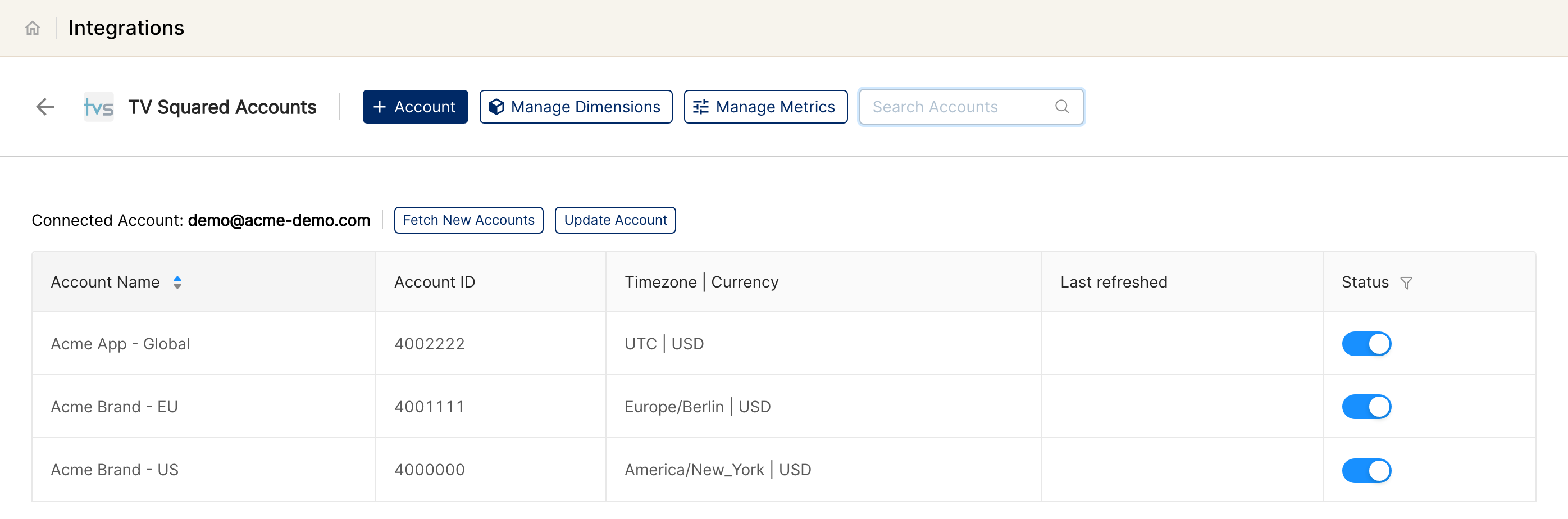
Each TVSquared brand appears as a separate Account row, named after its client. All of them are activated. Switch off the Status toggle for any brand you don't want in Clarisights.
Verify the connection
Open TV Squared under Manage connected channels on the Integrations page. Each connected brand should be listed with its status switched on.
First data appears within 24 hours, after the next scheduled sync.
Quick start: create a new report, add TV Squared as the data source, and add Account · Campaign · TVS: Spots · TVS: Cost · TVS: Audience Impressions · TVS: Sessions.
Data available
Hierarchy
How TVSquared's data maps to the Clarisights levels:
TVSquared | Clarisights level |
Client + Brand | Account (each client and brand pair becomes one Account) |
TV channel | Campaign (one Campaign per TV channel the spots aired on) |
Spot (TV airing) | Spot |
Hour of airing | Segment (an hourly breakdown under each spot) |
Dimensions
Dimension | Level | Description |
Account, Account ID, Brand ID | Account | TVSquared client name, client ID and brand ID |
TV Channel | Campaign | TV channel the spot aired on |
Creative ID | Spot | Creative identifier of the spot |
Daypart | Spot | Daypart classification (morning, primetime, and so on) |
Spot Length | Spot | Spot length in seconds |
Saleshouse | Spot | Sales house responsible for the placement |
TV Programme, Programme Genre | Spot | Programme aired alongside and its genre |
Position In Break, Position In Programme | Spot | Where the spot sat within the ad break and the programme |
TV Region | Spot | Geographic region |
Custom spot dimensions | Spot | Dimensions your brand defines in TVSquared (for example Buying Packages, Tactic or Creative Message) flow through with the names configured there |
Hour | Segment | Hour of the day the spot aired |
Metrics
Metric names start with TVS: in Clarisights (for example TVS: Cost).
Metric | Description |
Spots | Number of TV airings |
Sessions | Web / app sessions attributed to a spot |
Cost | Spot cost |
Ratecard Cost | Ratecard / list-price cost |
Audience Impressions | Modeled audience impressions delivered |
Orders, Acquisitions, Reorders, Installs | Conversion events attributed to TV exposure |
Gross Rating Point, BTRP | Gross Rating Point and broadcaster Target Rating Point |
CPA, CPO, CPV, Cost Per Spot | Cost divided by acquisitions, orders, sessions and spots |
Limitations & known constraints
Granularity: data is reported per day, with an hourly breakdown at the Segment level (the hour the spot aired).
Modeled data: audience impressions and sessions attributed to TV are modeled by TVSquared / Innovid. Numbers reconcile to the TVSquared UI but should not be expected to match exact deterministic counts.
Restatement window: TVSquared restates attribution as more sessions / conversions land. Clarisights re-pulls a 30-day rolling window so recent days will continue to update for several days after airing.
Lookback: rolling 30 days. Historic backfills are available on request.
Custom metrics: if your brand defines custom metrics in TVSquared, they can be brought into Clarisights with the names configured in TVSquared. Contact Clarisights support to set them up.
Carousel / non-spot inventory: only standard TV spots are ingested. Innovid-only inventory (e.g., CTV impressions captured via Innovid XP without a TVSquared spot record) is not surfaced via this integration.
Operating notes
Refresh schedule: daily.
Lookback: rolling 30 days.
Multi-account: a single API user connects every client and brand pair visible to it. When new brands are added in TVSquared, click Fetch New Accounts on the TV Squared page in Integrations. Add additional users (+ Account) to onboard brands managed under different TVSquared partner contracts.
Currency: each account uses your Clarisights reporting currency. Contact support if your TVSquared costs are in another currency.
Credential rotation: if the API password is rotated, update it from the TV Squared page in Integrations with Update Account. The partner domain rarely changes; reach out to support if it does.
Need help?
When contacting support from the in-app messenger, please include:
The integration name and brand ID (from the TV Squared page in Integrations)
The exact error message or screenshot
The step where the issue occurred
When the issue started