
Connecting Flashtalking on Clarisights
Flashtalking is an ad serving and creative personalisation platform for cross-channel display, video and CTV campaigns. Connecting Flashtalking to Clarisights lets you bring campaign, placement and creative performance into your cross-channel reporting and analyze impressions, viewability, clicks, interactions, video engagement, cost and Spotlight conversions side-by-side with your other paid channels.
At a glance
| Authentication | Flashtalking API username and password |
| Permissions needed | A Flashtalking login with API access to the advertisers you want to ingest, including access to reporting |
| Account discovery | Automatic: every advertiser visible to your login is connected as its own account |
| Data freshness | Daily (once per day, early morning in your company timezone) |
| Lookback window | 30 days on each scheduled run |
| Backfill on connect | Last 30 days, imported on the first scheduled run after you connect |
| Timezone | Your Clarisights company timezone (Flashtalking does not provide an advertiser timezone) |
| Currency | Chosen by you on the connect form (Flashtalking does not report a currency) |
| Levels supported | Account (Advertiser) · Campaign · Ad Group (Placement) · Ad (Creative) |
| Limited rollout | No |
Prerequisites
An active Flashtalking account with at least one advertiser
A Flashtalking API username and password. If you are not sure whether your login has API access, contact your Flashtalking account manager
The currency your Flashtalking advertisers report cost in (for example EUR or USD)
Access to the Clarisights Integrations page
Steps to Connect
Step 1: Get your Flashtalking API credentials
Clarisights connects to Flashtalking with an API username and password. Make sure the login can see every advertiser you want in Clarisights and can pull reports for them. If you do not have API credentials yet, ask your Flashtalking account manager to issue them.
Step 2: Open Flashtalking in Clarisights
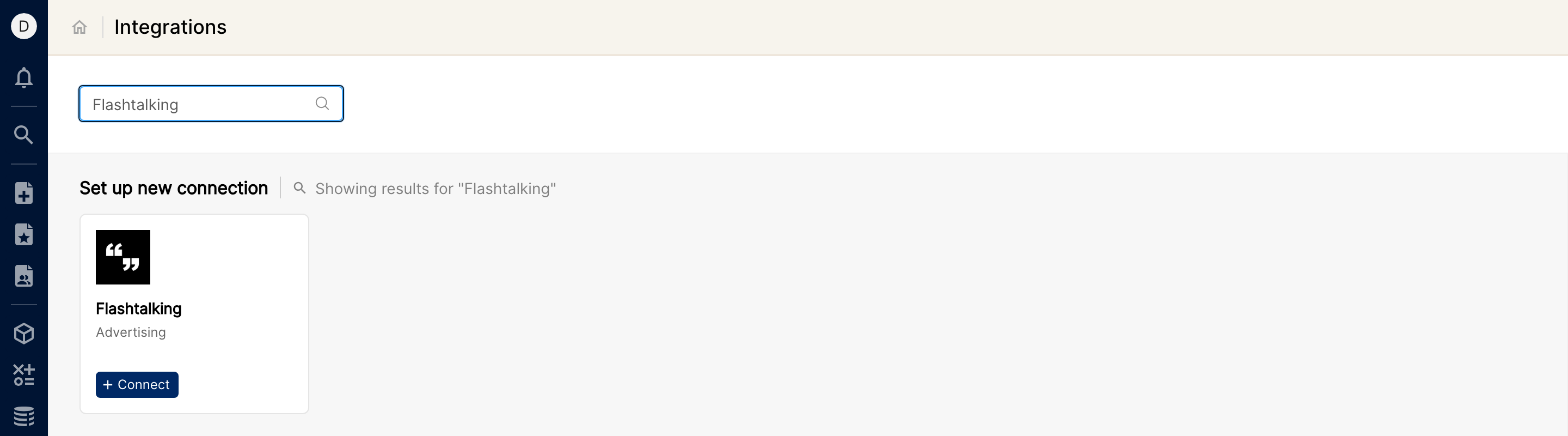
Click the Integrations icon in the left sidebar. Under Set up new connection, search for Flashtalking (or click See All) and click + Connect on the Flashtalking card.
Step 3: Enter credentials and currency
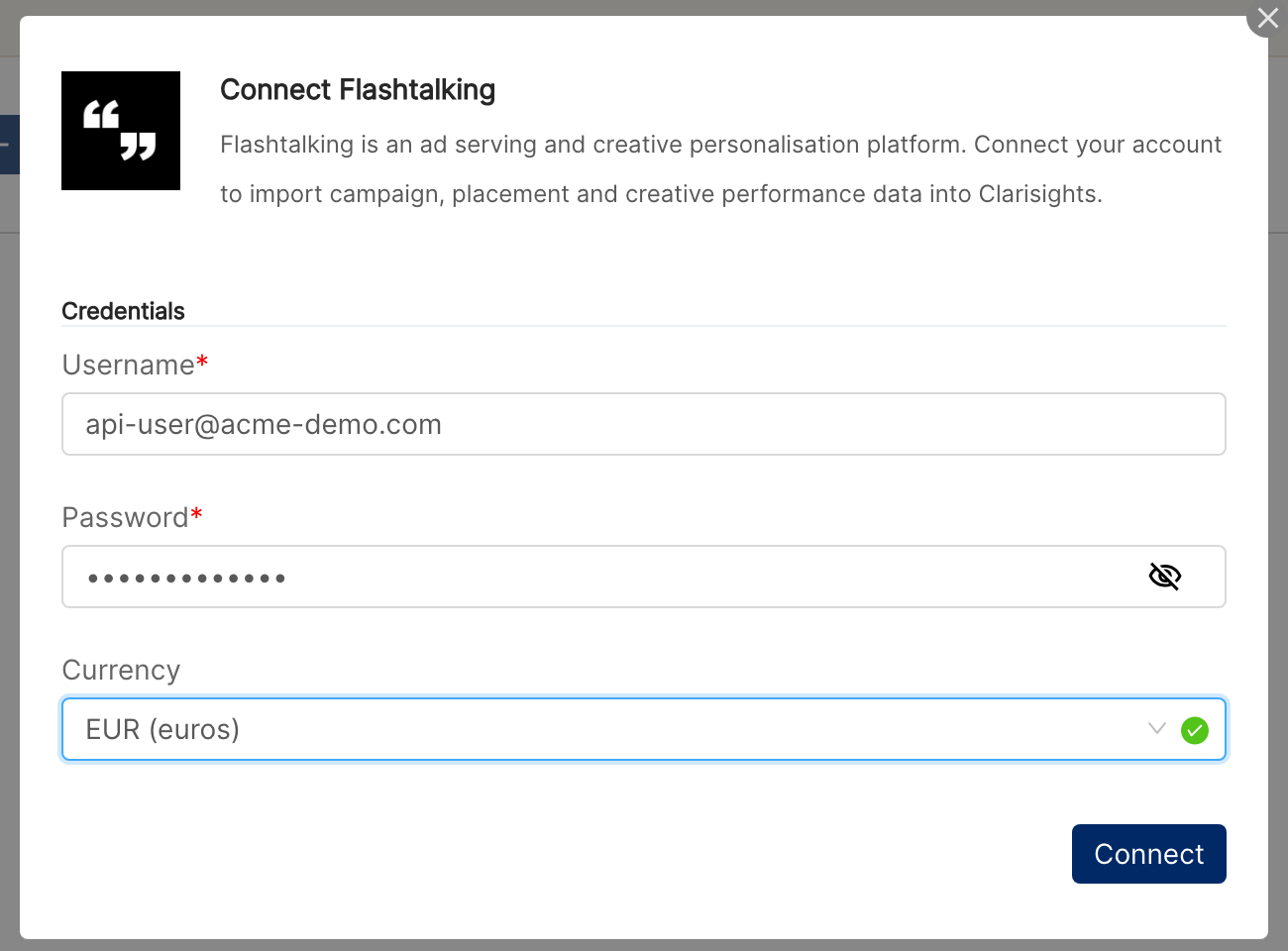
On the Flashtalking Accounts page, click + Add User. Enter your Flashtalking Username and Password, select the Currency your advertisers report in, then click Connect.
Choose the currency carefully. Flashtalking does not tell Clarisights which currency your costs are in, so every cost, income and conversion value metric is read in the currency you select here and converted to your reporting currency from it. A wrong currency means wrong spend figures.
⚠ “Error: Invalid credentials. Please check your username and password and try again.” → Flashtalking rejected the username and password. Check them for typos and confirm with your Flashtalking account manager that the login has API access, then retry.
⚠ “No advertisers found with provided credentials.” → The login is valid but cannot see any advertiser. Ask your Flashtalking account manager to grant the login access to the advertisers you need, then connect again.
⚠ “Too many requests. Please try again in a few minutes.” → Flashtalking is rate limiting requests. Wait a few minutes and click Connect again.
⚠ “Flashtalking is currently unavailable (HTTP …). Please try again later.” → Flashtalking returned an unexpected error. Retry later; if the error persists, contact support.
Step 4: Review the connected advertisers
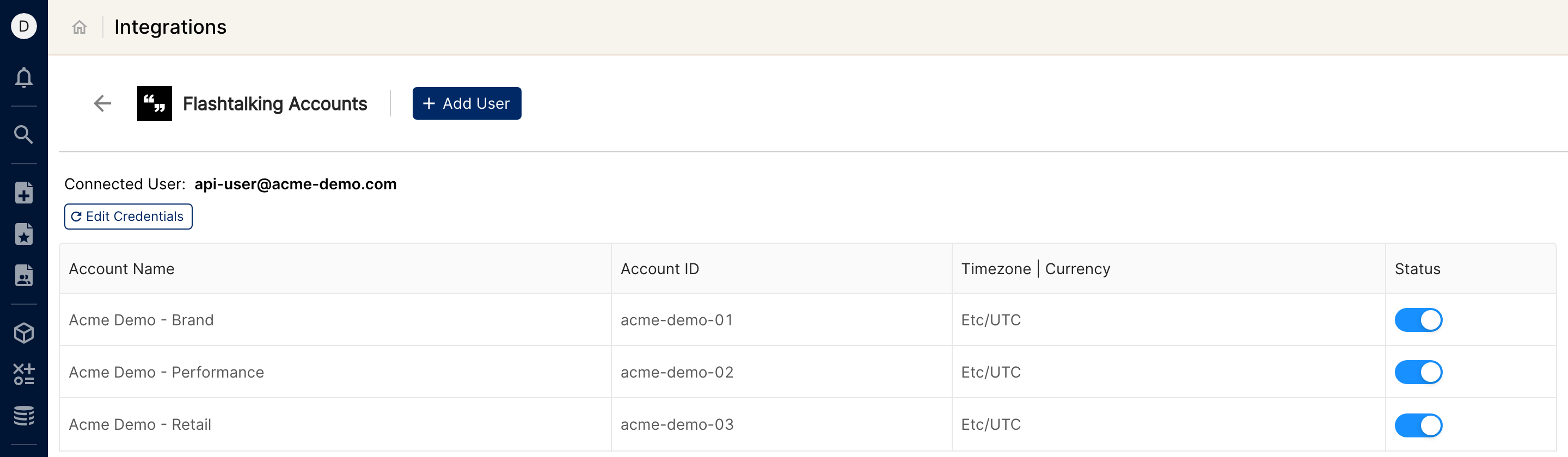
There is no advertiser selection step. Clarisights connects every advertiser visible to the login, and shows a confirmation with the number of advertiser accounts connected. Each advertiser appears as its own account on the Flashtalking Accounts page and starts ingesting on the next scheduled run.
Verify the connection
Go to Integrations → Flashtalking. Your login should be listed as the connected user, with each advertiser listed below it.
First data appears within about 24 hours (Flashtalking data syncs once per day on a 30-day lookback).
Quick start: create a new report, add Flashtalking as the data source, and add Account · Campaign · Impressions Delivered · Clicks · Total Cost · Total Spotlights (Conversions).
Data available
Hierarchy
How Flashtalking's native levels map to the standard Clarisights levels:
Native level (Flashtalking) | Clarisights level |
Advertiser | Account |
Campaign | Campaign |
Placement | Ad Group |
Creative | Ad |
Dimensions
Dimension | Level | Description |
Account / Account ID | Account | Advertiser name and ID |
Campaign / Campaign ID | Campaign | Campaign name and ID |
Market | Campaign | Market the campaign is set up for |
Cost Group Name | Campaign | Flashtalking cost group |
Strategy / Strategy ID | Campaign | Strategy name and ID |
Start Date / End Date | Campaign | Flight dates |
Adgroup / Adgroup ID | Ad Group | Placement name and ID |
Site / Site ID | Ad Group | Site (publisher) the placement runs on |
Ad / Ad ID | Ad | Creative name and ID |
Creative Dimensions | Ad | Creative size |
Creative Type | Ad | Type of creative |
Category | Ad | Creative category |
Creative Group 1 / Creative Group 2 | Ad | Creative groupings defined in Flashtalking |
Placement and creative levels are filled when the campaign has activity at that level.
Metrics
Metric | Description |
Impressions Delivered | Total impressions served |
Impressions Booked / Goal Impressions | Booked and goal impression volumes |
Viewable Impressions | Impressions measured as viewable |
Non-Viewable Rendered Impressions / Undetermined Viewability Impressions | Rendered impressions that were not viewable, and impressions whose viewability could not be measured |
Standard / Enhanced / Rich Media Impressions | Impressions by creative format |
Alt GIF Impressions / No-Script GIF Impressions | Impressions served as a fallback image |
Broadband / Narrowband Impressions | Impressions by connection type |
Sound-On Impressions / Fullscreen Impressions / Expand Views | Impressions with sound on, in fullscreen, or expanded |
Clicks / Unique User Clicks | Total clicks and clicks by unique users |
Standard / Enhanced / Rich Media Clicks | Clicks by creative format |
Backup GIF Clicks / Facebook Clicks / Natural Search Clicks | Clicks on fallback images, from Facebook, and from natural search |
Unique Users | Unique users reached |
Unique Interactions (by Impressions) / Total Interaction Time | Unique interactions and total time spent interacting |
Enhanced Interactions / Enhanced Interaction Time (Total) | Interactions and interaction time on enhanced creatives |
Rich Media Interactions / Rich Media Interaction Time (Total) | Interactions and interaction time on rich media creatives |
Video 1 Starts | Video starts |
Video 1 Played to 25% / 50% / 75% | Video quartile completions |
Video 1 Completes / Video 1 Replays | Videos played to the end, and replays |
Total Cost / Booked Cost | Actual and booked cost, in the currency you selected |
Flashtalking Unit Cost | Unit cost as reported by Flashtalking |
Total Income / Total Profit | Income and profit as reported by Flashtalking |
Goal Value | Goal value set in Flashtalking |
Total Spotlights (Conversions) | Total Spotlight conversions |
Total Spotlights from Clicks / from Views | Spotlight conversions attributed to a click or to a view |
Total Conversion Value | Total value of Spotlight conversions |
Total Conversion Value from Clicks / from Views | Conversion value attributed to a click or to a view |
Cost, income, profit, goal value and conversion value metrics are converted from the currency you selected to your reporting currency. Video and rich media metrics only have values for campaigns with that kind of activity.
Limitations & known constraints
Currency is set by you: Flashtalking does not report a currency, so Clarisights uses the one you select. If it is wrong, every money metric is converted at the wrong rate. Correct it with Edit Credentials. The currency applies to all Flashtalking advertisers connected in your Clarisights workspace.
One report per campaign: Flashtalking only reports one campaign at a time, so advertisers with many active campaigns take longer to sync.
Only campaigns active in the window are pulled: campaigns whose flight dates fall entirely outside the 30-day lookback are skipped on that run.
30-day lookback per run: each daily run pulls the last 30 days; longer historical backfills require a one-off pull from support.
Temporary gaps: if Flashtalking fails to produce a report for a campaign during a run, that campaign can show missing data for the affected dates until the next successful run.
All advertisers are connected: every advertiser visible to the login is connected; there is no selection step. You can switch an individual account off with its Status toggle on the Flashtalking Accounts page.
Timezone: Flashtalking does not provide an advertiser timezone, so accounts use your Clarisights company timezone and daily figures are taken as Flashtalking reports them.
Operating notes
Refresh schedule: daily, early morning in your company timezone.
Lookback: 30 days per run.
Multi-account: all advertisers under one Flashtalking login are connected together; data is keyed per advertiser ID. Adding a different username adds a second connection.
New advertisers: to pick up advertisers added to your login after connecting, open Edit Credentials, re-enter the password and click Update Credentials.
Credential rotation: update the password or currency from Integrations → Flashtalking → Edit Credentials. The username cannot be changed there; to use a different login, click + Add User.
Need help?
When contacting support from the in-app messenger, please include:
The integration name and advertiser ID (Integrations → Flashtalking)
The exact error message or screenshot
The step where the issue occurred
When the issue started