
Connecting Remerge on Clarisights
Remerge is a mobile app retargeting and incrementality measurement platform. Connecting Remerge to Clarisights lets you analyze impressions, clicks, conversions, app opens, and spend from your in-app retargeting campaigns alongside the rest of your paid stack, broken down by audience, campaign, segment, and ad.
At a glance
| Authentication | Email + password (Remerge login) |
| Permissions needed | A Remerge user with reporting API access on the audiences you want to connect |
| Account discovery | Automatic: every audience (mobile app) with activity in the last 30 days is added when you connect; new audiences are added on later syncs |
| Data freshness | Twice daily (core sync at 02:00 and 12:00 UTC; backfill at 16:00 UTC) |
| Lookback window | Last 10 days (rolling backfill) |
| Backfill on connect | Last 10 days, through the daily rolling backfill; older history on request from Clarisights support |
| Timezone | UTC (Remerge reports are UTC-only) |
| Currency | Cost currency from Remerge per row; auto-converted to your reporting currency |
| Levels supported | Audience (Account) · Campaign · Ad, plus a Campaign Segment (country) breakdown of each campaign |
| Limited rollout | No |
Prerequisites
An active Remerge account with reporting API access (confirm with your Remerge Account Manager if unsure)
The Remerge email and password used to log in to remerge.io
Your Remerge user must be linked to at least one audience (mobile app)
Steps to Connect
Step 1: Verify reporting API access
Log in to Remerge with the credentials you plan to use. Confirm your audiences are visible. If reporting API access has not been provisioned for your account, contact your Remerge Account Manager.
Step 2: Add Remerge in Clarisights
In Clarisights, open Integrations from the left sidebar. Under Set up new connection, search for Remerge and click + Connect on its card. If Remerge is already connected, open it from Manage connected channels and click + Account.
Step 3: Enter your Remerge credentials
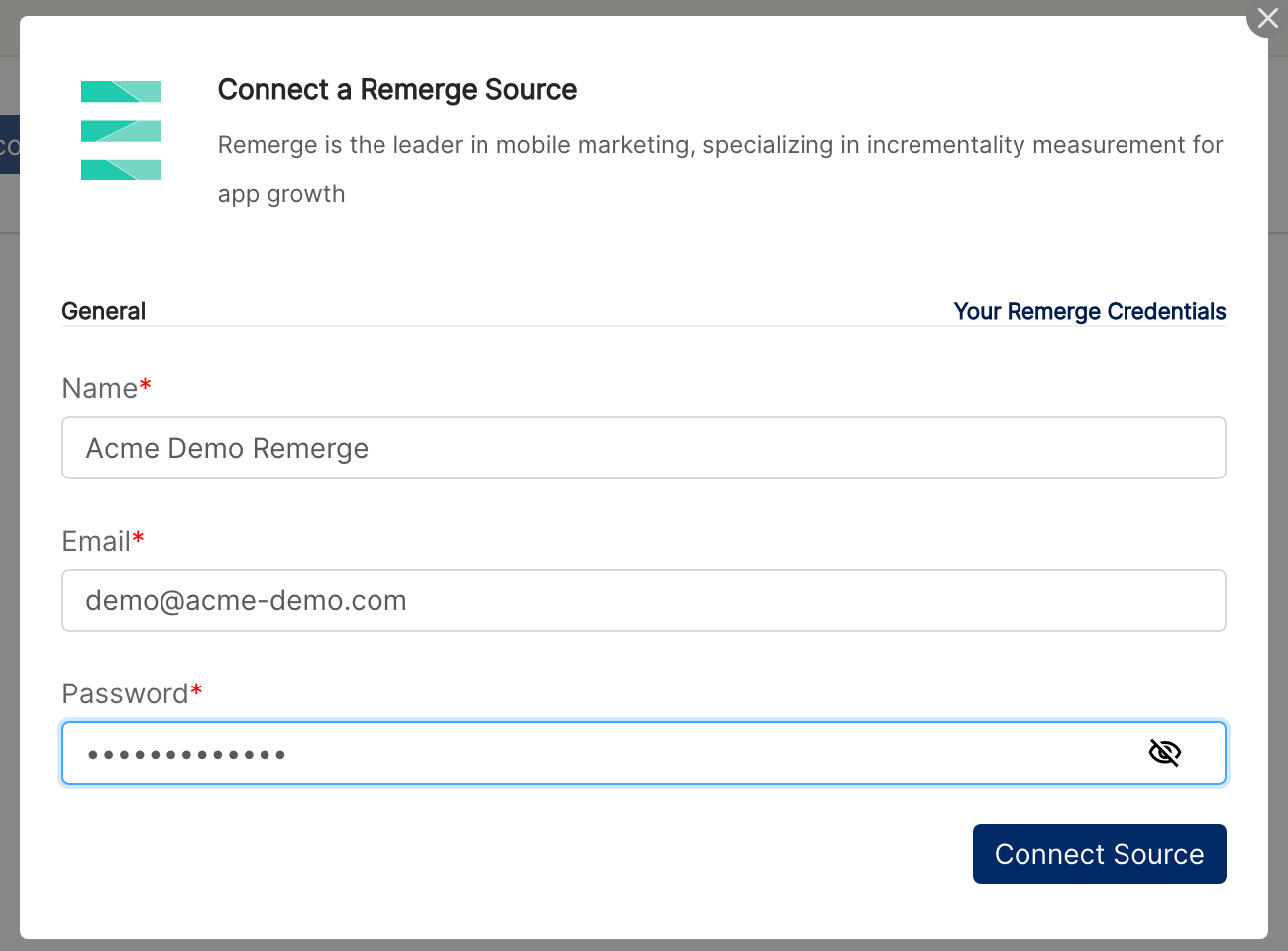
Enter a friendly Name, your Remerge Email, and your Password, then click Connect Source. Clarisights signs in to Remerge to retrieve a user token (the password is stored encrypted so we can refresh the token automatically).
⚠ "Invalid Credentials" → Remerge rejected the email/password. Confirm the same credentials work at remerge.io and that reporting API access is enabled on the user. If access was just enabled, allow a few minutes for the change to propagate.
Step 4: Audiences are auto-discovered
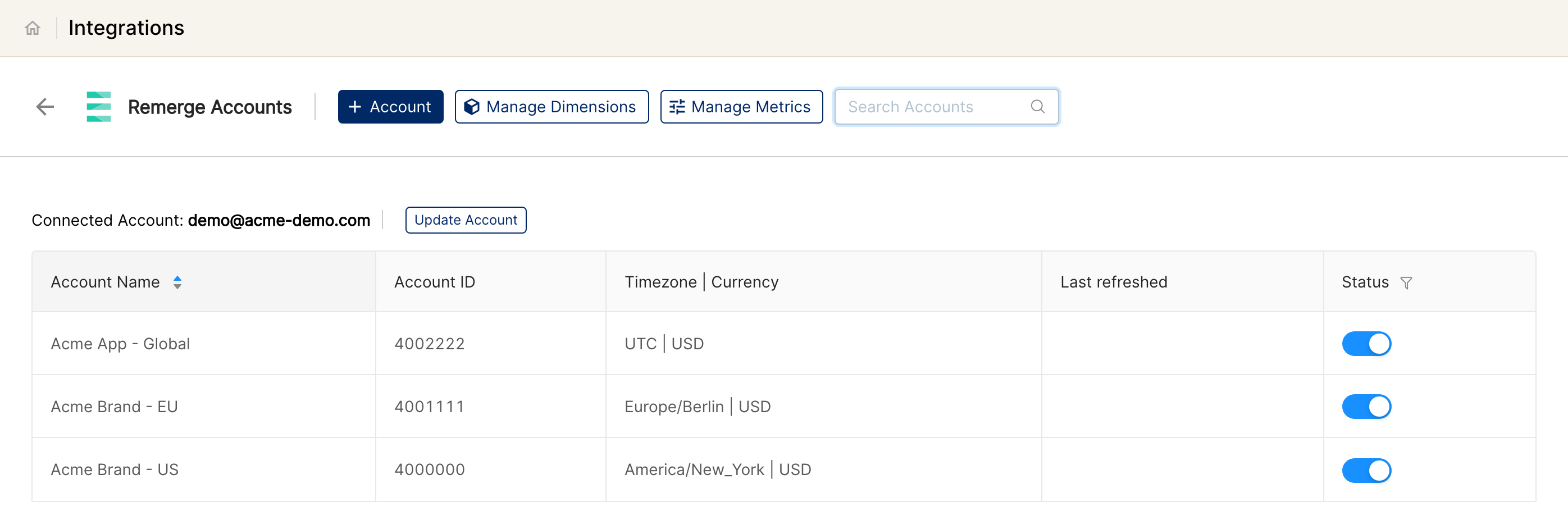
Clarisights looks at the last 30 days of Remerge activity to find every audience your Remerge user can see and adds each one as an account in Clarisights. Each audience corresponds to one mobile app in Remerge. All audiences are active by default; use the Status toggle next to an audience to stop syncing it.
Remerge calls a mobile app an "Audience" in the API and an "App" in the dashboard. In Clarisights this maps to Account.
Verify the connection
Go to Integrations → Remerge. Each connected audience is listed with its Status toggle on.
First data appears after the next scheduled sync (02:00 or 12:00 UTC).
Quick start: create a new report, add Remerge as the data source, and add Account · Campaign · Impressions · Clicks · Cost · Conversions.
Data available
Hierarchy
How Remerge's native levels map to the standard Clarisights levels:
Native level (Remerge) | Clarisights level |
Audience (App) | Account |
Campaign | Campaign |
Ad | Ad (each ad belongs to a campaign) |
Campaign Segment | Campaign Segment (a country breakdown of each campaign, reported alongside the Ad level rather than above or below it) |
Dimensions
Dimension | Level | Description |
Account / Audience ID | Account | Remerge audience identifier (one mobile app) |
Account Currency | Account | Your workspace currency (Remerge apps do not carry a currency of their own) |
Campaign / Campaign ID | Campaign | Remerge campaign name and ID |
Campaign Segment / Segment Type | Campaign Segment | Country breakdown of each campaign |
Ad / Ad ID | Ad | Creative name and ID |
Metrics
Metric | Description |
Impressions | Total ad impressions during the period |
Clicks | Total clicks during the period |
Cost | Total spend, converted from the row's cost currency to your reporting currency |
Conversions | Total conversions during the period |
App Opens | Open rate × total clicks during the period |
Limitations & known constraints
UTC-only: Remerge reports are emitted at UTC 00:00 boundaries. Day-over-day comparisons against channels in other timezones will show small alignment offsets.
Account-level reports skipped for currency reasons: Remerge's account-level endpoint does not perform currency conversion, so Clarisights pulls reports at campaign / segment / ad level only. Roll-ups to account are computed in Clarisights from those.
Daily data only: Remerge's API recommends one-to-two day windows per request. Clarisights iterates day-by-day under the hood; very large historical backfills can take several minutes to complete.
Token rotation: Remerge user tokens are refreshed by Clarisights using your stored password. If you change your Remerge password, update credentials in Clarisights or the integration will stop syncing.
Country is the only segment type: the Campaign Segment level breaks campaigns down by country. It is switched on per workspace; contact Clarisights support if you don't see it. Other Remerge breakdowns (OS, creative type) are not available.
Operating notes
Refresh schedule: core sync runs at 02:00 and 12:00 UTC. A 10-day backfill runs daily at 16:00 UTC.
Lookback: 10 days (rolling backfill).
Multi-account: a single Remerge user connects every audience they have access to. Add another Remerge user with + Account for audiences managed under separate logins.
Currency conversion: each Remerge row carries its cost currency; Clarisights converts to your reporting currency at the daily exchange rate.
Credential rotation: click Update Account next to the connected login in Integrations → Remerge and enter the new password. Passwords are encrypted at rest.
Need help?
When contacting support from the in-app messenger, please include:
The integration name and Audience ID (Integrations → Remerge)
The exact error message or screenshot
The step where the issue occurred
When the issue started