
Integrating Criteo into Clarisights
Criteo is a leading commerce media and retargeting platform. Connecting Criteo to Clarisights lets you blend retargeting and prospecting performance into your cross-channel reporting and analyse spend, sales, and revenue alongside your other paid channels.
At a glance
| Authentication | OAuth 2.0 client credentials |
| Permissions needed | Read access on Analytics, Audiences, Campaigns, Catalog, and Creatives domains in Criteo's C-Growth and Marketing Solutions product |
| Account discovery | Automatic: every advertiser linked to the consent URL is offered |
| Data freshness | Several syncs per day |
| Lookback window | 7 days |
| Backfill on connect | Historical data is imported automatically; you'll be notified once it's ready |
| Timezone | GMT (Criteo returns all data in GMT when no timezone is provided) |
| Currency | Account currency (set to your company currency on connect) |
| Levels supported | Account · Campaign (Ad Set) · Category |
| Limited rollout | No |
Prerequisites
An active Criteo advertiser account on partners.criteo.com
Permission to create apps in your Criteo organisation
The ability to grant portfolio (advertiser) access to the app you create
Steps to Connect
The flow has two parts: first you create a Criteo app and generate credentials in the Criteo portal, then you paste those credentials into Clarisights.
Part 1: In the Criteo portal
Step 1: Sign in to Criteo
Go to partners.criteo.com and log in with an account that has permission to create apps.
Step 2: Create a new app
Click Create a new app (or the plus icon next to your existing apps).
For a walkthrough of creating an app in the Criteo Developer Portal, see Criteo's guide: Create Your API Application.
Step 3: Add app details
Enter the following:
Name: Clarisights Data Platform
Description: Clarisights is a marketing analytics platform that helps businesses gather and analyse data from various marketing channels to make data-driven decisions and optimise marketing strategies.
Owner: the team or contact who owns this integration internally
Logo: download from careers.clarisights.com/clarisights-desktop.png
Click Next.
Step 4: Choose Client credentials
For the authentication method, select Client credentials, then click Create.
For help with choosing Client Credentials when creating your app, see Criteo's guide: Client Credentials Setup.
Step 5: Select "C-Growth and Marketing Solutions"
Pick the C-Growth and Marketing Solutions product. This grants the app access to advertisers, audiences, analytics, and creatives. Click Next.
Step 6: Grant Read access on all domains
On the Authorisations page, give Read access to all of the following:
Analytics: campaign analytics reports
Audiences: all audiences
Campaigns: all live and paused campaigns or ad sets
Catalog: all catalog products
Creatives: all live and paused creatives
Click Activate app.
Step 7: Confirm activation
Double-check the values from the previous steps. Once you click Activate, the name, description, and authorisations are locked.
Step 8: Create an API key
Scroll to the App credentials section and click Create new key. Criteo prompts you to download a .txt file containing your client_id and client_secret.
Treat this file like a password. You'll paste both values into Clarisights in Step 12, and Criteo will not show the secret again.
Step 9: Generate a consent URL
In the top right of the app page, click Generate new URL. The consent URL appears at the bottom of the first section. Copy it and open it in a new tab.
Step 10: Grant portfolio access
On the consent page, scroll to Portfolio access and select every advertiser you want to connect to Clarisights. Click OK to confirm.
Part 2: In Clarisights
Step 11: Open the Criteo integration page
Go to Integrations → Criteo and click + Account. If you have no Criteo accounts connected yet, the form opens automatically.
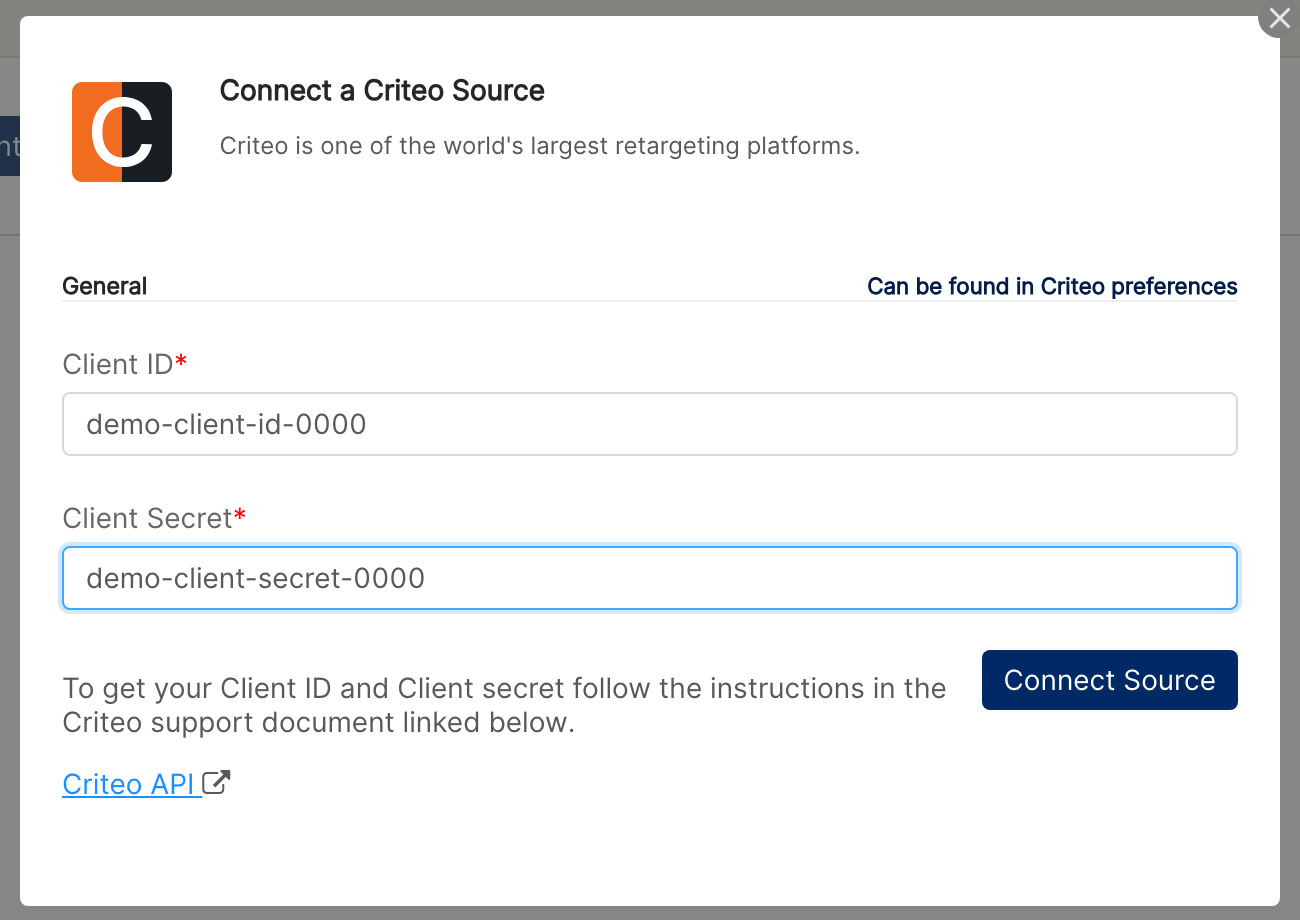
Step 12: Enter Client ID and Client Secret
Paste the client_id and client_secret values from the file you downloaded in Step 8 and click Connect Source.
⚠ "Invalid client" on connect → The credentials are wrong, the app was never activated, or the consent URL was not opened to grant portfolio access. Re-check Steps 7, 9, and 10. If the app exists but no portfolios are linked, generate a new consent URL and add the advertisers.
Verify the connection
Go to Integrations → Criteo. Each advertiser you authorised in Step 10 should appear as a connected ad account.
Historical data is imported automatically after connect. Clarisights will notify you once your reports are ready.
Quick start: create a new report, add Criteo as the data source, and add Account · Campaign · Impressions · Clicks · Spend.
Data available
Hierarchy
How Criteo's native levels map to the standard Clarisights levels:
Native level (Criteo) | Clarisights level |
Advertiser | Account |
Ad Set (Adset) | Campaign (Criteo's Ad Set is what Clarisights calls Campaign) |
Category | Category (catalog category breakdown below each Ad Set) |
N/A | Ad (not exposed by Criteo's reporting API) |
Dimensions
Dimension | Level | Description |
Account / Account ID | Account | Criteo advertiser name and ID |
Campaign / Campaign ID | Campaign | Ad Set ("Adset") name and ID |
Campaign Status | Campaign | Status of the Ad Set in Criteo |
Campaign Bid Type | Campaign | Bid strategy type of the Ad Set |
Category / Category ID | Category | Catalog category name and ID |
Category Bid Value / Bid Type / Bid Currency | Category | Bid settings for the category |
Average Price | Category | Average price of the products in the category |
Number Of Products | Category | Number of catalog products in the category |
Metrics
Core engagement
Metric | Description |
Clicks | Total clicks |
Displays (Impressions) | Ads served |
Advertiser Cost (Spend) | Total spend in account currency |
Visits / Qualified Visits | Site visits driven by Criteo, with the qualified subset |
Audience / Exposed Users / Reach | Unique audience and reach metrics |
Viewable / Non-viewable / Untrackable Displays | Viewability breakdown of impressions |
Potential Displays | Ads available for display |
Value
Metric | Description |
Advertiser Value | Order value attributed to Criteo |
Advertiser All Value | Advertiser Value including all attribution windows |
Sales (attributed conversions)
Each sales metric is reported per attribution window. Variants:
Sales: Client Attribution / Sales All: Client Attribution
Sales: Post-click 1d / 7d / 30d (and the All counterparts)
Sales: Post-view 24h (and the All counterpart)
Sales: Post-click 30d + Post-view 24h (and the All counterpart)
Revenue (from attributed conversions)
Mirrors the Sales attribution windows:
Revenue Generated: Client Attribution (and All)
Revenue Generated: Post-click 1d / 7d / 30d (and All)
Revenue Generated: Post-view 24h (and All)
Revenue Generated: Post-click 30d + Post-view 24h (and All)
Derived metrics
Metric | Description |
CTR | Click-through rate (clicks / impressions) |
CPC | Cost per click |
CPM | Cost per thousand impressions |
The "All" variant of any Sales / Revenue metric includes every attribution channel Criteo tracks for the advertiser; the non-"All" variant uses the advertiser's configured client attribution.
Limitations & known constraints
Reporting API only: Criteo's Marketing Solutions API exposes Account, Ad Set (Campaign), and Category. Creative-level (Ad) reporting is not available.
GMT timezone: All Criteo data is returned in GMT. Local timezone reporting is not supported via the API.
Newer renewal periods: A small number of recently renewed Ad Sets may briefly be served by Criteo's preview API. Clarisights handles this transparently, though you may occasionally see slight reporting delays for those Ad Sets.
No segment breakdowns: Criteo's reporting API does not expose breakdowns by geography, device, or audience.
App can't be edited after activation: Once you click Activate in Step 7, the app's name, description, and authorisations are locked. To change them, create a new app.
Operating notes
Refresh schedule: campaign metadata and reports are pulled several times a day, and a daily backfill re-fetches the last 7 days.
Lookback: 7 days are re-fetched daily to capture late-arriving conversions.
Multi-advertiser: a single Criteo app + consent URL can authorise every advertiser in your portfolio. To add new advertisers later, generate a fresh consent URL from the same app and grant them.
Currency conversion: account currency is set to your company currency at connect time. Native amounts are pulled in that currency and converted to your reporting currency by Clarisights.
Credential rotation: tokens auto-refresh using the client credentials flow. To rotate, create a new key in Criteo and click Update Account on the Criteo page in Integrations, enter the new Client ID and Client Secret, and click Update.
Need help?
When contacting support from the in-app messenger, please include:
The integration name and account ID (Integrations → Criteo)
The exact error message or screenshot
The step where the issue occurred
When the issue started