
Integrating DV360 on Clarisights
Display & Video 360 (DV360) is Google's enterprise demand-side platform. You bring DV360 data into Clarisights by scheduling a DV360 report to be emailed to a Clarisights address. Each file is imported into a Custom Advertising channel, so you can analyze programmatic display, video, audio, and CTV performance alongside the rest of your paid stack.
At a glance
Authentication | None. DV360 emails a scheduled report to a unique Clarisights address |
Permissions needed | A DV360 user who can create and schedule reports for the partners and advertisers you want to analyze |
Account discovery | From the report: every Advertiser in the file becomes an Account in Clarisights |
Data freshness | Follows your DV360 report schedule (daily is recommended); each email is imported when it arrives |
Lookback window | The date range you set on the scheduled report |
Backfill on connect | Run a one-off DV360 report for the historical range and email it to the same address |
Timezone | Set on the channel when you create it; should match the timezone of the DV360 report |
Currency | Set on the channel when you create it; should match the currency of the cost columns in the report. Converted to your reporting currency by Clarisights |
Levels supported | Account (Advertiser) · Campaign (Insertion Order) · Ad Group (Line Item), plus Ad if you map a creative column |
Limited rollout | No. Set up through the Custom Advertising card on the Integrations page |
Heads up: DV360 is not a one-click sign-in integration on the Integrations page. The email setup below is the self-serve way to bring DV360 data into Clarisights. If you would rather have a direct API connection to DV360, contact your Clarisights account manager.
Prerequisites
An active DV360 partner or advertiser account on displayvideo.google.com
Permission in DV360 to create reports and schedule email delivery
Permission in Clarisights to add channels on the Integrations page
Steps to Connect
Step 1: Create a DV360 channel in Clarisights
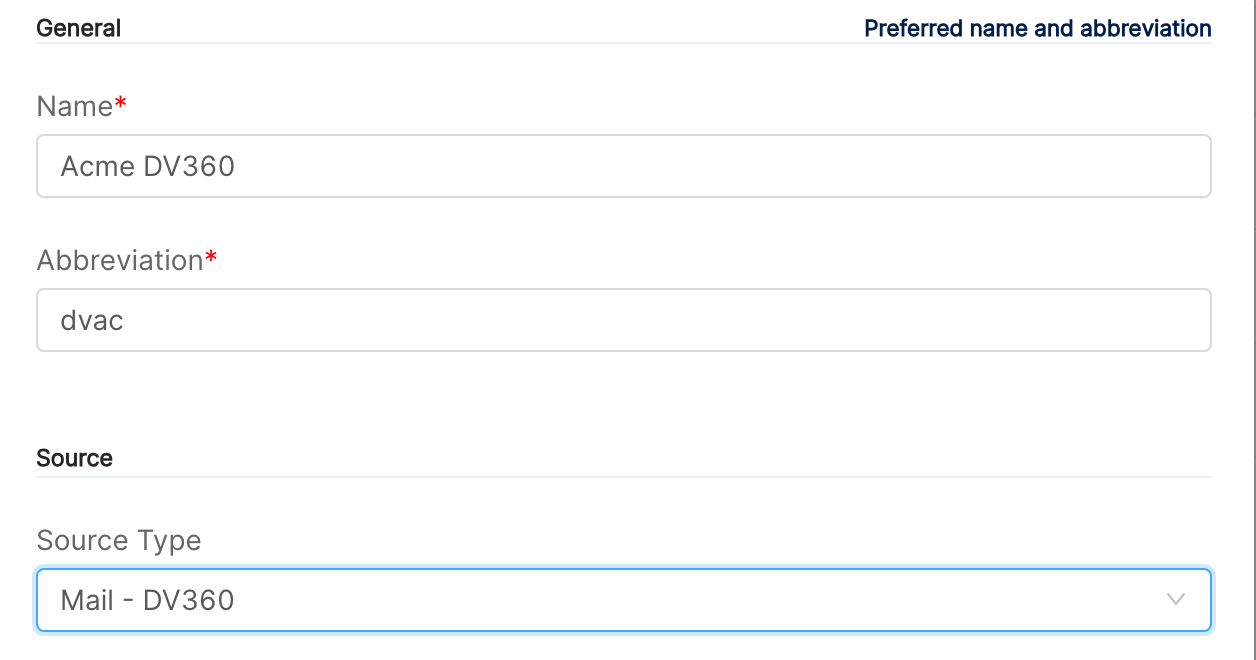
In Clarisights, open Integrations from the left sidebar. Under Set up new connection, search for Custom Advertising and click + Connect on its card (if you already have Custom Advertising channels, open it from Manage connected channels and click + Channel). Then:
Enter a Name (for example, "DV360") and a short Abbreviation of up to 4 characters.
Set Source Type to Mail - DV360.
Under Account Settings, choose the Currency and Timezone your DV360 report uses.
Click Connect Source.
Step 2: Copy your Clarisights email address
On the Custom Advertising Channels page, click + next to your new channel to expand it. It shows Mail: Send email to followed by a unique address for this channel. Copy it; DV360 will send the report there.
Step 3: Define the metrics you want to import
Click Metrics/Dimensions for the channel and add each DV360 metric column you plan to include in the report with + Metric, using the column name exactly as DV360 writes it in the file (for example Impressions, Clicks, Media Cost (Advertiser Currency)). Columns that are not defined as a metric or dimension are not imported. See Advertising Channel with Scheduled CSVs through Mail for how metrics, dimensions and header maps work.
Step 4: Build the report in DV360
In DV360, create a new report for the partner or advertisers you want to analyze and include:
Dimensions: Date, Advertiser, Advertiser ID, Insertion Order, Insertion Order ID, Line Item, Line Item ID. Clarisights maps Advertiser to Account, Insertion Order to Campaign, and Line Item to Ad Group automatically. To report at Ad level, also add Creative and Creative ID and map them to Ad with + Header Map.
Metrics: the metrics you defined in Step 3, for example Impressions, Clicks, Media Cost (Advertiser Currency), Total Conversions.
Step 5: Schedule email delivery
Open the report's schedule and delivery settings, turn on scheduling (daily is recommended) and choose a date range such as Yesterday. Turn on email delivery, set the format to Attachment (not a link), and add the Clarisights address from Step 2 as a recipient. Save the report.
⚠ No data after the first delivery → Check that the email was sent as an attachment (CSV, or a zipped CSV), that the report includes a Date column, and that the metric column names match the metrics you defined in Step 3 exactly. Open Logs for the channel to see how many rows were imported or rejected for each file.
Verify the connection
After the first scheduled delivery, open Integrations → Custom Advertising and click Logs for your DV360 channel. Each received file is listed with the number of rows imported.
Quick start: create a new report, add your DV360 channel as the data source, and add Account · Campaign · Ad Group · Impressions · Clicks · Media Cost (Advertiser Currency).
Data available
Hierarchy
How DV360's report columns map to Clarisights levels:
Native level (DV360) | Clarisights level |
Advertiser | Account (mapped automatically) |
Insertion Order | Campaign (mapped automatically) |
Line Item | Ad Group (mapped automatically) |
Creative | Ad (optional, map it with + Header Map) |
Dimensions
The Account, Campaign, Ad Group and Ad dimensions come from the columns above. Any other DV360 dimension in your report (for example Device Type or Country) can be imported by adding it as a dimension with + Dimension on the channel's Metrics/Dimensions page.
Metrics
You choose the metrics. Any numeric DV360 report column can be imported by adding it as a metric on the channel (Integer or Float, Currency or Non Currency). Commonly used DV360 metrics:
Metric | Description |
Impressions / Clicks | Ad impressions and clicks |
Media Cost (Advertiser Currency) | Cost of media in advertiser currency |
Total Media Cost (Advertiser Currency) | Media cost including fees |
Billable Cost (Advertiser Currency) | Cost billable to the advertiser |
Total Conversions / Post-Click Conversions / Post-View Conversions | Conversions, in total and by click or view path |
Active View: Viewable Impressions | Impressions that met Active View viewability criteria |
Complete Views (Video) / First-Quartile, Midpoint, Third-Quartile Views (Video) | Video completion counts |
Limitations & known constraints
Attachments only: DV360 must send the report as an email attachment (CSV, zipped CSV or Excel). Emails with only a download link are not imported. DV360 limits scheduled email attachments to 25 MB, so keep very large reports split by advertiser or date range.
One currency and timezone per channel: all cost values in a channel are read in the currency set on the channel. If your advertisers report in different currencies, create one channel and one scheduled report per currency.
Column names must stay stable: renaming or removing a column in the DV360 report stops that metric or dimension from importing until you update the channel's Metrics/Dimensions.
Metric limits: a Custom Advertising channel holds up to 20 integer and 20 float metrics.
Operating notes
Refresh schedule: driven by your DV360 report schedule. Each email is imported when it arrives.
Adding new advertisers: new advertisers appear as soon as they are included in the scheduled report. No change is needed in Clarisights.
Import logs: open Logs for the channel to see each file received, rows imported and rows rejected, and download the processed rows as a CSV.
Need help?
When contacting support from the in-app messenger, please include:
The name of your DV360 channel in Clarisights (Integrations → Custom Advertising)
The DV360 report name and its schedule
The exact error message or a screenshot of the channel's Logs
The step where the issue occurred
When the issue started