
Integrating The Trade Desk to Clarisights
The Trade Desk (TTD) is a global ad-buying DSP for programmatic display, video, audio, native, and CTV. Connecting TTD to Clarisights lets you analyze DSP spend, bids, impressions, click-through and view-through conversions, and creative-level performance side-by-side with your other paid channels.
At a glance
| Authentication | TTD login (email + password) with API access and your Partner ID, plus a scheduled report set up in TTD's My Reports for each advertiser |
| Permissions needed | API access on the TTD user, and read access to the Partner / Advertiser you're connecting |
| Account discovery | Automatic: every advertiser under the Partner ID is added when you connect. Each advertiser then needs the Schedule Name of its TTD report before data can flow |
| Data freshness | Daily (or weekly, whatever cadence the TTD scheduled report uses) |
| Lookback window | Each sync picks up the scheduled report runs from the last 3 days (7 days in the periodic backfill); the dates inside each run are whatever range your TTD schedule covers |
| Backfill on connect | Subject to what's available in My Reports execution history (last completed runs) |
| Timezone | UTC for all TTD accounts; the report's Date column is read as a UTC date |
| Currency | Advertiser currency from TTD (Adv Currency columns); converted to your reporting currency by Clarisights |
| Levels supported | Account · Campaign · Ad Group · Ad (Creative) |
| Limited rollout | No |
Prerequisites
A TTD login (email + password) with API access enabled by your TTD admin. Ask TTD support if you're unsure whether your seat has API access.
The Partner ID that owns the advertisers you want to connect (visible from the TTD dashboard URL or partner switcher).
Permission to create a scheduled report for each advertiser in TTD's My Reports.
Steps to Connect
Step 1: Set up the report template in TTD
Open My Reports in your TTD dashboard and create a new report template with the following fields and metrics. Field names must match exactly, because Clarisights parses the report by header name.
[TODO: Screenshot of TTD My Reports template editor]
Fields (Dimensions):
Advertiser ID
Advertiser
Advertiser Currency Code
Campaign ID
Ad Group ID
Creative ID
Ad Format
Date
Metrics:
Bids
Clicks
Impressions
Advertiser Cost (Adv Currency)
Data Cost (Adv Currency)
Optional cost metrics: add any of these if you want the matching metric in Clarisights: Media Cost (Adv Currency), TTD Cost (Adv Currency), TTD Margin (Adv Currency), Additional Fee Cost (Adv Currency), Fee Features Cost (Adv Currency), Predictive Clearing Savings (Adv Currency).
Conversion metrics: add each conversion event as two separate metrics: the click-through and view-through versions. Example: 01 - Click Conversion and 01 - View Through Conversion. To also bring in conversion revenue, add 01 - Click Conversion Revenue and 01 - View Through Conversion Revenue. Clarisights reads up to six conversion events (01 to 06). Do not use the combined Click + View Through metric, because Clarisights expects them to be split so click and view paths can be reported separately.
[TODO: Screenshot of TTD report metrics with split click vs. view conversions]
Step 2: Schedule the report
Schedule the report for recurring delivery for each advertiser you want to connect. Note the Schedule Name exactly as TTD shows it; the default is {Advertiser} | {Report Name}. You'll paste this into Clarisights in Step 5.
Configure the schedule with these settings (the ingest will reject the file otherwise):
Date Format: Sortable
Numeric Format: US
Recurring Scheduling: select Schedule for recurring delivery and pick a daily or weekly cadence
[TODO: Screenshot of TTD scheduling page with Sortable / US / Recurring options]
⚠ Data not appearing or appearing malformed → The most common cause is non-Sortable dates or non-US numeric format. Edit the schedule, change those two settings, and Clarisights will pick up the next execution automatically.
Step 3: Find your Partner ID
From the TTD dashboard, switch into the partner that owns the advertiser. The Partner ID appears in the URL (and in the partner switcher dropdown).
[TODO: Screenshot of TTD partner dropdown showing Partner ID]
Step 4: Connect in Clarisights
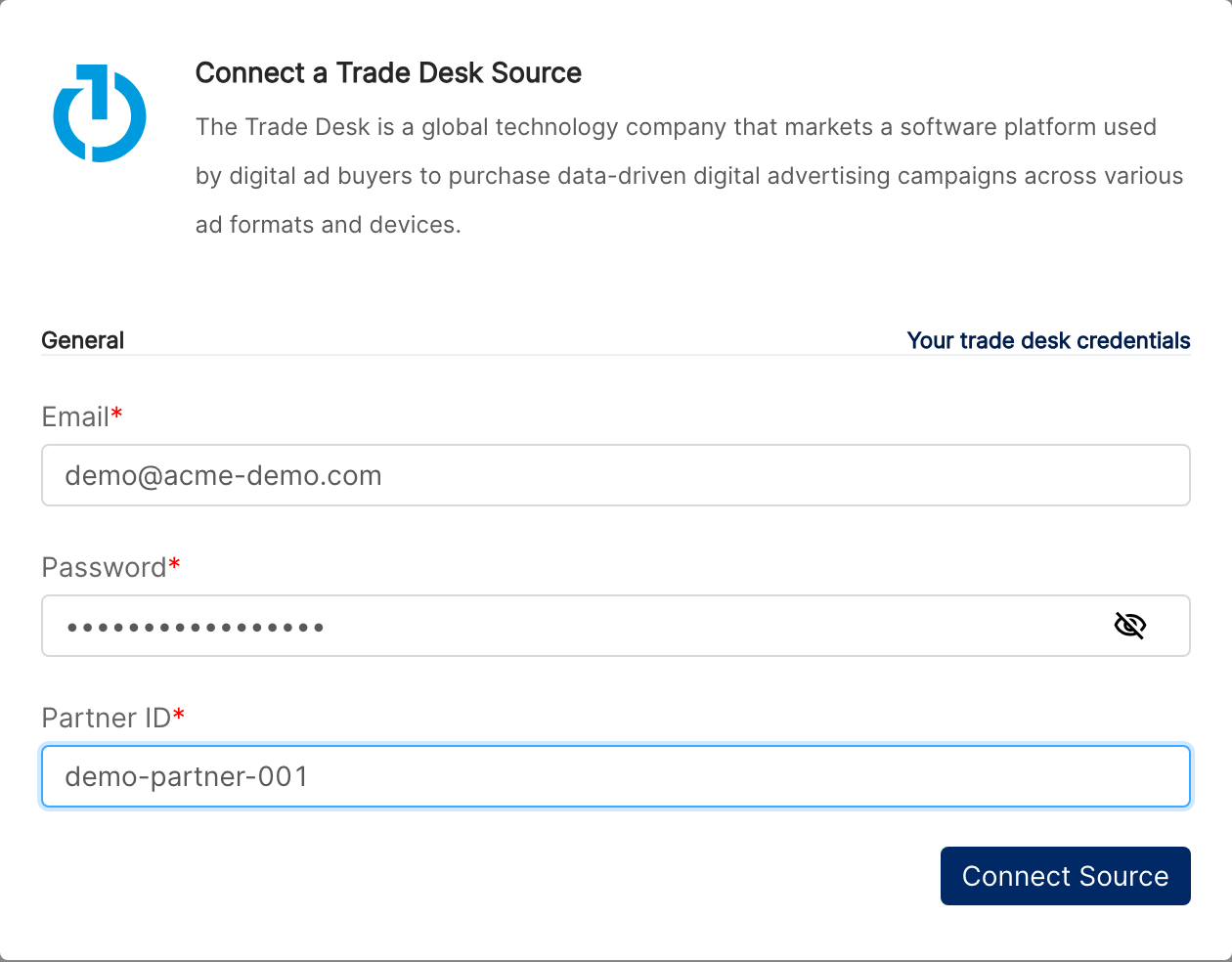
In Clarisights, open the Integrations page from the left sidebar. Under Set up new connection, search for The Trade Desk and click + Connect on its card. If The Trade Desk is already connected, open it from Manage connected channels and click + Account. Provide:
Email and Password: the TTD login with API access
Partner ID: the partner that owns your advertisers
Click Connect Source. Clarisights signs in to the TTD API and adds every advertiser under that Partner as an account.
⚠ Authentication failed (401 / 403) → The TTD seat does not have API access. Ask your TTD admin to enable it, or use a different login.
⚠ "Account already exists" → This Partner ID is already connected in your workspace. Refresh the page and look for it under The Trade Desk.
Step 5: Add the Schedule Name to each advertiser
On The Trade Desk page, click Edit in the row of each advertiser you want to report on, enter the Schedule Name from Step 2 exactly as TTD shows it, and click Update. Advertisers without a Schedule Name don't receive any performance data. Use the Status toggle to stop syncing advertisers you don't need.
⚠ No data after the first run → The Schedule Name doesn't match an existing scheduled report for that advertiser, or the report has not yet completed a run. Verify the name in TTD's My Reports and wait for the first run to finish.
Verify the connection
Go to Integrations → The Trade Desk. Each advertiser is listed with its name, timezone, currency, and Schedule Name, and its Status toggle is on.
First data appears after the first scheduled report execution completes (usually within ~24 hours of connecting). Each subsequent execution is pulled, parsed, and ingested automatically.
Quick start: create a new report, add The Trade Desk as the data source, and add Account · Campaign · Ad Group · Impressions · Clicks · Advertiser Cost.
Data available
Hierarchy
How TTD's native levels map to the standard Clarisights levels:
Native level (TTD) | Clarisights level |
Partner | Used at connect time only (one Partner can map to many advertisers / accounts) |
Advertiser | Account |
Campaign | Campaign |
Ad Group | Ad Group |
Creative | Ad |
Dimensions
Dimension | Level | Description |
Account | Account | TTD advertiser name |
Campaign / Campaign ID | Campaign | Campaign name and ID |
Campaign Status | Campaign | TTD configured status (Active / Paused / Archived) |
Daily Budget / Total Budget | Campaign | Configured pacing budgets |
Ad Group / Ad Group ID | Ad Group | TTD Ad Group name and ID |
Ad Group Status | Ad Group | Configured status |
Base Bid CPM / Max Bid CPM | Ad Group | Bid configuration |
Ad / Creative ID | Ad | Creative name and ID |
Creative Status | Ad | Configured status |
Creative Type | Ad | Display, video, audio, native, etc. |
Ad Format | Ad | TTD ad format on the creative |
Image | Ad | Creative preview rendered as an image where available |
Metrics
Metric | Category | Description |
Bids | Traffic | Total bids submitted |
Impressions | Traffic | Won impressions |
Clicks | Traffic | Total clicks |
Advertiser Cost | Cost | Total advertiser cost (Adv Currency) |
Data Cost | Cost | Cost of audience / data layered onto bids (Adv Currency) |
Media Cost | Cost | Pure media cost (Adv Currency) |
Ttd Cost / Ttd Margin | Cost | TTD platform cost and margin (Adv Currency) |
Additional Fee Cost / Fee Features Cost | Cost | Other fees (Adv Currency) |
Predictive Clearing Savings | Cost | Savings from TTD's Predictive Clearing |
CTR / CPM / CPC | Derived | Click-through rate, cost per mille, cost per click |
Win Rate | Derived | Impressions / Bids |
Click Through Conversions / Click Through Revenue | Conversions | Per-conversion-event metric, with one set per conversion event you add to the report (01 to 06) |
View Through Conversions / View Through Revenue | Conversions | Per-conversion-event metric, with one set per conversion goal you add to the report |
Limitations & known constraints
Schedule-driven: ingestion is gated by your TTD scheduled report. Pause the schedule and Clarisights stops receiving new data until the next execution.
Strict report shape: the report's column headers, date format (Sortable), and numeric format (US) must match this guide exactly. Any drift causes parse failures.
Conversions must be split: combined click+view conversion metrics aren't ingested. Add each goal as separate Click Conversion and View Through Conversion metrics.
One Schedule Name per advertiser: a single TTD login and Partner ID brings in all advertisers under that Partner, but each advertiser reads its own scheduled report. A Partner ID can be connected only once per workspace.
Creative auto-fetch: if a row references a creative not yet in Clarisights, we fetch it from the TTD API on the fly. If the creative is missing from TTD's API entirely, the row is dropped.
Operating notes
Refresh schedule: driven by your TTD My Reports cadence (daily or weekly). Each completed execution is downloaded, sanitized, and ingested.
Lookback: each sync picks up report runs from the last 3 days, and a periodic backfill re-reads the last 7 days of runs. The dates covered depend on the range your scheduled report uses; adjust the schedule in TTD if you need a longer window.
Multi-advertiser under one Partner: all advertisers share the same TTD login, and each has its own Schedule Name. When new advertisers are added under the Partner, click Fetch New Accounts.
Currency conversion: the advertiser-currency cost values are stored on ingest and converted to your Clarisights reporting currency.
Credential rotation: when your TTD password changes, click Update Account next to the connected login in Integrations → The Trade Desk and enter the new password. The API access token is short-lived and refreshed automatically.
Need help?
When contacting support from the in-app messenger, please include:
The integration name, advertiser, and Partner ID
The exact Schedule Name in TTD
The exact error message or screenshot
The step where the issue occurred
When the issue started