
Connecting Kwai Ads on Clarisights
Kwai Ads is the advertising platform of the Kwai short-video app, widely used to reach mobile audiences in Brazil and Latin America. Connecting Kwai Ads to Clarisights lets you bring daily campaign, ad set and creative performance (spend, impressions, clicks, video views, app and conversion events) into your cross-channel reporting and analyze it side by side with your other paid channels.
At a glance
| Authentication | Kwai developer credentials: Refresh Token, Client ID, Client Secret and Corp ID (Clarisights exchanges them for short-lived access tokens automatically) |
| Permissions needed | Kwai Ads API access for the Corp (business) that owns or manages the ad accounts you want to ingest |
| Account discovery | Automatic: every ad account under the Corp ID is discovered and connected when you submit your credentials |
| Data freshness | Daily (once per day) |
| Lookback window | 60 days on each scheduled run |
| Backfill on connect | Last 60 days, on the first scheduled run after you connect |
| Timezone | Your Clarisights company timezone (reports are requested from Kwai in that timezone) |
| Currency | Each ad account's currency from Kwai; defaults to BRL if Kwai does not return one |
| Levels supported | Account · Campaign · Ad Group (Ad Set) · Ad (Creative) |
| Limited rollout | No |
Prerequisites
An active Kwai Ads account with at least one ad account under your Corp (business)
Kwai Ads API credentials: a Refresh Token, Client ID, Client Secret and your Corp ID. These come from your Kwai for Business developer (API) setup. If you do not have API access or are unsure where to find these values, contact your Kwai account manager
Access to the Clarisights Integrations page
Steps to Connect
Step 1: Get your Kwai Ads API credentials
Collect the four values Clarisights needs: Refresh Token, Client ID, Client Secret and Corp ID. Make sure the credentials belong to the Corp that owns or manages the ad accounts you want in Clarisights. Clarisights only sees ad accounts that are visible to that Corp ID.
Step 2: Open Kwai Ads in Clarisights
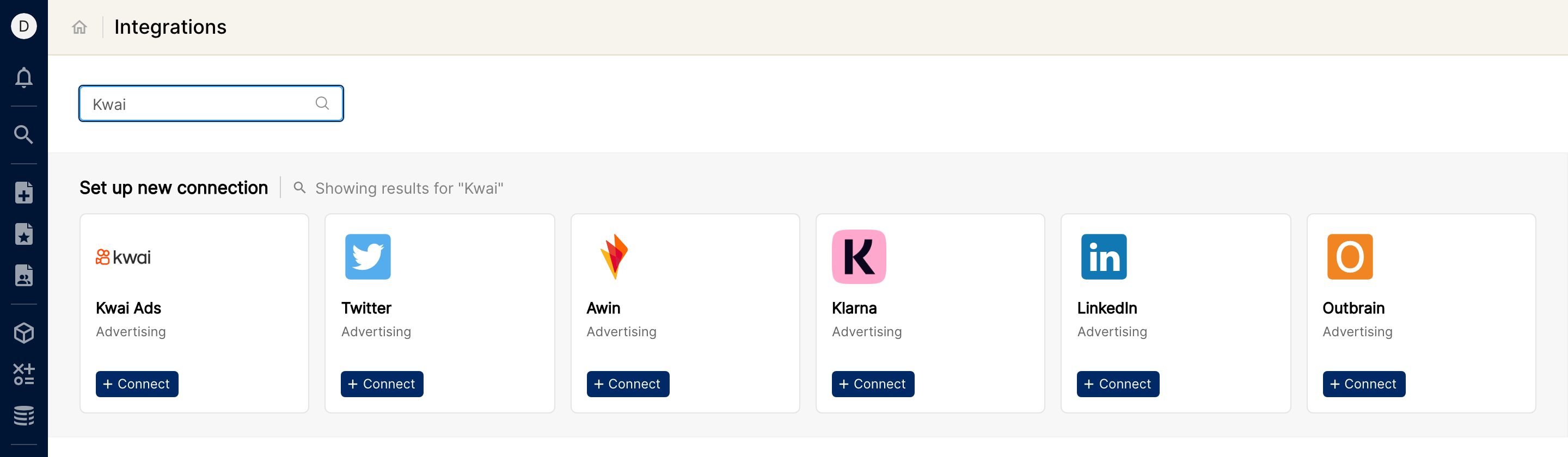
In Clarisights, click the Integrations icon in the left sidebar. Under Set up new connection, search for Kwai (or click See All), then click + Connect on the Kwai Ads card.
Step 3: Enter your credentials
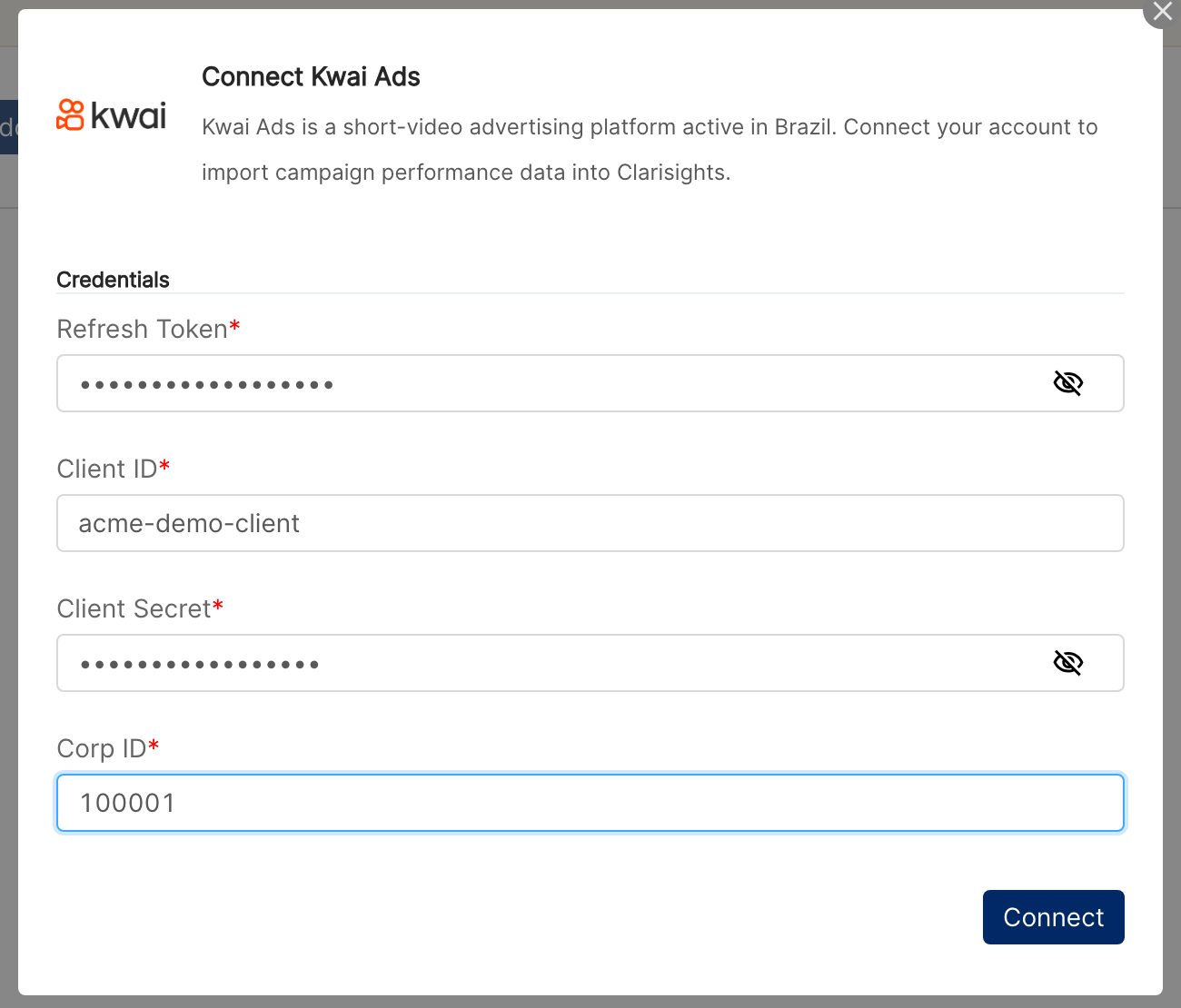
In the Connect Kwai Ads form, enter the Refresh Token, Client ID, Client Secret and Corp ID. All four fields are required. Click Connect. Clarisights checks the credentials with Kwai and looks up every ad account under the Corp ID.
⚠ “Error: Invalid credentials. Please check your Kwai Ads authentication and try again.” → Kwai rejected the credentials. Check that all four values are copied exactly (no extra spaces) and that the Corp ID matches the credentials, then retry.
⚠ “Kwai Ads token refresh failed” → Kwai would not issue an access token for this Refresh Token, Client ID and Client Secret. The refresh token may have expired or been revoked, or the client secret may be wrong. Generate a new refresh token in your Kwai developer setup (or ask your Kwai account manager), then retry.
⚠ “Connection failed. Please check your Kwai Ads credentials and try again.” → The connection could not be completed. Retry after a few minutes; if it keeps failing, contact support with the time of the attempt.
Step 4: Review your ad accounts
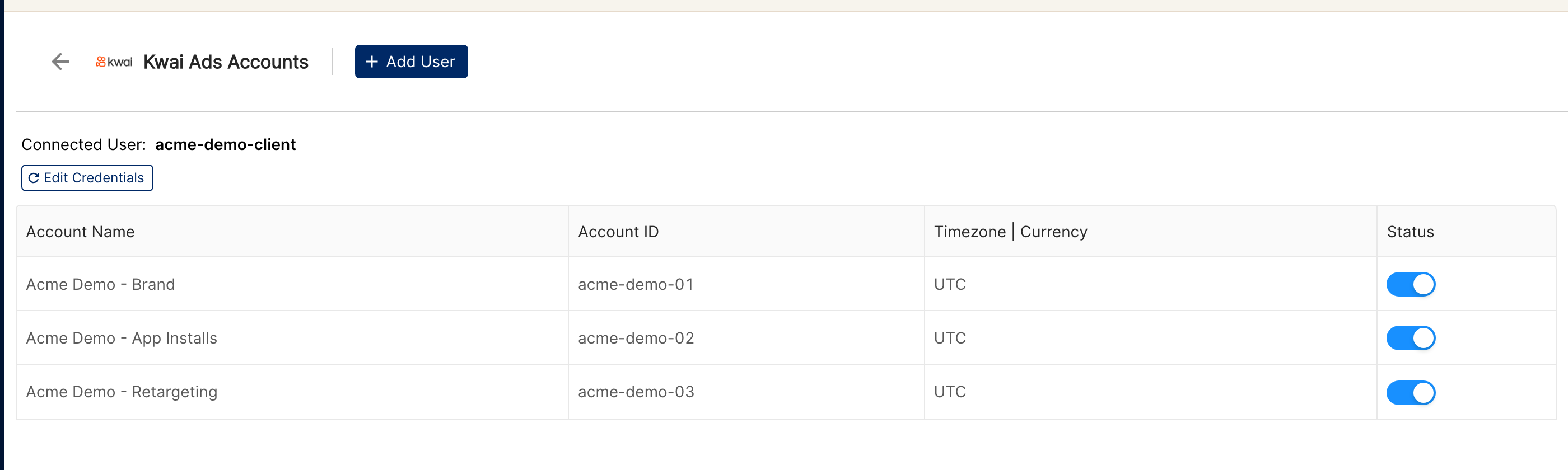
On success you will see “Kwai Ads connected! Ad accounts will be populated automatically.” Every ad account found under the Corp ID is added to Clarisights and switched on. If there are accounts you do not want to ingest, switch them off using the Status toggle on the Kwai Ads Accounts page.
Verify the connection
Go to Integrations → Kwai Ads. You should see the connected user (your Client ID) and a row for each ad account, with its Account ID and status.
First data appears within about 24 hours. Kwai Ads data syncs once per day, and each sync covers the last 60 days.
Quick start: create a new report, add Kwai Ads as the data source, and add Account · Campaign · Impressions · Clicks · Spend.
Data available
Hierarchy
How Kwai Ads' native levels map to the standard Clarisights levels:
Native level (Kwai Ads) | Clarisights level |
Ad Account | Account |
Campaign | Campaign |
Ad Set | Ad Group |
Creative | Ad |
Dimensions
Dimension | Level | Description |
Account / Account ID | Account | Kwai ad account name and ID |
Campaign / Campaign ID | Campaign | Campaign name and ID |
Country Code | Campaign | Country code reported by Kwai |
Buying Type | Campaign | Campaign buying type |
Bidding Type | Campaign | Campaign bidding type |
Adgroup / Adgroup ID | Ad Group | Ad set name and ID |
Ad / Ad ID | Ad | Creative name and ID |
Metrics
Metric | Description |
Impressions | Total ad impressions |
Clicks | Total clicks |
Actions | Total actions reported by Kwai |
Spend | Advertiser spend in the account currency |
Video Plays 3s / Video Plays 5s | Video plays of at least 3 or 5 seconds |
Video Play Finished | Video plays watched to the end |
Video Thru Plays | ThruPlays reported by Kwai |
Video 25% Plays / 50% Plays / 75% Plays | Video plays reaching 25%, 50% and 75% of the video |
Video Avg Play Time | Average video play time |
Brand Impressions / Brand Clicks | Impressions and clicks for brand placements |
Activations | App activations (installs) attributed to Kwai |
App Launches / Unique App Launches | App launches, total and unique |
Purchases / Unique Purchases | Purchase events, total and unique |
Registrations | Registration events |
Add to Cart | Add-to-cart events |
Page Views / Unique Page Views | Page view events, total and unique |
Key In-App Actions | Key in-app action events |
Day-1 Retention | Users retained on day 1 |
Ad Views / Ad Clicks | In-app ad view and ad click events |
First Ad Views / First Ad Clicks | First-time in-app ad view and ad click events |
Ad View 24h Value | Value of in-app ad views within 24 hours, in the account currency |
Purchase 24h Value | Value of purchases within 24 hours, in the account currency |
First Deposits | First deposit events |
Form Submits | Form submission events |
User Follow Clicks | Clicks to follow the advertiser's profile |
Profile Opens | Opens of the advertiser's profile |
Photo Likes / Photo Forwards | Likes and shares of the ad video |
Comments | Comments submitted on the ad |
Interactions | Total interactions with the ad |
Limitations & known constraints
All ad accounts are connected: every ad account under the Corp ID is added and switched on when you connect. Use the Status toggle to stop ingesting accounts you do not need.
New ad accounts are not picked up automatically: ad accounts created in Kwai after you connect only appear after you re-submit your credentials via Edit Credentials.
60-day lookback per run: each daily run refreshes the last 60 days. Data older than that is not re-pulled; longer historical backfills require a one-off request to support.
Daily granularity: data is imported per day. Hourly data is not available.
Account timezone label: the Kwai Ads Accounts page lists accounts as UTC, but report days follow your Clarisights company timezone.
Credential expiry: Kwai refresh tokens expire after a long period or when revoked. When that happens, syncs stop until you enter new credentials.
Kwai API limits: Kwai limits the number of API requests per day for each developer and each ad account. Clarisights paces its requests, but very large account sets can take longer to sync.
Operating notes
Refresh schedule: daily.
Lookback: 60 days per run.
Multi-account: all ad accounts under one Corp ID are connected together; data is keyed per Account ID. To connect ad accounts from a different Corp, click Add User on the Kwai Ads Accounts page and enter that Corp's credentials.
Currency conversion: each ad account's currency is preserved on ingest and converted to your reporting currency by Clarisights.
Credential rotation: update credentials from Integrations → Kwai Ads → Edit Credentials, using the same Client ID. Access tokens refresh automatically on the next sync.
Need help?
When contacting support from the in-app messenger, please include:
The integration name and Account ID (Integrations → Kwai Ads)
The exact error message or screenshot
The step where the issue occurred
When the issue started