
Integrate Amazon Ads on Clarisights
Connect your Amazon Ads accounts to monitor Sponsored Products, Sponsored Brands, and Sponsored Display performance (spend, sales, ACOS, ROAS, new-to-brand, and video engagement) alongside the rest of your marketing stack.
At a glance
| Authentication | OAuth 2.0 via Login with Amazon (LWA) |
| Permissions needed | Admin, Editor, or Viewer on each Amazon Ads account, with view access to campaigns and reports |
| Account discovery | Automatic across regions (North America, Europe, Far East) on credential validation. Vendor and Seller profile types are supported. |
| Data freshness | Daily |
| Lookback window | 60 days (Amazon API retention limit) |
| Backfill on connect | Up to 60 days; ask your Clarisights account manager if you need 60 to 90 days |
| Timezone | Profile native timezone |
| Currency | Account native currency (auto-converted via Currency Conversion) |
| Levels supported | Profile (Account) · Campaign · Ad Group · Target / Keyword (Ad) |
| Limited rollout | No |
Prerequisites
An active Amazon Ads account with at least one campaign of type Sponsored Products, Sponsored Brands, or Sponsored Display
An Amazon user with Admin, Editor, or Viewer permissions on the accounts you want to connect
View access to campaigns and reports for those accounts
Steps to Connect
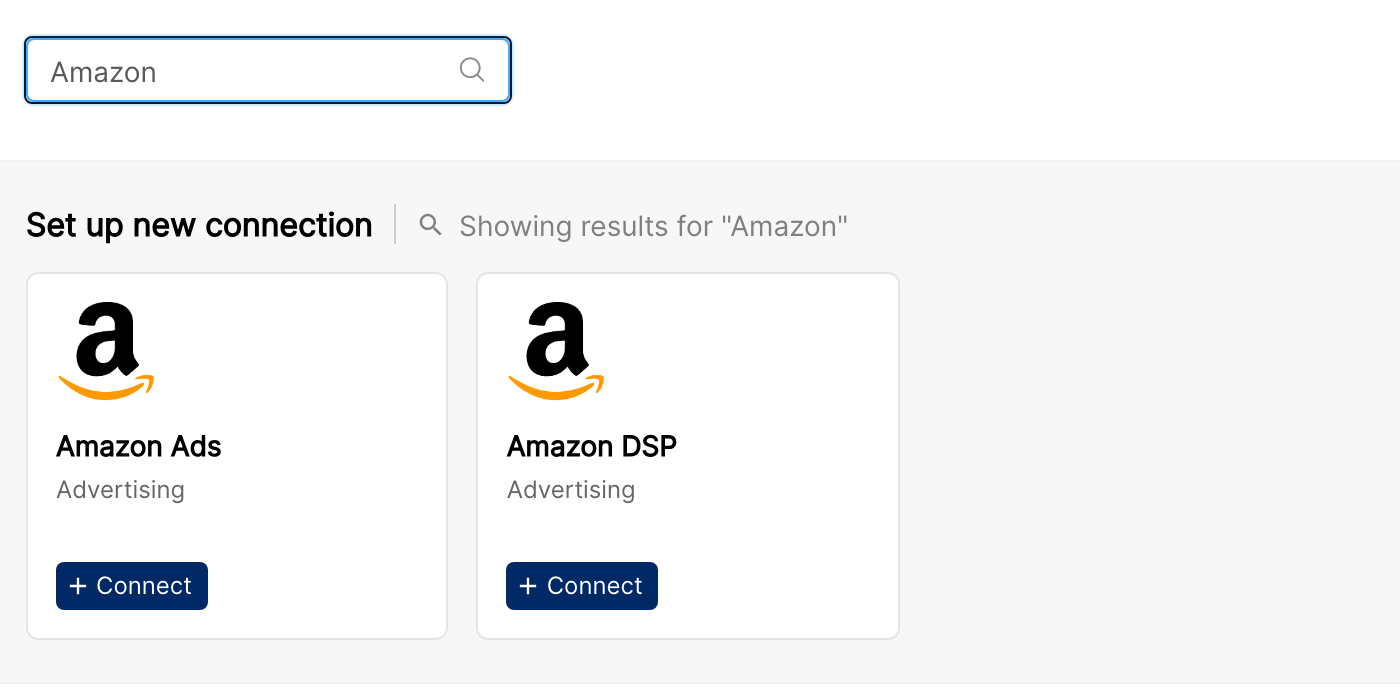
Step 1: Select Amazon Ads from the Integrations page
In Clarisights, open Integrations from the left sidebar, search for Amazon Ads under Set up new connection, and click + Connect.
Step 2: Sign in with Amazon
You'll be redirected to Login with Amazon. Sign in with the email and password of the Amazon user that has access to the ad accounts you want to connect.
Amazon describes this sign-in step in its Amazon Ads API guide: Create an authorization grant.
Step 3: Authorize Clarisights
On the consent screen, click Allow to authorize the Clarisights app to access the Advertising API on behalf of your Amazon user.
For details on the consent form and the Allow button, see Amazon's guide: Create an authorization grant.
⚠ Common error: "You don't have permission to authorize this app." → The Amazon user you signed in with does not have Admin / Editor / Viewer access on any account, or the account admin has restricted third-party app access. Use a different Amazon user or ask the account admin to grant access.
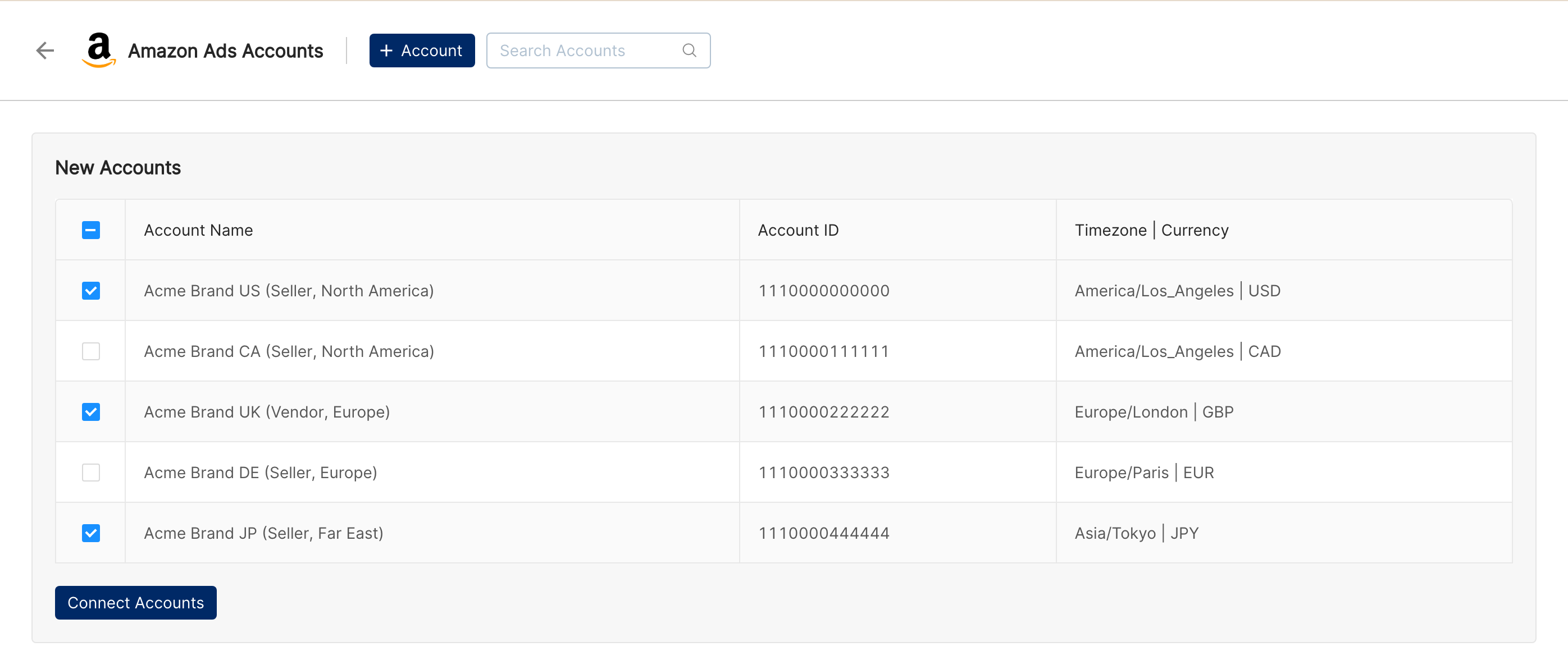
Step 4: Select accounts to integrate
Clarisights queries every region (North America, Europe, Far East) and lists the Vendor and Seller profiles your user has access to. Select the accounts to bring in and confirm.
Verify the connection
Go to Integrations → Amazon Ads. Each connected profile should show a "Connected" status.
First data appears within 24 hours of the next scheduled sync. Initial backfill covers up to 60 days; contact your Clarisights account manager if you need 60 to 90 days.
Quick start: create a new report, add Amazon Ads as the data source, and add Account · Campaign · Ad Product Type · Impressions · Clicks · Spend · Sales.
Data available
Hierarchy
How Amazon Ads' native levels map to the standard Clarisights levels:
Native level (Amazon Ads) | Clarisights level |
Profile (a Vendor or Seller account in a region) | Account |
Campaign | Campaign |
Ad Group | Ad Group |
Target / Keyword (the row in the targeting report) | Ad |
Dimensions
Clarisights does not pull every Amazon Ads dimension. The dimensions below are available across all three Sponsored ad types (SP, SB, SD) for the campaign, ad-group, and targeting reports.
Account
Dimension | Description |
Account / Profile ID | Amazon profile ID for the connected account |
Account Name | Profile name (Vendor or Seller account name) |
Campaign
Dimension | Description |
Ad Product Type | Sponsored Products / Sponsored Brands / Sponsored Display |
Campaign Start Date / End Date | Configured campaign run dates |
Campaign State | Enabled, Paused, Archived |
Campaign Delivery Status / Reason | Whether the campaign is delivering and, if not, why |
Budget Time Period | Recurrence period for budget caps |
Campaign Budget Type / Amount | Daily / lifetime budget configuration and value |
Targeting Settings | Auto / manual targeting configuration |
Bid Strategy | Bid strategy applied to the campaign |
Multi Ad Group Flag | Whether the campaign supports multiple ad groups |
Campaign Creation Date / Updated Date | Audit timestamps |
Cost Type | Pricing model (CPC, vCPM, etc.) |
Ad Group
Dimension | Description |
Ad Product Type | Sponsored Products / Brands / Display |
Ad Group State | Enabled, Paused, Archived |
Ad Group Delivery Status / Reason | Whether the ad group is delivering and, if not, why |
Creative Type | SB-specific creative type |
Ad Group Bid | Default bid set on the ad group |
Optimization Goal / KPI | Configured optimization objective and KPI |
Ad Group Creation Date / Updated Date | Audit timestamps |
Target / Keyword (Ad)
Dimension | Description |
Target State | Enabled, Paused, Archived |
Target Bid | Bid applied to the target / keyword |
Match Type | Broad, Phrase, Exact, etc. |
Keyword Target | Keyword string for the target row |
Target ASIN | ASIN being targeted (product targeting) |
Target Product Category / Brand / Genre | Resolved category / brand / genre name and the underlying ID |
Target Product Price Less Than / Greater Than | Price range filters for product targeting |
Target Product Rating Less Than / Greater Than | Rating range filters for product targeting |
Target Product Age Range | Resolved age range and the underlying ID |
Target Product Prime Shipping Eligible | Prime-eligibility filter |
Target Audience ID | Audience identifier (SD audience targeting) |
Target Lookback | Lookback window for SD audience targeting |
Metrics
Some metrics are not uniformly available across ad types. The table below lists the Clarisights metric and the underlying field per ad type. A blank cell means Amazon does not expose the metric for that ad type.
Core delivery & spend
Clarisights metric | Sponsored Products | Sponsored Brands | Sponsored Display |
Impressions | impressions | impressions | impressions |
Clicks | clicks | clicks | clicks |
Spend | cost | cost | cost |
Sales & purchases
Clarisights metric | Sponsored Products | Sponsored Brands | Sponsored Display |
Sales | sales14d | sales | sales |
Purchases | purchases14d | purchases | purchases |
Purchases (Clicks) | purchasesClicks | purchasesClicks | |
Sales (Clicks) | salesClicks | salesClicks | |
Units Sold Clicks | unitsSoldClicks14d | unitsSold | unitsSold |
Engagement
Clarisights metric | Sponsored Products | Sponsored Brands | Sponsored Display |
Add to Cart | addToCart | addToCart | |
Add to Cart (Clicks) | addToCartClicks | addToCartClicks | |
Detailed Page views | detailPageViews | detailPageViews |
New-to-Brand
Clarisights metric | Sponsored Products | Sponsored Brands | Sponsored Display |
New to Brand Purchases | newToBrandPurchases | newToBrandPurchases | |
New to Brand Sales | newToBrandSales | newToBrandSales | |
New to Brand Units Sold | newToBrandUnitsSold | newToBrandUnitsSold |
Video
Clarisights metric | Sponsored Products | Sponsored Brands | Sponsored Display |
Video Complete Views | videoCompleteViews | videoCompleteViews | |
Video First Quartile Views | videoFirstQuartileViews | videoFirstQuartileViews | |
Video Mid Point Views | videoMidpointViews | videoMidpointViews | |
Video Third Quartile Views | videoThirdQuartileViews | videoThirdQuartileViews |
SP-only same-SKU / other-SKU breakdowns
Clarisights metric | Sponsored Products |
Units Sold Same SKU 1d | unitsSoldSameSku1d |
Units Sold Same SKU 14d | unitsSoldSameSku14d |
Units Sold Other SKU 7d | unitsSoldOtherSku7d |
Clarisights also computes Conversion Rate, CPM, CTR, CPC, ACOS, and ROAS from the metrics above.
Limitations & known constraints
Vendor and Seller profiles only: Agency profiles correspond to Amazon DSP and are not supported on this connector. Use the dedicated Amazon DSP connector instead.
Reports supported: campaign, ad group, and targeting reports across SP, SB, and SD. The following report types are not supported today: SB ad-level reports, SP product-level reports, SB placement reports, SP/SB search-term reports, and SP/SD advertised-product reports.
Backfill capped at 60 days: Amazon Ads enforces a 60-day data retention limit on the v3 reporting API. Older data cannot be recovered.
Sales / purchases attribution windows differ by ad type: Sponsored Products sales and purchases use Amazon's 14-day attribution window, while Sponsored Brands and Sponsored Display use Amazon's default sales and purchases attribution. Account for this when comparing across ad types.
Operating notes
Refresh schedule: data is pulled daily.
Lookback: 60 days.
Multi-region: a single Amazon user may have profiles in multiple regions (NA, EU, FE). Clarisights pulls all regions in one connection, so you don't need to integrate per region.
Adding new accounts: when Amazon provisions a new Vendor or Seller account, return to Clarisights and re-open the Amazon Ads integration to discover and add it.
Currency conversion: native amounts are pulled as-is and converted to your reporting currency by Clarisights.
Credential rotation: Login with Amazon refresh tokens are rotated automatically. Re-authenticate only if you change your Amazon password or revoke Clarisights' access.
Need help?
When contacting support from the in-app messenger, please include:
The integration name and Amazon profile ID (Integrations → Amazon Ads)
The exact error message or screenshot
The step where the issue occurred
When the issue started