
Connecting Amazon DSP on Clarisights
Connect your Amazon DSP advertisers to monitor programmatic display, video, and audio campaign performance (spend, viewable impressions, on-Amazon and off-Amazon conversions, new-to-brand metrics, and DSP-specific fees) alongside the rest of your marketing stack.
At a glance
| Authentication | OAuth 2.0 via Login with Amazon (LWA), separate from the Amazon Ads connector |
| Permissions needed | An Amazon user with view access to the DSP Advertisers and Manager Accounts you want to connect |
| Account discovery | Automatic across regions (North America, Europe, Far East) on credential validation; DSP Advertisers are discovered via Manager Accounts |
| Data freshness | Daily |
| Lookback window | 60 days |
| Backfill on connect | Up to 60 days; ask your Clarisights account manager if you need more |
| Timezone | Advertiser native timezone |
| Currency | Order native currency (auto-converted via Currency Conversion) |
| Levels supported | Advertiser (Account) · Order (Campaign) · Line Item (Ad Group) · Creative (Ad) |
| Limited rollout | No |
Prerequisites
An active Amazon DSP seat with at least one Advertiser running orders / line items
An Amazon user that is added to the DSP Manager Account or Advertiser with view (or higher) access
Permission to authorize third-party apps for that Amazon user
💡 Note: Amazon DSP is a separate product from Amazon Ads (Sponsored Products / Brands / Display). Use this connector for DSP. Don't try to bring DSP advertisers in through the Amazon Ads connector. Agency profiles in Amazon Ads correspond to DSP and are routed here.
Steps to Connect
Step 1: Select Amazon DSP from the Integrations page
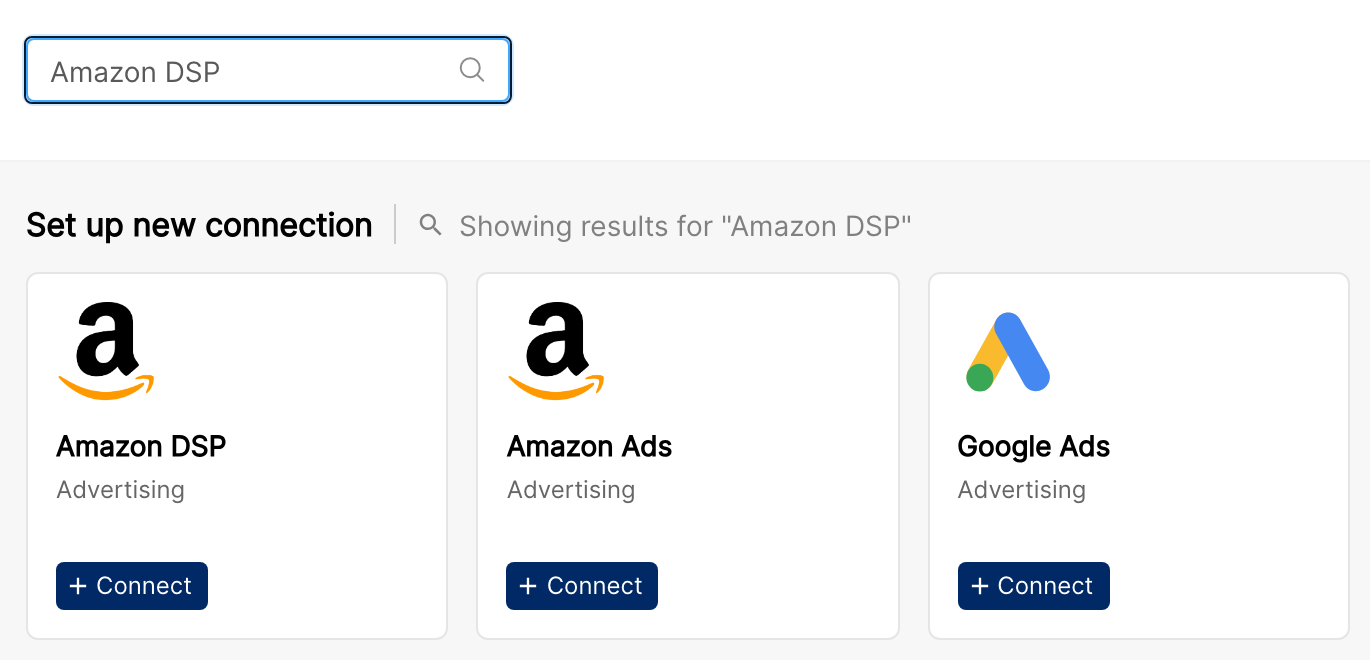
In Clarisights, open Integrations from the left sidebar, search for Amazon DSP under Set up new connection, and click + Connect.
Step 2: Sign in with Amazon
You'll be redirected to Login with Amazon. Sign in with the email and password of the Amazon user that has access to the DSP Manager Account or Advertisers you want to connect.
To learn how the Login with Amazon sign-in and consent screens work, see Amazon's overview: Login with Amazon Conceptual Overview.
Step 3: Authorize Clarisights
On the consent screen, click Allow to authorize Clarisights to access the Amazon Advertising / DSP API on behalf of your Amazon user.
For a description of the consent screen and the permissions it lists, see Amazon's guide: Login with Amazon customer experience.
⚠ Common error: "No advertisers found." → The Amazon user you signed in with isn't attached to any DSP Manager Account or Advertiser, or only has access to Sponsored Ads (not DSP). Confirm DSP access in Amazon DSP → Settings → User Management and try again.
Step 4: Select advertisers to integrate
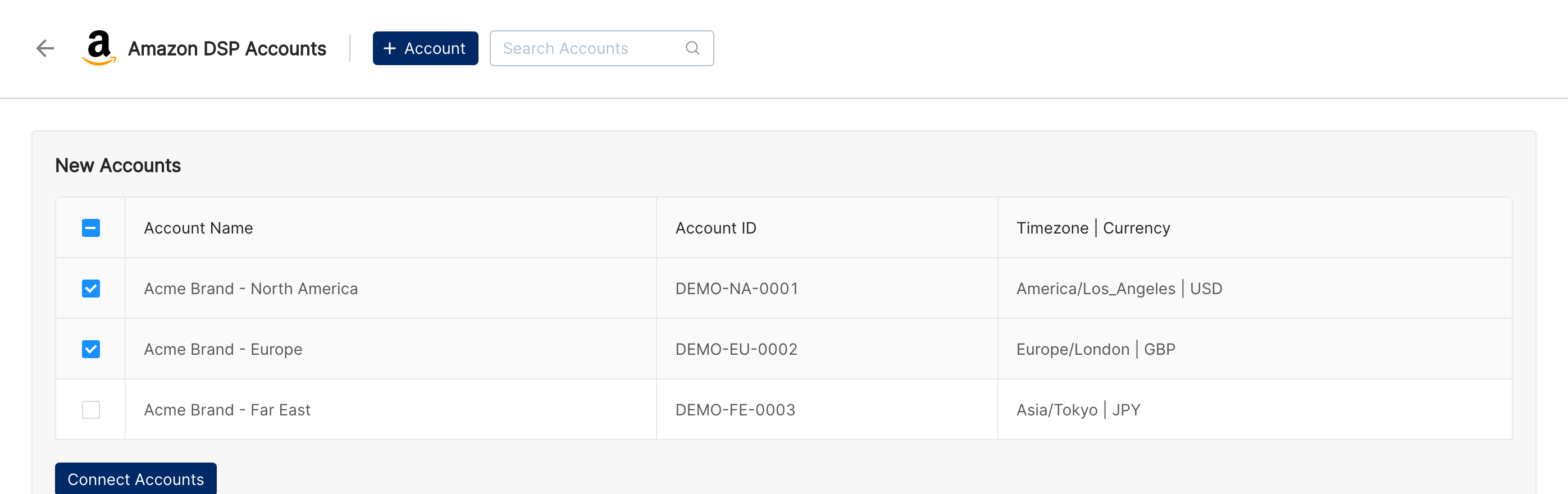
Clarisights queries every region (North America, Europe, Far East) and lists the DSP Advertisers your user can see. Select the advertisers to bring into Clarisights and confirm.
Verify the connection
Go to Integrations → Amazon DSP. Each connected advertiser should show a "Connected" status.
First data appears within 24 hours of the next scheduled sync. The initial backfill covers up to 60 days.
Quick start: create a new report, add Amazon DSP as the data source, and add Advertiser · Order · Line Item · Impressions · Total Cost · Total Sales.
Data available
Hierarchy
How Amazon DSP's native levels map to the standard Clarisights levels:
Native level (Amazon DSP) | Clarisights level |
Advertiser (under a Manager Account, in a region / marketplace) | Account |
Order | Campaign |
Line Item | Ad Group |
Creative | Ad |
Dimensions
Advertiser (Account)
Dimension | Description |
Advertiser ID | DSP advertiser identifier |
Advertiser Name | Display name of the advertiser |
Advertiser Country | Country configured on the advertiser |
Advertiser Timezone | Reporting timezone of the advertiser |
Marketplace | Amazon marketplace the advertiser is associated with |
Order (Campaign)
Dimension | Description |
Order ID | DSP order identifier |
Order Name | Order name set in DSP |
Order External ID | External / IO reference for the order |
Order Start Date / End Date | Order flight dates |
Order Currency | Currency the order is booked in |
Proposal ID | Proposal the order originated from |
Line Item (Ad Group)
Dimension | Description |
Line Item ID | DSP line item identifier |
Line Item Name | Line item name set in DSP |
Line Item Type | Display, Video, Audio, OTT, etc. |
Line Item Status | Delivering, Paused, Ended, etc. |
Line Item Approval Status | DSP review state |
Line Item Comment | Free-text comment on the line item |
Line Item Start Date / End Date | Line item flight dates |
Line Item External ID | External / IO reference for the line item |
Line Item Language Targeting | Configured language targeting |
Creative (Ad)
Dimension | Description |
Creative ID | DSP creative identifier |
Creative Name | Creative name set in DSP |
Creative Ad ID | Underlying ad ID for the creative |
Creative Type | Display, Video, Audio, etc. |
Creative Size | Dimensions for display creatives |
Creative Language | Language of the creative |
Entity ID | DSP entity identifier the creative belongs to |
Interval Start / End | Reporting interval boundaries for the row |
Metrics
Delivery
Metric | Description |
Gross Impressions | Total impressions delivered |
Viewable Impressions | Impressions that met DSP's viewability threshold |
Measurable Impressions | Impressions measurable for viewability |
Video Ad Impressions | Impressions for video ads |
Spend & fees
Metric | Description |
Total Cost | Total media + fee cost |
Agency Fee | Agency fee component |
3P Fees | Third-party measurement / verification fees |
Omnichannel Metrics Fee | Amazon omnichannel metrics fee |
Total Fee | Sum of fee components |
On-Amazon outcomes
Metric | Description |
Total Purchases | Total purchases attributed to DSP |
Total Units Sold | Total units sold |
Total Sales | Total sales (revenue) |
Total Detail Page View | Detail page views attributed to DSP |
Total Add To Cart | Add-to-cart events |
Total Add To List | Add-to-list events |
Total Subscribe And Save | Subscribe & Save events |
New Subscribe And Save | New Subscribe & Save sign-ups |
Brand Searches | Brand searches on Amazon |
Combined Purchases / Combined Units Sold | On-Amazon + off-Amazon combined views |
New-to-Brand
Metric | Description |
Total New To Brand Purchases | NTB purchases |
Total New To Brand Units Sold | NTB units sold |
Total New To Brand Sales | NTB sales |
Total New To Brand DPVs | NTB detail page views |
Off-Amazon outcomes (Amazon Attribution)
Metric | Description |
Off Amazon Purchases | Purchases on third-party sites |
Off Amazon Conversions | Conversions on third-party sites |
Off Amazon Clicks | Clicks driving off-Amazon traffic |
Off Amazon Product Sales | Off-Amazon sales revenue |
Off Amazon Units Sold | Off-Amazon units sold |
Page Views / Page View Views | Off-Amazon page views |
Search | Search events |
Contact | Contact events |
Checkout | Checkout events |
Lead | Lead events |
Application | Application events |
App, video, audio engagement
Metric | Description |
App Store First Opens / App Store Opens | App Store engagement events |
Mobile App First Starts | First-time mobile app starts |
Video Streams / Video Downloads / Downloaded Video Plays | Video engagement events |
Video Ad Start / Video Ad Mute | Video ad engagement signals |
Audio Ad Completions | Completed audio ad plays |
Add To Watch List | Watchlist additions |
Subscription & signup
Metric | Description |
Subscribe | Subscription events |
Free Trial Subscription Signups | Free trial sign-ups |
Paid Subscription Signups | Paid subscription sign-ups |
Paid Subscription Signup Rate | Paid sign-ups divided by impressions |
Sign Up CPA | Cost per sign-up |
Product Review Page Visit Rate | Product review page visits divided by impressions |
Clarisights also computes CPM, CTR, CPC, vCPM, and ROAS from the metrics above.
Limitations & known constraints
Amazon DSP requires a separate connection: it uses a different OAuth scope and API surface from Sponsored Ads (Products / Brands / Display). You must connect Amazon DSP via this connector even if your Amazon user already authorized Amazon Ads.
Manager Account discovery: Clarisights walks Manager Accounts to find the underlying DSP Advertisers. If a user only has access to a single Advertiser without a Manager Account binding, account discovery may need a re-auth.
Backfill capped at 60 days: by default Clarisights pulls 60 days on connect. Older data is bounded by Amazon's reporting retention window; ask your Clarisights account manager if you need a longer backfill.
Currency at the order level: DSP reports report cost in order currency. If a single advertiser has orders in multiple currencies, expect Clarisights to convert each to your reporting currency at row level.
Off-Amazon metrics depend on Amazon Attribution: Off Amazon * metrics only populate when Amazon Attribution tags are configured on the destination pages.
Operating notes
Refresh schedule: data is pulled daily.
Lookback: 60 days.
Multi-region: a single Amazon user may have advertisers in multiple regions (NA, EU, FE). Clarisights pulls all regions in one connection.
Adding new advertisers: when a new DSP Advertiser is provisioned under your Manager Account, return to Clarisights and re-open the Amazon DSP integration to discover and add it.
Currency conversion: native amounts are pulled as-is from each order's currency and converted to your reporting currency by Clarisights.
Credential rotation: Login with Amazon refresh tokens are rotated automatically. Re-authenticate only if you change your Amazon password or revoke Clarisights' access.
Need help?
When contacting support from the in-app messenger, please include:
The integration name and DSP Advertiser ID (Integrations → Amazon DSP)
The exact error message or screenshot
The step where the issue occurred
When the issue started