
Connecting Topsort on Clarisights
In this article
In this article group
Topsort is a retail media platform that runs sponsored listings and banner ads on marketplaces. Connecting Topsort to Clarisights imports your daily impressions, clicks, ad spend, purchases and sales for every campaign and promoted product, so you can compare retail media with your other paid channels in the same reports.
At a glance
Authentication | Topsort Advanced API key (entered once in Clarisights) |
Permissions needed | An Advanced API key for the marketplace. Each key belongs to one marketplace |
Account discovery | Automatic: Clarisights finds the marketplace the key belongs to. You enter its name, currency and timezone, then confirm it before connecting |
Data freshness | Daily (once per day) |
Lookback window | 30 days on each scheduled run, up to and including today |
Backfill on connect | Last 30 days, on the first scheduled run after you connect |
Timezone | The timezone you choose when connecting (your marketplace's timezone in Topsort) |
Currency | The currency you choose when connecting (your marketplace's currency in Topsort) |
Levels supported | Account (Marketplace) · Campaign (Campaign) · Ad Group (Product) |
Limited rollout | No |
Prerequisites
A Topsort marketplace with at least one campaign. Clarisights identifies the marketplace from its campaigns, so a marketplace with no campaigns can't be connected yet.
A Topsort Advanced API key for that marketplace. A Marketplace API key doesn't work.
The marketplace's name, currency and timezone, exactly as they are set up in Topsort.
A Clarisights role that can add integrations.
Steps to Connect
Step 1: Get your Topsort Advanced API key
In Topsort, go to Settings → API Access and click Generate Key to create an Advanced API key. Copy the full key. Each key gives access to one marketplace. If you don't have access to these settings, ask an administrator of your Topsort account or your Topsort representative.
While you are in Topsort, note the marketplace's currency and timezone from its account details. You need them in step 3.
Step 2: Open Topsort in Clarisights
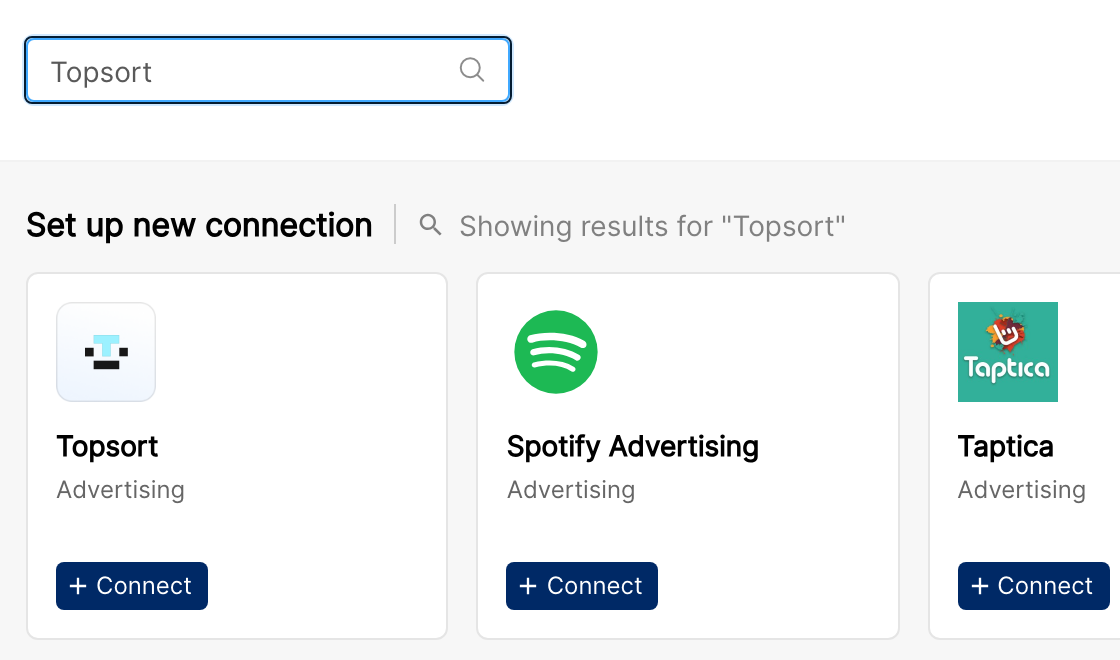
In Clarisights, click the Integrations icon in the left sidebar. Search for Topsort (or click See All under Set up new connection), then click + Connect on the Topsort card.
Step 3: Enter your key and marketplace details, then validate
In the Connect Topsort window, fill in:
API Key: your Advanced API key.
Marketplace Name: the name you want to see for this marketplace in Clarisights.
Currency: the marketplace's currency in Topsort. Spend and sales are converted from this currency to your reporting currency.
Timezone: the marketplace's timezone in Topsort. It sets where each reporting day starts and ends.
Then click Validate. Clarisights checks the key with Topsort. Nothing is saved at this point.
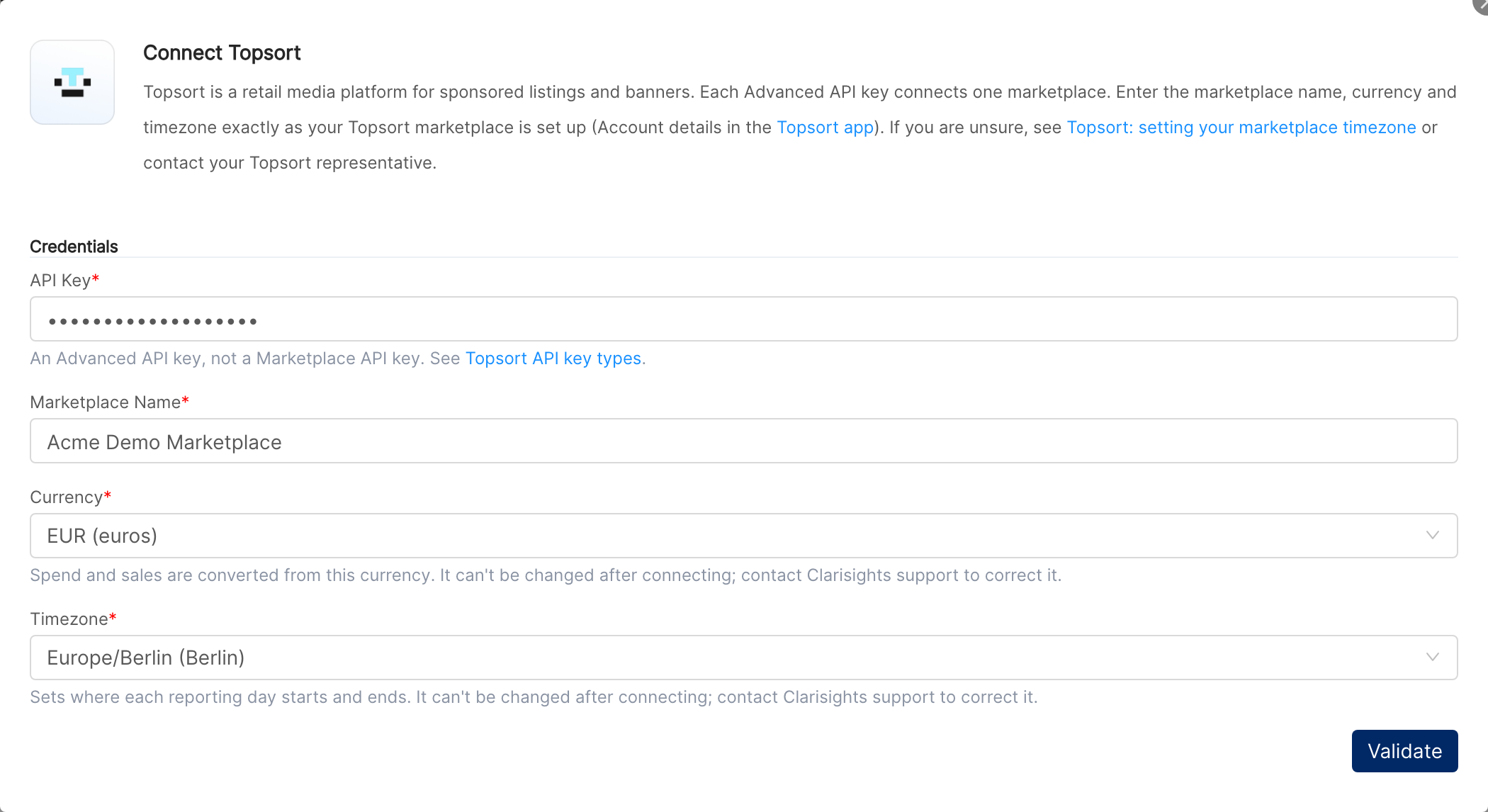
Important: Pick the currency and timezone carefully. You can't change the marketplace name, currency or timezone after connecting. To correct them later, contact your Clarisights CSM.
⚠ “Invalid Topsort API key. Use an Advanced API (TSC) key for this marketplace.” → The key is wrong, incomplete, revoked, or a Marketplace API key. Copy the full Advanced API key again, or generate a new one.
⚠ “This Topsort marketplace has no campaigns yet, so its marketplace can't be identified. Connect it once it has a campaign.” → Create a campaign in Topsort first, then try again.
⚠ “Topsort API rate limit reached. Please try again in a minute.” → Wait a minute and click Validate again.
⚠ “Topsort API is unavailable (HTTP …). Please try again later.” → Topsort's API returned an error. Wait a few minutes and try again. If it keeps happening, contact support.
Step 4: Confirm the marketplace and connect
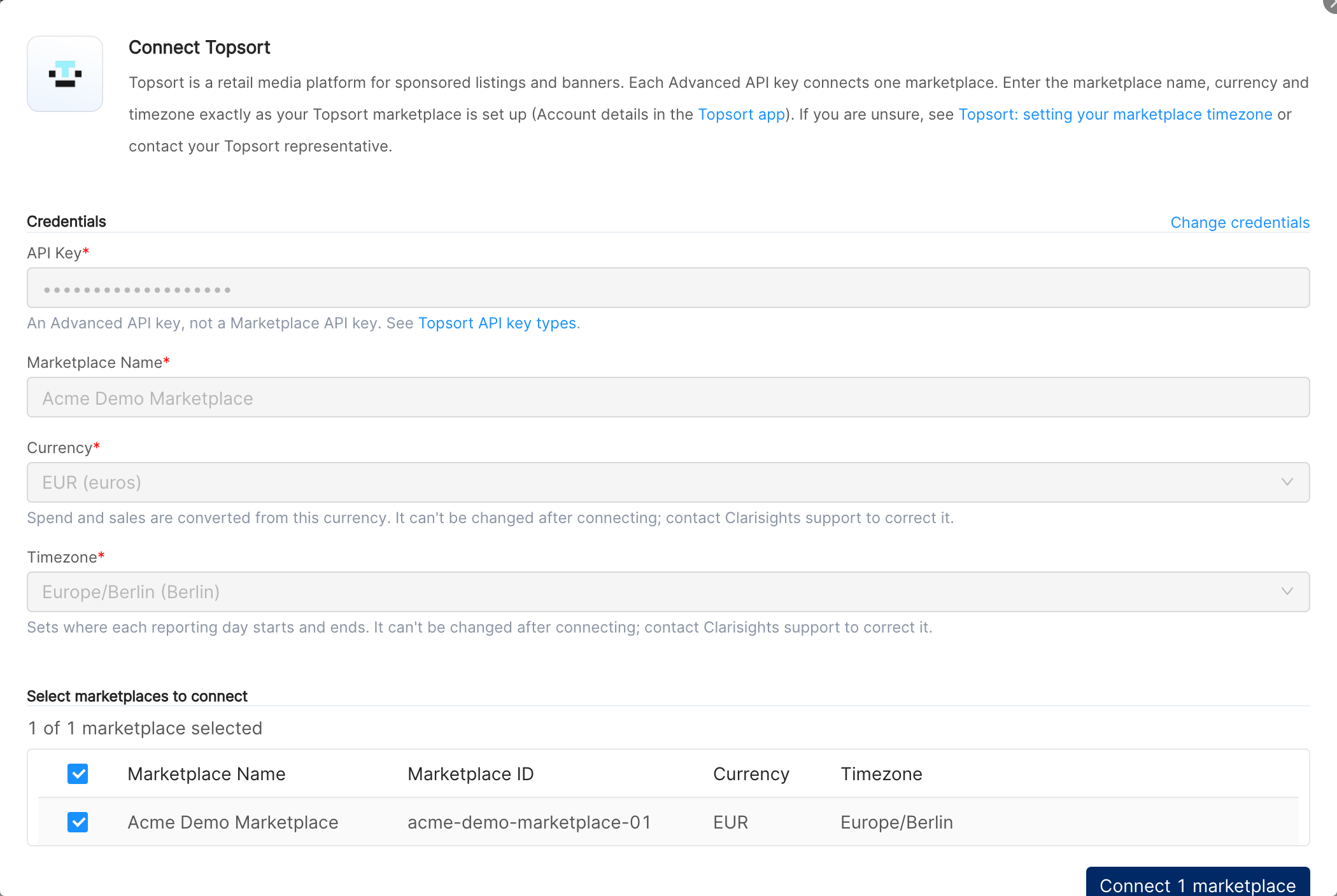
Once the key is accepted, the window lists the marketplace it belongs to, with its Marketplace Name, Marketplace ID, Currency and Timezone. Make sure the marketplace is selected and click Connect 1 marketplace. To change what you entered, click Change credentials.
⚠ “Every marketplace these credentials can see is already connected. Use Edit Credentials or Fetch New Accounts on the connected user instead.” → This marketplace is already connected in your workspace. To replace its key, use Edit API Key on the Topsort Accounts page (see Operating notes).
⚠ “Something went wrong while connecting. Please try again or contact support.” → An unexpected error occurred while saving the connection. Try again. If it fails again, contact support with the time you tried.
To connect another Topsort marketplace later, click + Marketplace on the Topsort Accounts page and repeat steps 3 and 4 with that marketplace's API key.
Verify the connection
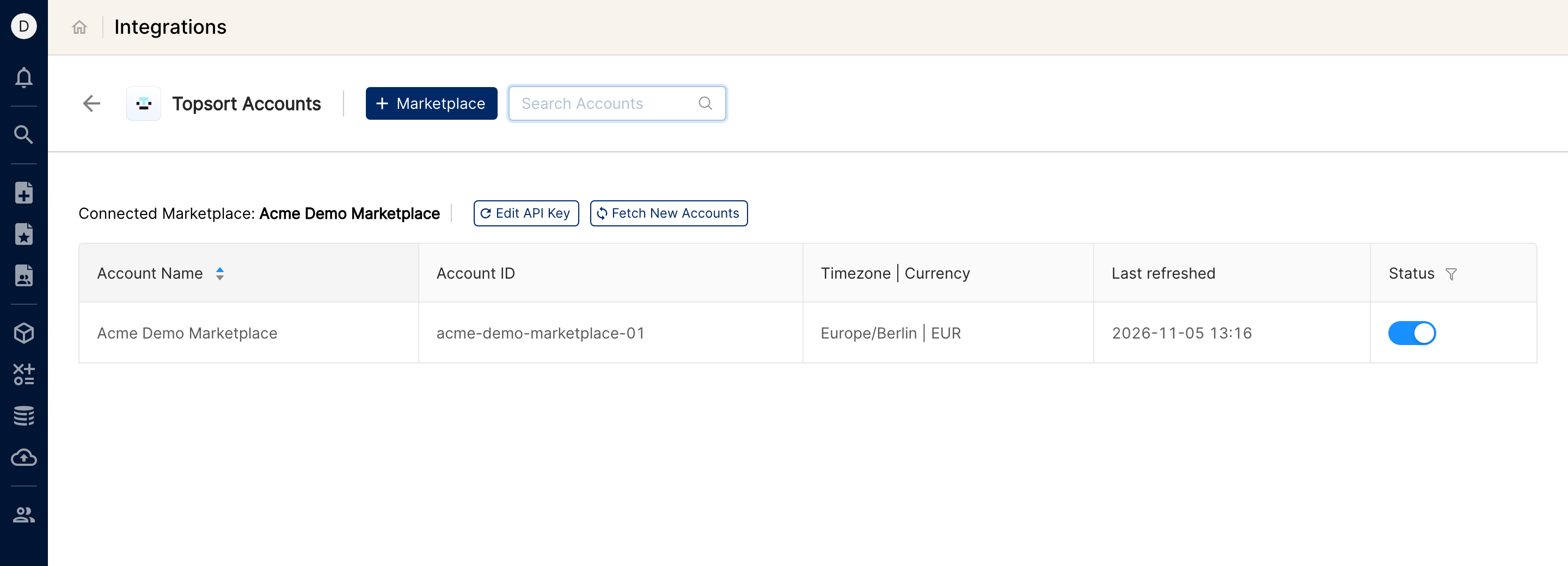
Go to Integrations → Topsort. Your marketplace appears on the Topsort Accounts page with its name, ID, timezone and currency.
First data appears within about 24 hours: the first scheduled run imports the last 30 days.
Quick start: create a new report, add Topsort as the data source, and add Campaign · Vendor Name · Impressions · Clicks · Ad Spend · Total Purchases · Total Sales.
Data available
Hierarchy
How Topsort maps to the standard Clarisights levels:
Native level (Topsort) | Clarisights level |
Marketplace | Account |
Campaign | Campaign |
Product | Ad Group |
Dimensions
Dimension | Level | Description |
Account / Account ID | Account | The marketplace name you entered and the marketplace ID |
Campaign / Campaign ID | Campaign | Campaign name and ID |
Vendor Name / Vendor ID | Campaign | The vendor (brand or seller) that runs the campaign |
Ad Format | Campaign | The campaign's ad format, such as sponsored listings or banners |
Charge Type | Campaign | How the campaign is charged |
Autobidding Objective | Campaign | The campaign's autobidding objective |
Campaign Type | Campaign | The campaign's type in Topsort |
Status / Is Active | Campaign | The campaign's status, and whether it is active |
Target ROAS | Campaign | The campaign's target return on ad spend |
Campaign Start Date / Campaign End Date | Campaign | The campaign's first and last running day (YYYY-MM-DD), in the marketplace timezone |
Ad Group / Ad Group ID | Ad Group | The promoted product's ID |
Metrics
Metric | Description |
Impressions / Charged Impressions | Times your ads were shown, and the impressions you were charged for |
Clicks / Charged Clicks | Clicks on your ads, and the clicks you were charged for |
Ad Spend | Total spend across every charge model |
Ad Spend (Impressions) / Ad Spend (Clicks) / Ad Spend (Purchases) / Ad Spend (Exclusive Campaigns) | Ad Spend split by charge model: per impression, per click, per purchase, and flat-fee exclusive campaigns |
Total Purchases / Charged Purchases | Purchases attributed to your ads, and the purchases you were charged for |
Total Units Sold | Units sold in attributed purchases |
Total Sales | Sales value of attributed purchases |
Halo Purchases / Halo Units Sold / Halo Sales | Purchases, units and sales that Topsort attributes to the campaign as halo, rather than to a promoted product |
Data is reported per day, per product. Money metrics are converted from the marketplace currency to your reporting currency. Rates such as CTR, CPC and ROAS aren't imported: build them from these metrics with custom metrics.
Limitations & known constraints
One marketplace per key: each Advanced API key gives access to one marketplace. Connect each marketplace with its own key.
Halo metrics at campaign level only: Topsort reports halo per campaign and day, so Halo Purchases, Halo Units Sold and Halo Sales show at the account, campaign and vendor level and read 0 for each product. They are already included in Total Purchases, Total Units Sold and Total Sales, so don't add them on top.
Products by ID: the Ad Group level shows the product ID. Product names aren't available.
Settings fixed after connecting: the marketplace name, currency and timezone you enter can't be changed in Clarisights. If one is wrong, contact your Clarisights CSM to correct it and to re-import the affected dates.
Marketplace needs a campaign: a marketplace with no campaigns can't be connected, and its key can't be replaced, until it has at least one campaign.
Today is partial: each run includes today in the marketplace timezone, so today's numbers grow until the next day's run. Recent days can also change as purchases are attributed; the 30-day lookback picks up these updates.
Older history: each run covers the last 30 days. To load older data, contact your Clarisights CSM.
Operating notes
Refresh schedule: data is imported once a day, and each run re-imports the last 30 days.
Credential rotation: if you generate a new API key or revoke the old one, go to Integrations → Topsort, click Edit API Key next to the connected marketplace, paste the new key and click Update. The new key must belong to the same marketplace. Until you update it, imports for that marketplace stop.
Key for a different marketplace: if you enter a key for another marketplace in Edit API Key, Clarisights shows “These credentials can't access the connected account(s) …” and keeps the current key. Use + Marketplace to connect the other marketplace instead.
Fetch New Accounts: because each key belongs to one marketplace, this normally shows “All accounts are already connected.”
Need help?
To contact support, click ? at the bottom right of Clarisights and choose Send us a message, or email support@clarisights.com. Include:
The integration name and Account ID (Integrations → Topsort)
The exact error message or screenshot
The step where the issue occurred
When the issue started