
Setting a widget's own date range (Date Override)
Every report has a date selector that sets the primary date range, and optionally a comparison range, for all its widgets. Date Override gives one widget its own date range instead.
Setting a date override

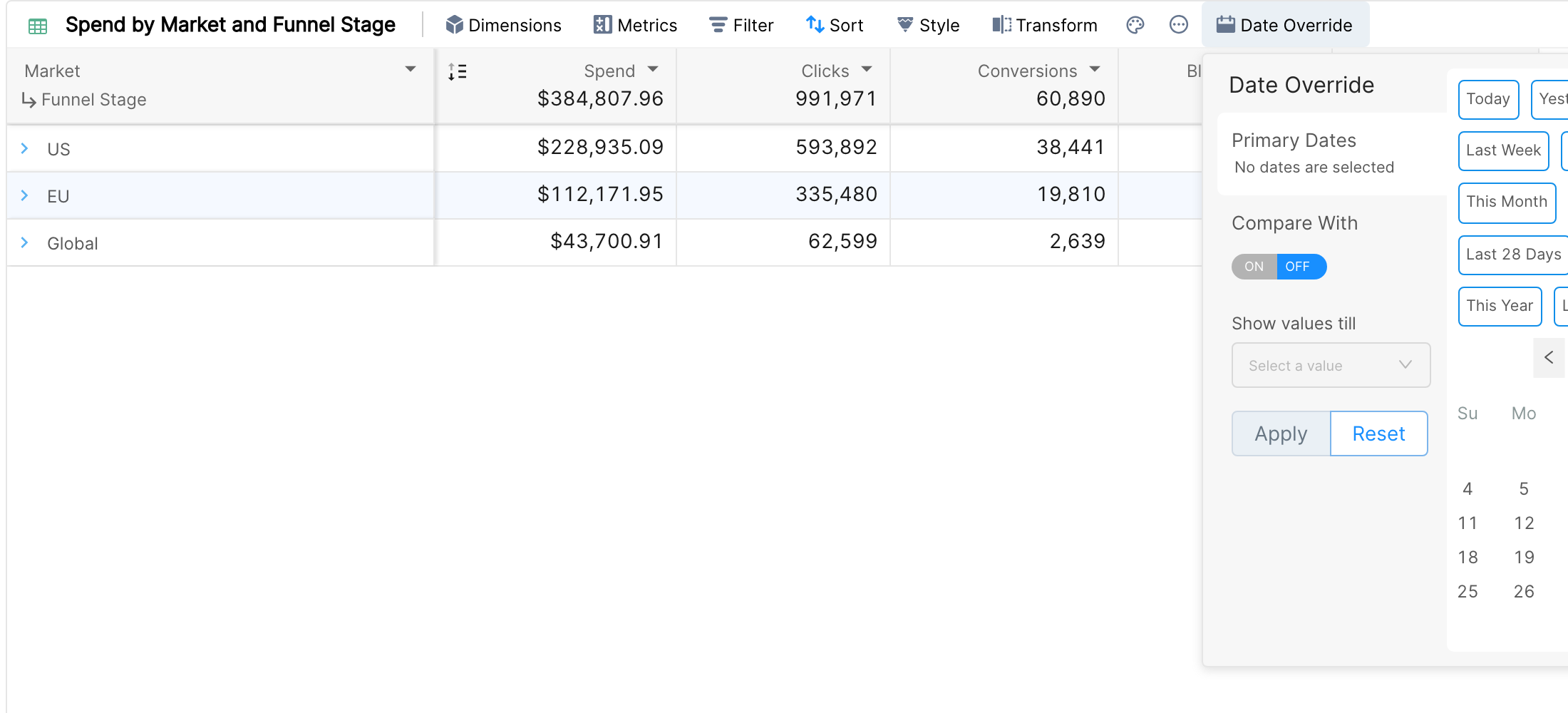
Click Date Override in the widget toolbar.
Choose the range under Primary Dates, from the presets (Today, Yesterday, This Week, Last Week, Last 4 Weeks, Last 12 Weeks, This Month, Last Month, Last 7 Days, Last 28 Days, This Quarter, Last Quarter, This Year, Last Year, Last Year To Date) or in the calendar.
For Table, Pivot Table and Tile widgets, you can also turn Compare With on or off and choose a comparison range.
Click Apply. To go back to the report dates, open the panel again and click Reset.
A widget with an override shows its date range in the toolbar, next to a blue calendar icon, so viewers know it differs from the report.
Same options as the report date picker
Future dates can be selected, whatever the data sources of the report.
For presets such as This Week or This Month, Show values till lets you pick
Yesterday,TodayorComplete Period.
Use cases

This report has three widgets. The two at the top use the report dates. The table below them uses a date override to compare last week with the week before, which calls out week-over-week changes.
Other uses:
Showing an insight that is only visible over a longer timeframe, while the rest of the report stays free to change.
An always-current "This Month" or "This Quarter" pacing widget.
Tiles that show the same KPIs for different periods side by side.
Note: in a locked report snapshot, or without edit access, the override can't be changed.