
Adjust App Analytics Integration
Adjust is a mobile measurement partner (MMP) that attributes installs, in-app events, and revenue back to the marketing activity that drove them. Connecting Adjust to Clarisights brings those attributed metrics alongside your paid spend so you can answer questions like cost per install, ROAS by cohort window, and SKAN-reported conversions for iOS, without leaving your performance dashboard.
Adjust is a secondary (analytics) integration on Clarisights: its metrics are joined onto the ad objects (Account / Campaign / Ad Group / Ad) of your connected advertising channels rather than being a standalone reporting source. You'll see them prefixed with AJ:, AJ-C:, AJ-SKAN:, etc., next to native channel metrics. If you instead need Adjust's own dimensions (network, country, OS, organic traffic, affiliates) as a primary source, see the Alternative: POD-AJ section below.
At a glance
| Authentication | API token from your Adjust dashboard |
| Permissions needed | Adjust account user with access to KPI Service for the apps you want to connect |
| Account discovery | Manual: apps are added one at a time using the app token |
| Data freshness | Daily (multiple intra-day refreshes; SKAN and cohort windows refresh on their own schedules) |
| Lookback window | Last 8 days for app and SKAN metric groups; up to 210 days for cohort metric groups (per cohort window) |
| Backfill on connect | Subject to Adjust's expired-attribution limits, typically 90 days for Facebook, Twitter, Snapchat; longer for others |
| Timezone | Set per app at connect time; cannot be changed without a backfill |
| Currency | Set per app at connect time; cannot be changed without a backfill |
| Levels supported | Joined onto your ad channel's Account · Campaign · Ad Group · Ad (no standalone hierarchy) |
| Integration type | Secondary (analytics): metrics only, joined onto primary ad channel objects |
| Limited rollout | No |
Prerequisites
An active Adjust account with KPI Service access
Your Adjust API Token (from My Profile in the Adjust dashboard)
The App Token for each Adjust app you want to connect (visible in the URL of each app's dashboard)
At least one supported ad channel already connected to Clarisights (Adjust metrics join onto ad-channel objects; see How Adjust data is joined)
Steps to Connect
Step 1: Get your Adjust API Token
In Adjust, open My Profile and copy the API Token. You'll paste it into Clarisights in Step 3.
For steps to find your API token under Account settings > My profile, see Adjust's guide: Report service API authentication.
Treat your API token like a password. It grants read access to every app under your Adjust account.
Step 2: Get your App Token(s)
Open each app's dashboard in Adjust. The App Token is the string between default/ and ?timezone_id in the URL. Copy it for each app you want to connect.
Adjust also explains where to find your app token in the dashboard: Get app token and choose reporting currency.
Step 3: Add the Adjust user in Clarisights
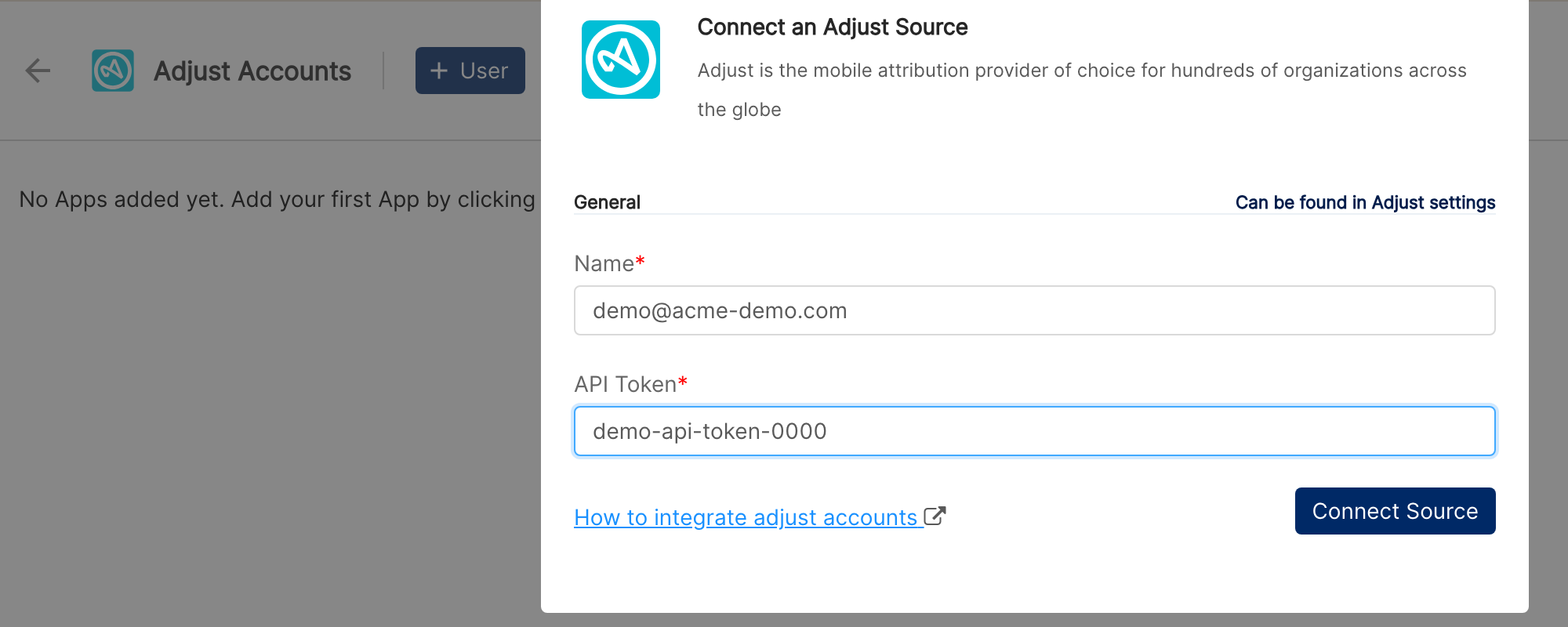
In Clarisights, open Integrations, search for Adjust under Set up new connection, and click + Connect (or, on the Adjust Accounts page, click + User). In Connect an Adjust Source, enter a Name (for example your email), paste the API Token, and click Connect Source.
If you've already added your Adjust user previously and only want to connect new apps, skip ahead to Step 4.
Step 4: Add each app
Click + App next to your Adjust user and provide:
App name: how it should appear in Clarisights
App Token: from Step 2
Currency: must match what your Adjust dashboard reports in
Timezone: the timezone you want data shown in inside Clarisights
Click Add.
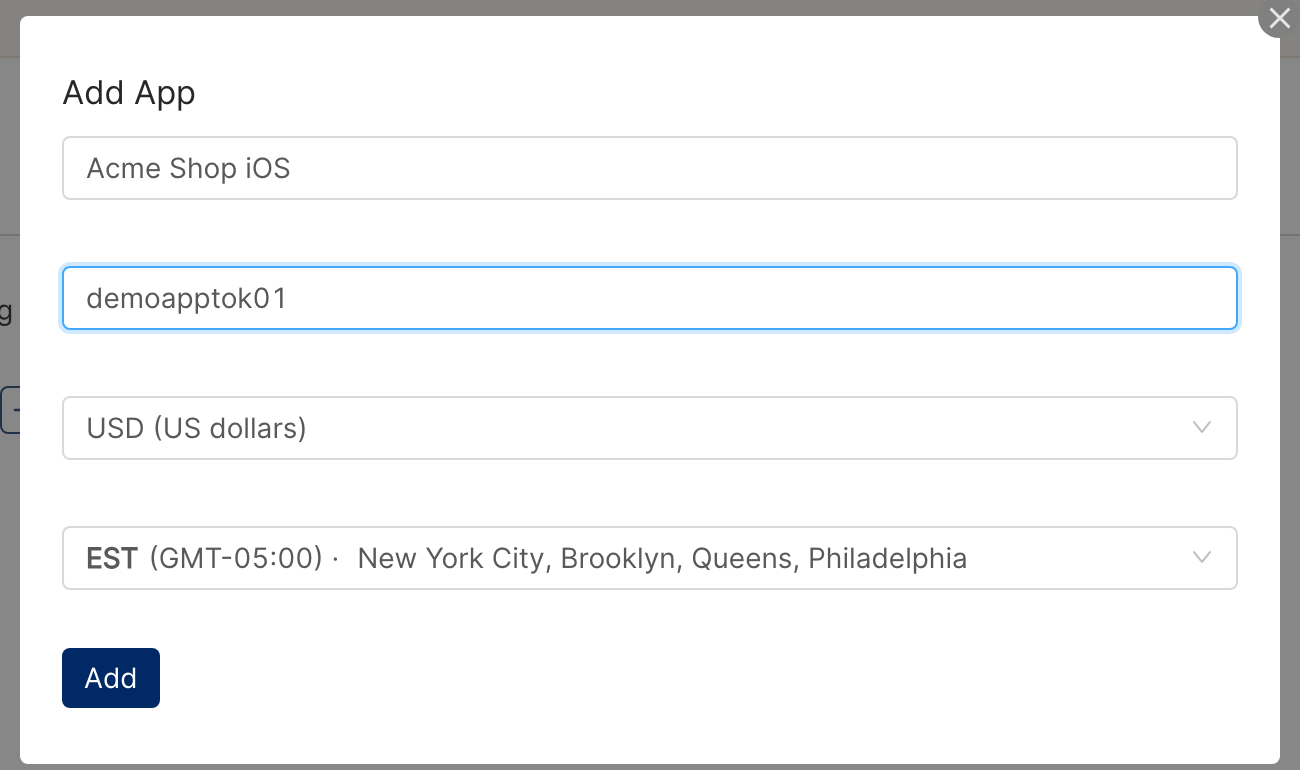
Currency and timezone are immutable. Once an app is connected, changing either requires a backfill to re-state historical data. Reach out to your Clarisights account manager before changing.
Step 5: Map Adjust networks to your ad channels
Adjust groups data under Network trackers. To join Adjust metrics onto the right ad channel objects, declare which Adjust network corresponds to which Clarisights ad channel.
Open Connected Networks on the Adjust integration page. Default mappings are pre-populated for common networks (for example Facebook, Google Ads, TikTok, Snapchat, Twitter, Apple Search Ads, The Trade Desk, Yahoo, Criteo, Remerge, Taboola, and Liftoff). Click + Network to add a custom mapping: enter the network tracker name in Value, pick the Clarisights ad channel in Channel, and click Create. Both API ad channels and Custom Advertising channels are selectable.
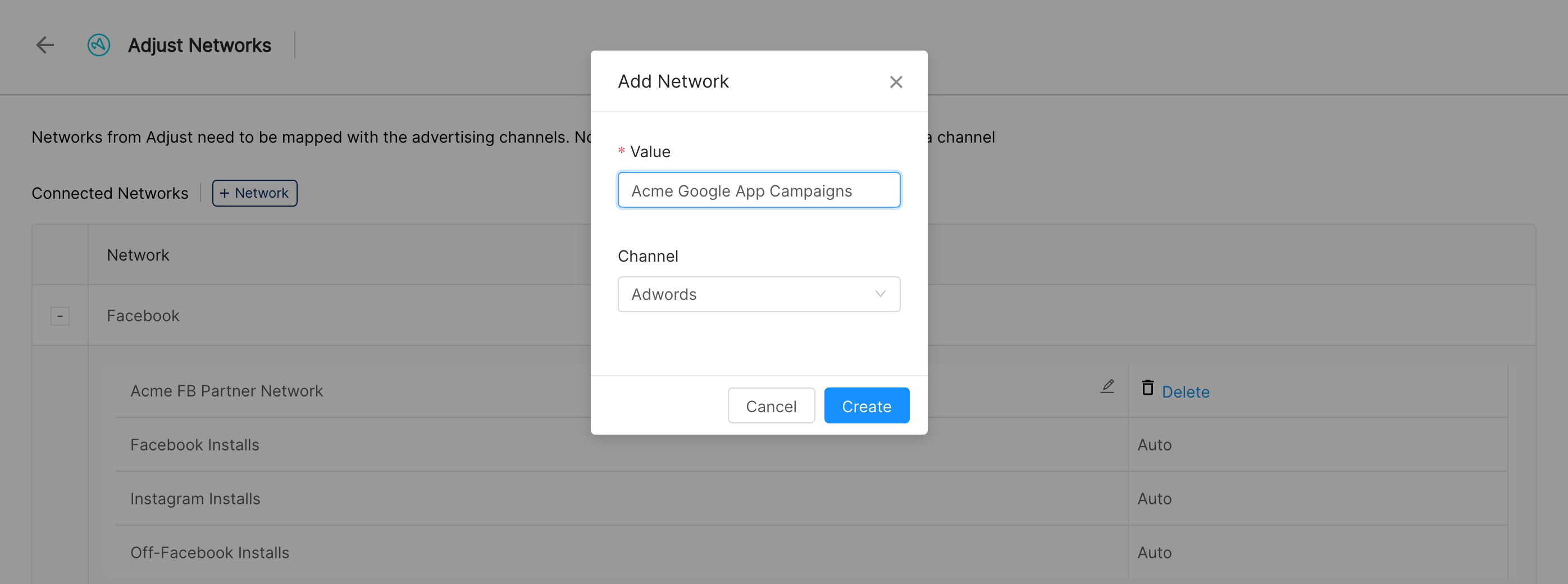
Where to find network names: Adjust dashboard → Deliverables. The top-level row is the Network tracker name. If a network has no mapping in Clarisights, its data won't be joined to any channel and won't be visible.
Step 6: Map SKAN partners (iOS only)
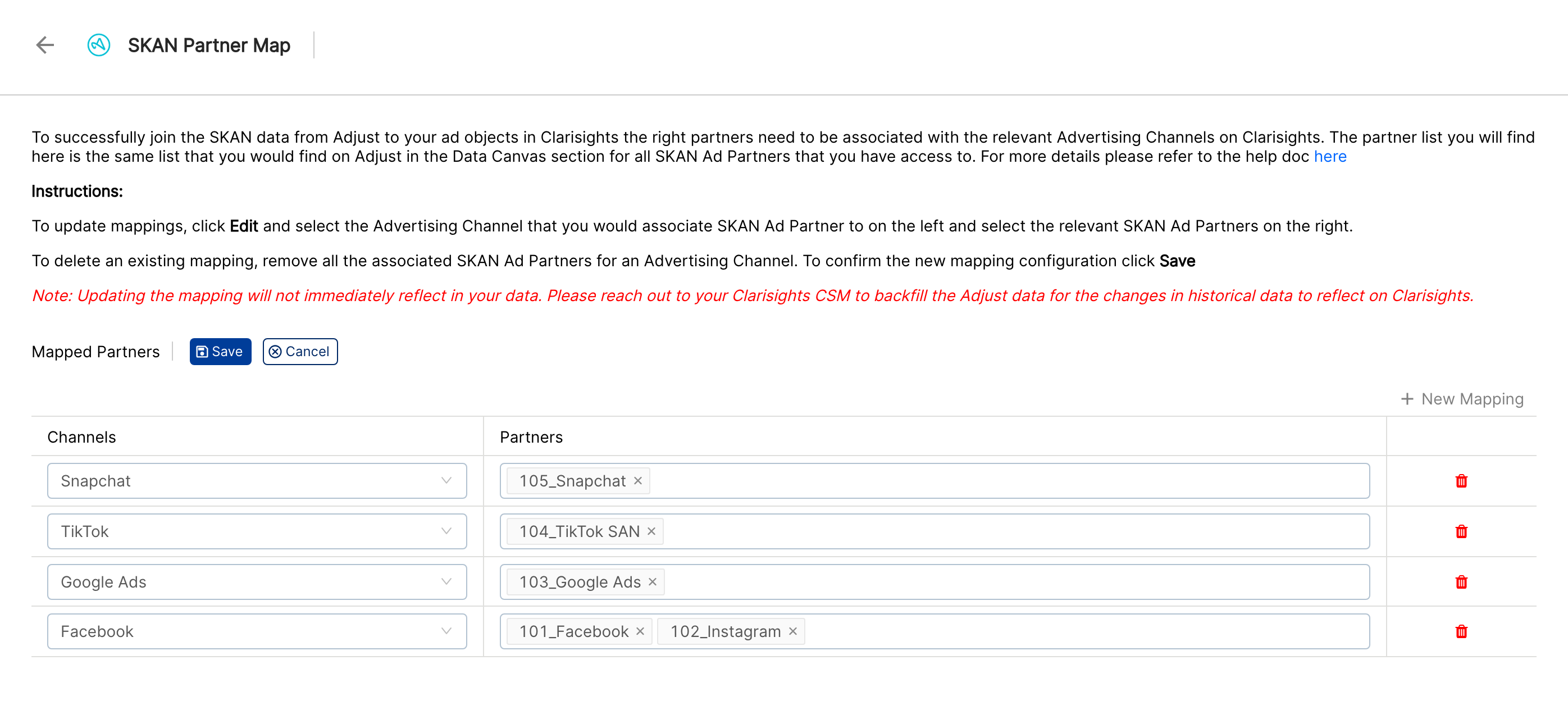
SKAdNetwork (SKAN) data references a Partner rather than a Network. Open the SKAN Partner Map on the Adjust integration page and click Edit. Confirm the pre-populated partner-to-channel mappings, use New Mapping to add more, and click Save. Mapping changes apply to new data; ask your Clarisights account manager for a backfill if you need history updated.
Step 7: Add custom in-app events (optional)
To pull metrics for in-app events you've configured in Adjust, click Add Events next to the relevant app. On the Custom events page, tick the events to import, tick Decimal or Currency where the event values need it, and click Add Events. The Decimal and Currency choice cannot be changed later.
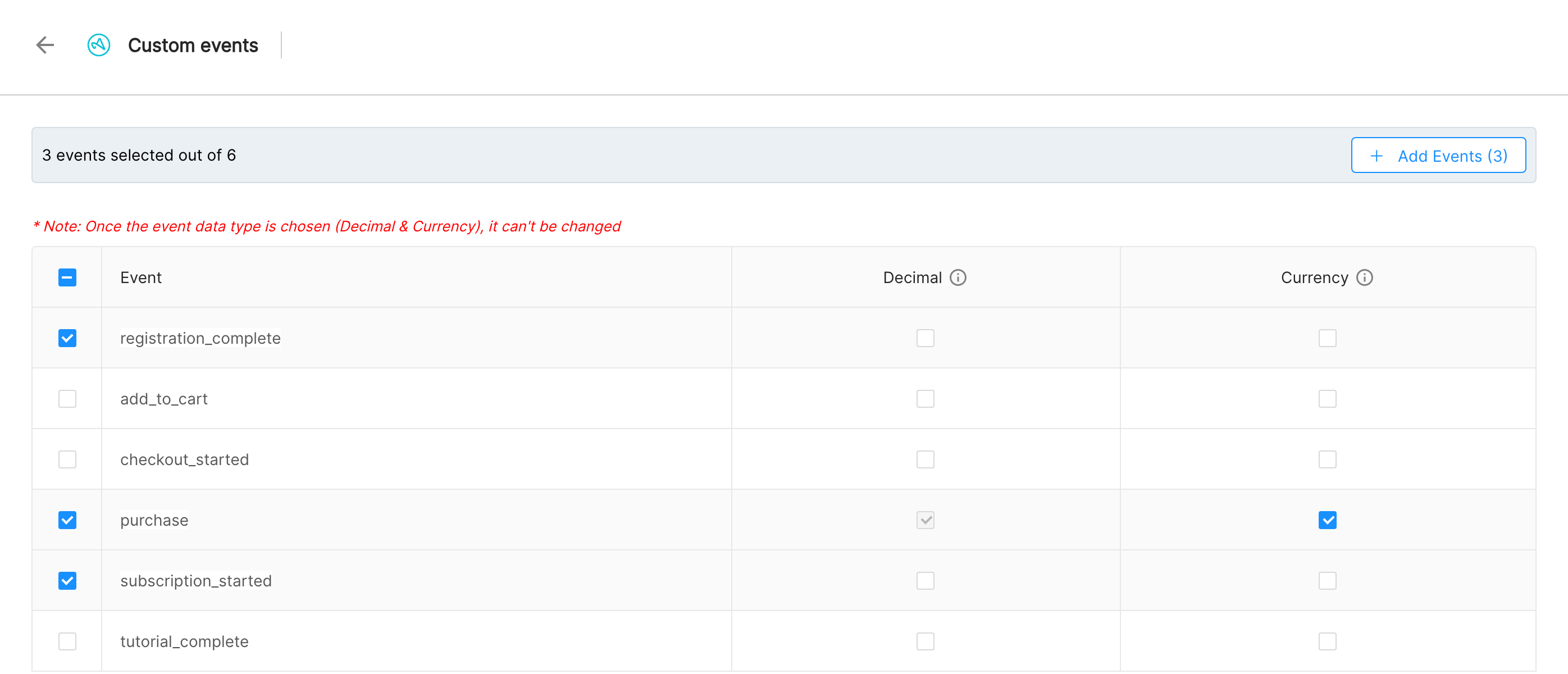
Pro tip: If two apps emit the same conceptual event under different names (e.g.
PurchasevsPurchase Complete), rename them in Adjust so they unify into one column on Clarisights.
Verify the connection
On Integrations, open Adjust under Manage connected channels. The user and each connected app should show as Active.
Adjust metrics typically appear within about 24 hours of connecting, depending on the metric group and the ad channel.
Quick check: open a report on a connected ad channel (e.g. Facebook), add the dimension Campaign and the metric AJ: Installs (Base). Rows should populate for campaigns whose Adjust network is mapped.
Data available
Hierarchy
Adjust data isn't browsed as its own hierarchy. It's joined onto the ad object (Account / Campaign / Ad Group / Ad) of the mapped advertising channel. Adjust's tracker levels map to Clarisights levels as follows:
Native level (Adjust tracker) | Clarisights level |
Network tracker | (Used to route data to the correct ad channel; not a Clarisights level itself) |
Campaign / 1st sub-tracker | Campaign |
Adgroup / 2nd sub-tracker | Ad Group |
Creative / 3rd sub-tracker | Ad |
How Adjust data is joined
Adjust metrics are joined onto an ad channel's objects by name and/or ID. The expected default format for Campaign / Adgroup / Creative tracker values is Object Name (Object ID), e.g. Holiday Sale (1234567).
API ad channels: when the standard format is in place, Clarisights matches the Adjust object to the same ID or name in the mapped ad channel (for example Facebook Ads, Google Ads, TikTok Ads, Snapchat, Twitter, Apple Search Ads, Criteo, or Remerge) and joins the metrics directly.
Custom Advertising channels: Clarisights joins on the same name/ID basis, provided the hierarchy on both sides matches and tracker values are in a consistent format.
Non-standard tracker formats: if your tracker links use a different pattern (e.g. Campaign Name & Campaign ID), a custom regular expression can be configured to extract the name and ID. Reach out to your Clarisights account manager or write to support@clarisights.com to set this up.
Metrics
Adjust metrics are surfaced as four categories. Each base metric is also broken down by OS and by retargeting status, producing the eight metric groups listed under Breakdowns.
App KPIs (always available)
Common to every app, no configuration needed. Prefix: AJ:, with the suffix (Base), for example AJ: Installs (Base).
Metric | Description |
AJ: Installs (Base) | Attributed app installs |
AJ: Reinstalls (Base) | Reinstalls of an app on the same device |
AJ: Uninstalls (Base) | Detected uninstalls |
AJ: Reattributions (Base) | Inactive users re-engaged via a retargeting campaign |
AJ: Deattributions (Base) | Attributions removed by Adjust (e.g. fraud, expiry) |
AJ: Sessions (Base) | App sessions opened by attributed users |
AJ: Clicks (Base) | Tracker click-throughs recorded by Adjust |
AJ: Revenue (Base) | Total in-app revenue (in app currency) |
AJ: Transactions (Base) | Count of revenue events |
AJ: DAUS / WAUS / MAUS (Base) | Daily / weekly / monthly active users |
AJ: Limit Ad Tracking enabled Installs (Base) | Installs from devices with LAT enabled |
AJ: Limit Ad Tracking enabled Reattributions (Base) | Reattributions from devices with LAT enabled |
AJ: Network Installs (Base) | Installs reported by the ad network (vs. attributed by Adjust) |
AJ: Rejected Installs (Base) | Installs rejected by Adjust's fraud filters |
AJ: Rejected Reattributions (Base) | Reattributions rejected by Adjust's fraud filters |
AJ: Cost (Base) | Cost reported by Adjust (when partner cost data is enabled) |
In-app Event KPIs (configurable)
Counts of in-app events you've configured in Adjust and selected via Add Events in Clarisights. Prefix: AJ: (with the suffix (Event)).
Examples:
Metric pattern | What it represents |
AJ: <event_name> (Event) | Number of times the event fired in the period |
AJ-R: <event_name> (Event) | Revenue associated with the event (when revenue is enabled for that event) |
Cohort KPIs (configurable)
Cohorts isolate users who installed (or were reattributed) within a given timeframe and let you trace event counts and revenue from day-of-install onwards. Prefix: AJ-C: (count) and AJ-RC: (revenue).
Supported cohort windows: 0d to 6d, 0w, 1w, 2w, and 0m by default; longer windows (up to 210d, 30w, or 6m) can be enabled by your Clarisights account manager.
Metric pattern | What it represents |
AJ-C: <event_name> (<window>) | Event count within the cohort window, e.g. AJ-C: Transaction Completed (0w) |
AJ-RC: <event_name> (<window>) | Revenue within the cohort window |
SKAN KPIs (iOS 14.5+)
For iOS 14.5+ campaigns subject to Apple's ATT, conversions are reported via Apple's SKAdNetwork and shared with Adjust by ad partners. Prefix: AJ-SKAN:
Metric | Description |
AJ-SKAN: Installs | SKAdNetwork-attributed installs |
AJ-SKAN: Reinstalls | SKAdNetwork-attributed reinstalls |
AJ-SKAN: Conversion 1 to Conversion 6 | Counts for each configured SKAN conversion value |
AJ-SKAN: Valid Conversions | Conversions Adjust considers valid |
AJ-SKAN: Invalid Payloads | Payloads rejected by Adjust validation |
Breakdowns: OS and Retargeting
Each base, event, and cohort metric is also exposed split by device OS (Android and iOS) and by retargeting status. The full set of prefixes:
Prefix | Group |
AJ: | Adjust (all OS, attribution) |
AJAND: | Adjust Android |
AJIOS: | Adjust iOS |
AJRE: | Adjust Retargeting (all OS, reattribution) |
AJREAND: | Adjust Retargeting Android |
AJREIOS: | Adjust Retargeting iOS |
Examples: AJIOS: Installs (Base), AJREAND: Sessions (Base), AJREIOS-C: Purchase (1w).
Fraud metrics
Fraud-related metrics (rejected installs, rejected reattributions, etc.) are configurable per account. Contact your Clarisights account manager to enable or disable fraud metric ingestion for your Adjust integration.
Alternative: POD-AJ
The Adjust integration described above is a secondary data source: its metrics are joined onto the ad-channel objects (Account / Campaign / Ad Group / Ad) of your connected advertising channels, and Adjust's own dimensions (network, country, OS, app) are used as join keys rather than being available to slice reports by.
POD-AJ is a different connector that brings Adjust data in as a primary data source. With POD-AJ, Adjust dimensions are stored alongside the metrics and are first-class fields you can group, filter, and pivot on.
Primary vs Secondary data, in one example
When Clarisights imports a primary data source (e.g. an ad channel like Google Ads), we keep all of its metrics and dimensions. A row in Clarisights might look like:
Account | Campaign | Country | Device | Spend | Clicks |
Google Ads (DE) | Holiday Sale | DE | Mobile | 1,200 | 5,400 |
For a secondary source like Adjust, we drop the Adjust-side dimensions and use them as join keys instead. The same row, after Adjust is joined, looks like:
Account | Campaign | Spend | Clicks | AJ: Installs | AJ: Revenue |
Google Ads (DE) | Holiday Sale | 1,200 | 5,400 | 820 | 9,500 |
The Adjust dimensions (network tracker, country, OS, app) are no longer columns; they were consumed during the join. That's why Adjust isn't a standalone source in the report builder; its metrics show up automatically when a joined ad channel is added to a report.
Why use POD-AJ instead
Use POD-AJ when you need any of the following:
Organic, affiliate, and untracked traffic: installs and revenue that don't come from a paid ad channel won't appear under
AJ:metrics (because there's no ad-channel row to join onto). POD-AJ surfaces them directly.Network-tracker independent reporting: slice installs by Adjust network, country, OS, or app without going through an ad channel's hierarchy.
Adjust's own dimensions in widgets: group, filter, and pivot on Adjust dimensions as if they were ad-channel dimensions. With the standard Adjust integration these aren't available; with POD-AJ they are.
Reporting on affiliates by tracker: when an affiliate sends clicks through a specific network tracker, POD-AJ lets you analyse that tracker's performance on its own.
Adjust integration vs POD-AJ at a glance
Adjust integration | POD-AJ | |
Source type | Secondary (analytics) | Primary |
Adjust dimensions stored | No, used as join keys only | Yes, first-class dimensions |
Customizable metrics / dimensions | No, fixed metric set | Yes, chosen at channel setup |
Visible as a standalone data source | No, joined onto ad channels | Yes, selectable when building reports |
Captures organic / affiliate / untracked traffic | No | Yes |
Setting up POD-AJ
POD-AJ is a POD (primary data) channel that Clarisights sets up for you; it is not available as a source type in the self-serve POD form. Contact your Clarisights account manager to create a POD-AJ channel, and tell them which apps, metrics, and Adjust dimensions you need. For background on POD channels, see Guide to POD data source.
Limitations & known constraints
No standalone Adjust dimensions. Adjust is a secondary integration: tracker, network, country, OS, etc. are not available as Clarisights dimensions on the Adjust source; they're used internally as join keys. If you need Adjust as a primary, dimension-rich source, use POD-AJ (see above).
Expired-attribution windows. Some ad partners stop sharing attribution with Adjust after a fixed period. Facebook, Twitter, and Snapchat cap at roughly 90 to 150 days. Backfills beyond those windows will return no data. See Adjust's expired-attribution docs.
SKAN granularity varies by partner. Facebook reports SKAN down to ad level; Google Ads only to campaign. See Adjust's SKAN partner integrations for the full matrix.
Currency and timezone are immutable per app. Changing either requires a backfill to re-state history.
Unify event names. Each distinct event name becomes its own set of metrics. Reuse the same event names across apps when you can.
Network mapping is mandatory. If an Adjust network tracker isn't mapped to a Clarisights ad channel, its data is dropped from the join and won't appear.
Custom join rules require setup. Non-standard tracker value formats need a regex configured by Clarisights. Write to support@clarisights.com.
Operating notes
Refresh schedule: daily ingestion runs the app and SKAN metric groups over the last 8 days; cohort metric groups run on staggered schedules covering each cohort window (7-day, 15-day, 30-day, and so on up to 210-day buckets) to keep the most relevant cohorts fresh.
Lookback: 8 days for app/SKAN; cohort windows up to 210 days, gated by what's enabled for your company.
Backfill: when you connect an app, Clarisights backfills as far as Adjust will return data (subject to per-partner expired-attribution caps). Targeted backfills can be requested via your Clarisights account manager.
Multi-account: one Adjust user (API token) can host any number of apps. Add multiple users if you have apps under separate Adjust accounts.
Currency conversion: revenue is preserved in the app's configured currency on ingest and converted to your reporting currency by Clarisights.
Credential rotation: update the API token any time from the Adjust Accounts page by editing the user. App tokens can be updated by editing the app.
Need primary-source Adjust data? Use the POD-AJ connector; see Alternative: POD-AJ above.
Need help?
When contacting support from the in-app messenger, please include:
The Adjust user / app name in Clarisights (Integrations → Adjust)
The Adjust App Token of the affected app
The Network tracker name (and the Clarisights ad channel it should map to)
The exact error message or screenshot
The metric, date range, and dashboard / widget where the issue is visible
When the issue started