
Integrating Branch to Clarisights
Branch is a mobile growth and attribution platform. Connecting Branch to Clarisights brings install, click, impression, and custom-event attribution data alongside the rest of your marketing performance, so you can analyze paid acquisition cost-per-install, post-install conversion, and ROAS in the same reports as your ad-channel spend.
Branch is classified as an Analytics channel in Clarisights: it provides attribution data that's joined to your ad channels (Google Ads, Apple Search Ads, Facebook, and Snapchat, plus any Custom Advertising channels you've configured).
At a glance
| Authentication | Branch Key and Branch Secret (entered as Client Key and Client Secret), per Branch app |
| Permissions needed | Access to Account Settings → Profile on the Branch dashboard for each app |
| Account discovery | Each Branch app is connected individually with its own key/secret pair |
| Data freshness | Daily (7-day rolling pull window) |
| Lookback window | 7 days |
| Backfill on connect | Last 7 days; longer historical backfills available on request |
| Timezone | UTC |
| Currency | Native (typically USD); converted to your reporting currency by Clarisights |
| Levels supported | Joined onto your ad channel's Campaign · Ad Group · Ad · Keyword |
| Limited rollout | No |
Prerequisites
An active Branch account with one or more Branch apps
Access to the Branch dashboard with permissions to view Account Settings → Profile
The Branch Key and Branch Secret for each app you want to connect
The Branch app's App ID and a friendly App Name
Steps to Connect
Step 1: Get your Branch credentials
In the Branch dashboard, go to Account Settings → Profile. For each app you want to connect, copy:
App Name
App ID
Branch Key
Branch Secret
To find your Branch Key and Secret, see Branch's guide: Manage Account Profile.
Treat the Branch Secret like a password. It grants read access to your Branch query API for that app.
Step 2: Connect the app in Clarisights
In Clarisights, open Integrations, search for Branch under Set up new connection, and click + Connect (or, on the Branch App page, click + Account). In Add a Branch app, fill in App Name and App ID, paste the Branch Key into Client Key and the Branch Secret into Client Secret, and click Connect App.
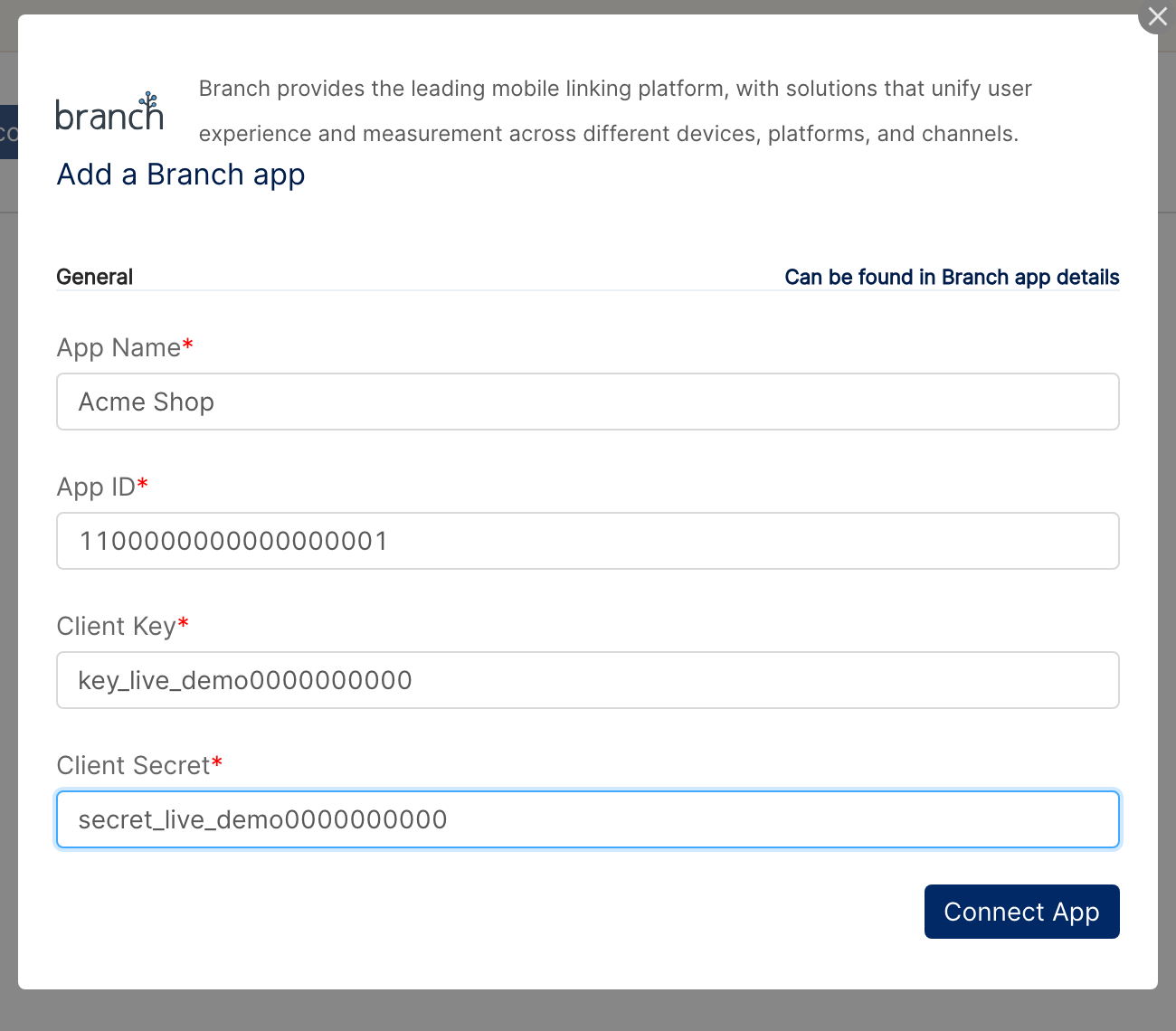
⚠ "Authentication failed" on submit → Re-check that the Branch Key and Secret were copied without leading/trailing whitespace and that the credentials match the same Branch app. Keys and secrets are app-specific.
Step 3: Connect each additional app individually
If you have multiple Branch apps, repeat Steps 1 and 2 for each one. Branch's API exposes one app's data per credential pair.
Step 4: Configure data sources (Analytics Config)
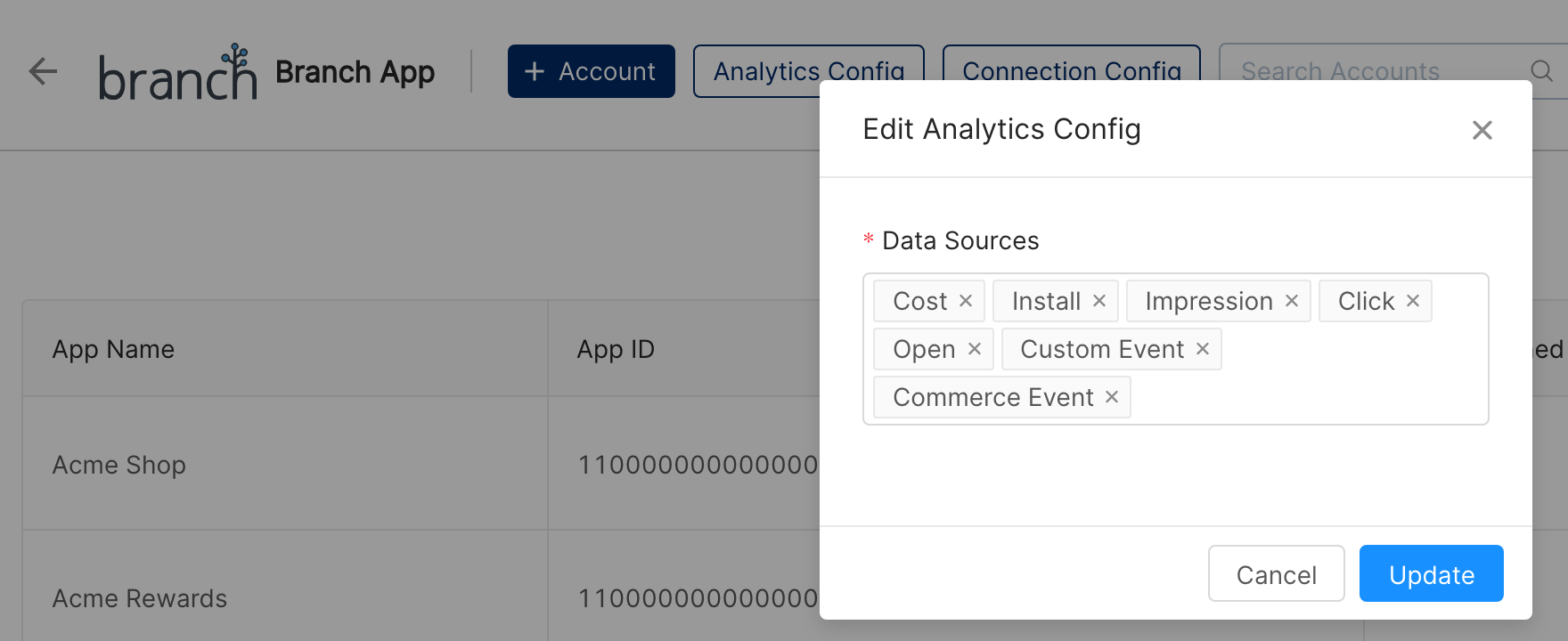
After you connect your first app, the Edit Analytics Config dialog opens (you can reopen it any time with Analytics Config on the Branch App page). Choose which Branch Data Sources Clarisights should pull and click Update. Branch groups metrics into data sources. By default, Clarisights pulls:
cost: spend across ad channels
eo_install: installs across ad channels
eo_impression: impressions
eo_click: clicks
eo_open: app opens
eo_custom_event: your custom in-app events
eo_commerce_event: revenue / commerce events (revenue data source)
Custom events configured on Branch can be exposed as their own metrics. Let your Clarisights account manager know which custom events you want pulled. The data-source list applies to all Branch apps connected to your workspace.
Step 5: Configure advertising channels (Connection Config)
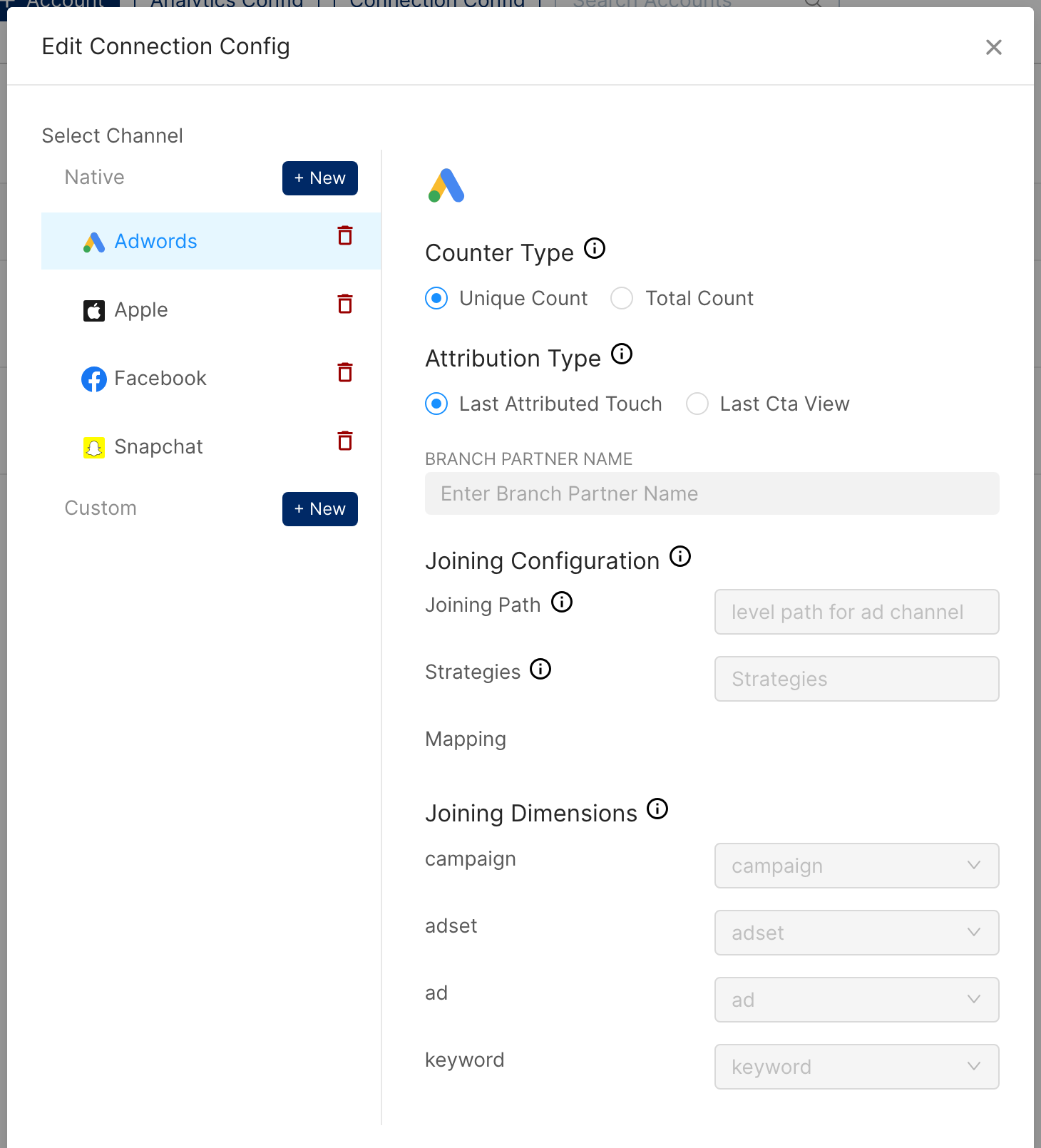
Click Connection Config on the Branch App page. In Edit Connection Config, use + New under Native or Custom to add each ad channel you want Branch attribution joined to, then click Update. Supported partners:
Google Ads
Apple Search Ads
Facebook Ads
Snapchat Ads
Custom Advertising channels
Branch attribution for Twitter and TikTok can be set up by Clarisights on request.
For native channels, set the Counter Type and Attribution Type (defined below). For Custom Advertising channels, you'll also set the Branch Partner Name and the Joining Configuration (Joining Path, Strategies, and Joining Dimensions); your Clarisights account manager will help with these settings.
Verify the connection
On Integrations, open Branch under Manage connected channels. Each connected Branch app should be listed with its App Name and App ID.
First data appears within about 24 hours, after the next scheduled sync.
Quick start: open a report that uses one of your ad channels (Google Ads, Apple Search Ads, etc.), and add Branch Installs as a metric. The values should populate against the campaign/ad-group rows in that report.
Data available
Hierarchy
Branch is an analytics channel: its data is joined onto your ad channels rather than living in its own ad-account hierarchy. The conceptual hierarchy below is how Branch organizes data internally; it maps to standard Clarisights levels via the underlying ad channel.
Native level (Branch) | Clarisights level |
Branch App | Account (one Clarisights account per Branch app) |
Advertising Partner Name | Joined to the matching ad channel (Google Ads, Apple Search Ads, Facebook, etc.) |
Campaign / Campaign ID | Campaign on the joined ad channel |
Ad Set / Ad Set ID | Ad Group on the joined ad channel |
Ad / Ad ID | Ad on the joined ad channel |
Keyword | Keyword (search channels only) |
(Unpopulated / null partner) | "Unpopulated" (organic / non-ad-attributed activity) |
Counter Type: Branch returns each event as either a Unique Count (one event per user) or a Total Count (every occurrence). Revenue is always the sum of all purchase events. Set this per ad channel in Connection Config; Branch's API only returns one of the two per request.
Example: a user who opens the app 3 times in a day counts as 1 with Unique Count and 3 with Total Count. Over a month the gap is significant.
Attribution Type: Branch supports Last Attributed Touch (the conversion goes to the latest impression, click, or web-to-app redirect) and Last Cta View (click-based). You can set this per ad channel in Connection Config. Default is Last Attributed Touch.
Dimensions
Branch data is joined onto your ad channel's objects, so you slice it by that ad channel's dimensions. These Branch fields are used to route and join the data:
Branch field | Level | How it is used |
Advertising Partner Name | Channel | Routes the data to the matching ad channel (Google Ads, Apple Search Ads, Facebook, Snapchat, or a Custom Advertising channel); "Unpopulated" for organic |
Campaign / Campaign ID | Campaign | Joined to the ad channel's campaign by ID or name |
Ad Set / Ad Set ID | Ad Group | Joined to the ad channel's ad group by ID or name |
Ad / Ad ID | Ad | Joined to the ad channel's ad by ID or name |
Keyword | Keyword | Joined to keywords (Google Ads, Apple Search Ads) |
Platform | Metric | Exposed as iOS and Android variants of each metric |
Metrics
Branch metrics are pulled per data source. The exact list depends on which data sources you enable in Analytics Config.
Standard data sources
Data source | Description |
cost | Spend reported via Branch from connected ad channels |
eo_install | App installs (attributed) |
eo_impression | Ad impressions tracked through Branch |
eo_click | Ad clicks tracked through Branch |
eo_open | App opens (configurable as unique or total) |
eo_custom_event | Custom in-app events you've configured in Branch |
eo_commerce_event | Commerce events including revenue |
SKAdNetwork data sources (configurable) | iOS SKAN postback events with Branch's conversion-value mapping |
Custom event metrics
Each Branch event surfaces as its own metric in Clarisights (for example Install, Open, Purchase, or Complete registration), with iOS and Android variants such as IOS : Install and ANDROID : Install. Custom events configured in Branch are added the same way; send your Clarisights account manager the list of custom events you want exposed.
Revenue metrics
Commerce events come with a revenue companion metric that surfaces revenue per event in your reporting currency.
Limitations & known constraints
One app per credential: each Branch app needs its own key/secret. Use multiple connections for multi-app accounts.
Data sources are workspace-wide: the list of enabled data sources in Analytics Config applies to every connected Branch app in your Clarisights workspace.
API rate limits: Branch enforces API rate limits for each app. Large backfills are throttled and may take longer to complete.
7-day rolling pull window: each scheduled sync pulls the last 7 days. Late-arriving attribution older than 7 days will not update existing rows; ask your Clarisights account manager about a backfill if you need it.
Counter Type is per-channel: you can only request Unique Count or Total Count, not both. Choose based on how you analyze each channel.
Organic attribution: events with no ad partner are tagged "Unpopulated" rather than mapped to an ad channel.
Operating notes
Refresh schedule: daily, with a 7-day rolling lookback.
Lookback: 7 days.
Multi-app: connect each Branch app individually; each becomes its own Clarisights account.
Currency conversion: native amounts are pulled as they are and converted by Clarisights.
Credential rotation: rotate the Branch Key and Secret in the Branch dashboard, then edit the app on the Branch App page in Clarisights and enter the new Client Key and Client Secret.
Adding new ad channels: enable a new partner in Connection Config and configure its Counter Type and Attribution Type. Your Clarisights account manager helps with Custom Advertising partners (which need a Branch Partner Name and Joining Configuration).
SKAN events: if you use SKAdNetwork, share the SKAN event names and conversion-value mapping with your Clarisights account manager so they can be exposed as named metrics.
Need help?
When contacting support from the in-app messenger, please include:
The Branch App Name and App ID (Integrations → Branch)
The ad channel and date range affected
The Counter Type and Attribution Type configured for that channel
The exact error message or screenshot
When the issue started