
Connecting AppsFlyer on Clarisights
AppsFlyer is a leading mobile measurement partner (MMP) for app marketers. Connecting AppsFlyer to Clarisights blends install attribution, in-app events, cohort revenue, and SKAdNetwork (SKAN) reporting alongside your paid acquisition spend so you can analyze CPI, ROAS, retention, and post-install funnels in one place.
At a glance
| Authentication | AppsFlyer API Token v2 |
| Permissions needed | An API Token v2 with Master API access (required, so Clarisights can list your apps). Cohort API and SKAN API access are needed for cohort and SKAdNetwork data |
| Account discovery | Automatic: Clarisights lists every app the token can access and you pick the apps to connect. Each app (per platform) becomes one account |
| Data freshness | Daily (most reports). Cohort and SKAN reports honor configured rate limits |
| Lookback window | Set per report type (Event, Cohort, SKAN) when Clarisights configures your reports |
| Backfill on connect | Historical data on request from Clarisights support |
| Timezone | App timezone as set in AppsFlyer (your workspace timezone if AppsFlyer does not return one) |
| Currency | App currency as set in AppsFlyer (your workspace currency if AppsFlyer does not return one); converted to your reporting currency by Clarisights |
| Levels supported | App (Account) · Media Source · Campaign · Ad Set · Ad |
| Limited rollout | No. You connect from the AppsFlyer card; Clarisights then sets up the reports for your apps |
Prerequisites
An active AppsFlyer account with at least one app configured
An AppsFlyer API Token v2 with Master API access, generated by an AppsFlyer admin or account owner. Cohort API and SKAN API access are recommended so Clarisights can also pull cohort and SKAdNetwork data
For SKAN reporting: SKAN must be enabled for the app in AppsFlyer
Steps to Connect
Step 1: Generate an API Token v2 in AppsFlyer
Sign in to AppsFlyer and open the API tokens page (the Connect form points you to Settings → API tokens). Generate a V2 token, name it Clarisights, copy the value, and store it securely, because AppsFlyer only displays it once.
For instructions on viewing and creating API tokens, see AppsFlyer's guide: Managing AppsFlyer tokens.
Treat the API Token v2 like a password. It grants read access to every app under the AppsFlyer account. If it is exposed, revoke and re-issue it from the same page.
Step 2: Open the AppsFlyer card in Clarisights
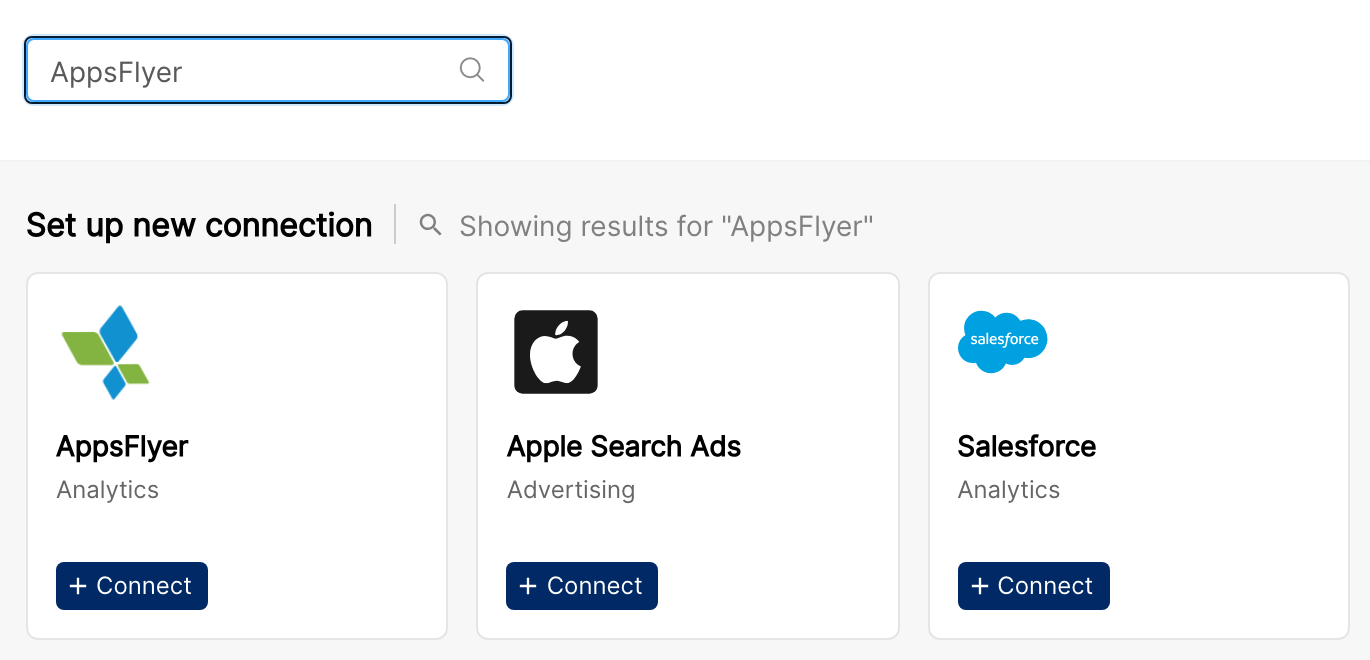
Open Integrations from the database-stack icon in the left sidebar. Under Set up new connection, search for AppsFlyer and click + Connect on the AppsFlyer card. The Connect AppsFlyer form opens.
Step 3: Validate your token
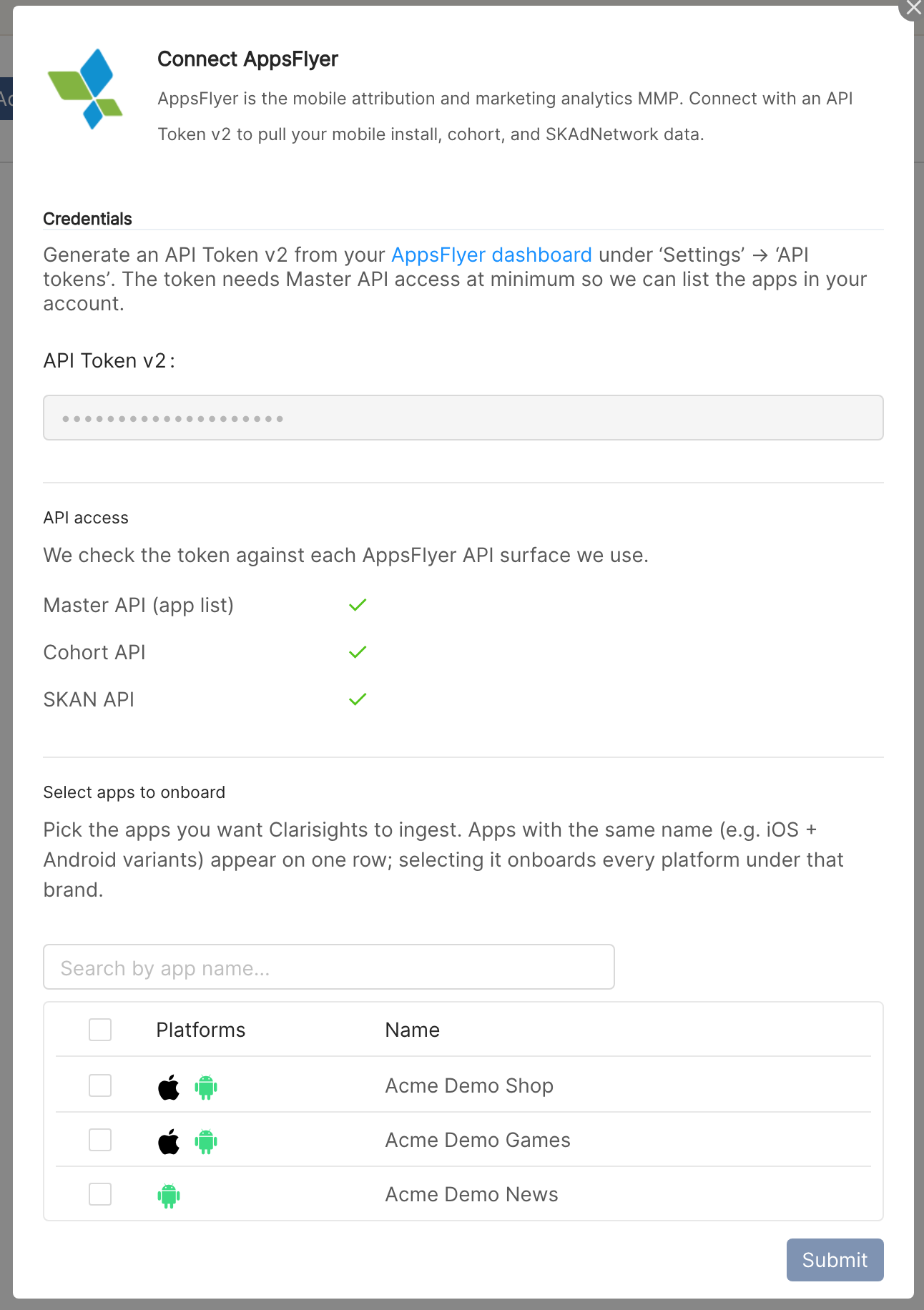
Paste the token into API Token v2 and click Validate Token. Under API access, Clarisights checks the token against three AppsFlyer APIs and shows a green check or a red cross with the error for each:
Master API (app list): required. Without it Clarisights cannot list your apps and you cannot continue.
Cohort API: needed for cohort data. You can still connect if it fails.
SKAN API: needed for SKAdNetwork data. You can still connect if it fails.
⚠ "Validation failed. Please check your API token." or a red cross on Master API (app list) → The token is mistyped, has been revoked, or is not a V2 token. Generate a fresh API Token v2 in AppsFlyer and validate again.
⚠ "No apps available for this token." → The token is valid but the AppsFlyer user that owns it has no apps. Add the app (or app access) in your AppsFlyer dashboard, then validate again.
Step 4: Select the apps to onboard
Under Select apps to onboard, use Search by app name to find your apps and tick the ones you want. Apps with the same name on different platforms (for example the iOS and Android versions) appear on one row, and selecting the row connects every platform under that name. Hover a platform icon to see that platform's AppsFlyer App ID. Click Submit.
Step 5: Report setup
Clarisights pulls three families of reports: Event (Master API: installs, sessions, revenue, and in-app events), Cohort (KPIs by cohort day), and SKAN (SKAdNetwork postbacks, for apps where SKAN is available). After you submit, Clarisights configures which KPIs, in-app events, and cohort settings to pull for your apps. Contact your Clarisights account manager or support if you need specific in-app events, a non-default cohort window, or a historical backfill.
Verify the connection
Go to Integrations and open AppsFlyer under Manage connected channels. Each connected app appears with its Account Name, Account ID, and Timezone | Currency.
First data appears after the reports for your apps are set up and the next daily sync has run. Cohort and SKAN APIs are rate limited, so backfills of those reports can take longer.
Quick start: create a new report, add AppsFlyer as the data source, and add Account, Media Source, Campaign, and your install and revenue metrics.
Data available
Hierarchy
How AppsFlyer's native levels map to the standard Clarisights levels:
Native level (AppsFlyer) | Clarisights level |
App | Account |
Media Source (Partner / pid) | Account / Channel attribute |
Campaign (c) | Campaign |
Adset (af_adset) | Ad Group |
Ad (af_ad) | Ad |
Site ID (af_siteid) | Sub-publisher (dimension only) |
Dimensions
Dimension | Level | Description |
Account / App ID | Account | AppsFlyer app name and app identifier |
Media Source | Account | Acquisition source ( |
AF Partner | Account | Attribution partner reporting the row ( |
AF Channel | Account | Sub-channel within a media source ( |
Campaign / Campaign ID | Campaign | Campaign name ( |
Adset / Adset ID | Ad Group | Ad set name ( |
Ad / Ad ID | Ad | Creative name ( |
Country | Any | Install country |
Keyword | Any | Search keyword ( |
Site ID | Any | Sub-publisher ( |
Touch Type | Cohort | Click or impression attribution ( |
Cohort Type | Cohort | user_acquisition or retargeting |
Date | Any | Report date (Event and SKAN) or install date (Cohort) |
Metrics
Connections made from the AppsFlyer card
Metrics come from the three report families. The exact list depends on the KPIs and in-app events configured for your apps:
Report | Typical metrics |
Event | Installs, sessions, cost, revenue, and the in-app events you choose, by report date |
Cohort | The selected KPIs (for example users, revenue, or event counts) by cohort day, split by Cohort Type (user acquisition or retargeting) |
SKAN | SKAdNetwork installs and the SKAN events configured for the app |
Older AppsFlyer connections
AppsFlyer connections set up before the AppsFlyer card was available use the metric families below.
Basic AppsFlyer metrics (prefix AF:)
Metric | Description |
AF: Installs | Number of installs on a given day |
AF: Loyal Users | Users who open the app more than 3 times on a given day (irrespective of install date) |
AF: Loyal Users (1 / 7 / 28 / 30 days) | Users who open the app more than 3 times within N days from install (attributed to install date) |
AF: Revenue | Total revenue generated on a given day (irrespective of install date) |
AF: Revenue (1 / 7 / 28 / 30 days) | Total revenue from users within N days from install (attributed to install date) |
AF: Sessions | Total app opens on a given day (irrespective of install date) |
AF: Sessions (1 / 7 / 28 / 30 days) | App opens by users within N days from install (attributed to install date) |
All N-day metrics are attributed to the day of install. For example, AF: Revenue (30 days) for 1 Jan equals total revenue from users who installed on 1 Jan, summed from 1 Jan to 30 Jan.
Custom event metrics (any in-app event configured in AppsFlyer)
Metric | Description |
AF: custom_event (Event counter) | Total count of the event on a given day (irrespective of install date) |
AF: custom_event (Event counter, 1 / 7 / 28 / 30 days) | Event counts within N days from install (attributed to install date) |
AF: custom_event (Unique users) | Unique users firing the event on a given day |
AF: custom_event (Unique users, 1 / 7 / 28 / 30 days) | Unique users within N days from install (attributed to install date) |
AF: custom_event (Sales) | Total sales (revenue) from the event on a given day |
AF: custom_event (Sales, 1 / 7 / 28 / 30 days) | Sales from the event within N days from install (attributed to install date) |
Platform-specific metrics
Android- and iOS-specific basic metrics and custom event metrics are exposed with prefixes AFAND: and AFIOS: respectively (e.g. AFAND: Installs, AFIOS: Revenue).
AppsFlyer Retargeting metrics
Retargeting-only metrics use the prefix AFRE: (e.g. AFRE: Loyal Users). Platform-specific retargeting metrics use AFREAND: and AFREIOS: (e.g. AFREAND: Installs, AFREIOS: Revenue).
Cannot find a metric you expect? Reach out via the in-app messenger or write to support@clarisights.com.
Limitations & known constraints
Token-scoped access: a token grants access to every app its AppsFlyer user can see. Only the apps you select in Clarisights are connected.
Cohort & SKAN rate limits: AppsFlyer enforces strict per-token rate limits on the cohort and SKAN APIs. Clarisights splits backfills into 7-day chunks and retries automatically, so large backfills take longer.
SKAN only where available: SKAN reports are fetched only for apps where SKAN is available in AppsFlyer, and the token needs SKAN API access.
Cohort data matures: cohort metrics keep changing for several days after install as later activity is attributed to the install date.
Token revocation: if the API Token v2 is revoked or expires in AppsFlyer, the integration stops syncing until a new token is provided.
Operating notes
Refresh schedule: data is pulled daily (cohort and SKAN respect configured rate limits and may take longer to backfill).
Lookback: each daily run re-fetches a lookback window set per report type, so recent days are refreshed as AppsFlyer updates them.
Adding new apps: click + Connect on the AppsFlyer card again, validate your token, and select the new apps.
Currency conversion: each app keeps the currency AppsFlyer reports for it, and Clarisights converts to your reporting currency.
Credential rotation: replace the token any time from Integrations → AppsFlyer → Edit API Token. Paste the new API Token v2 and click Update Credentials. Your connected apps stay as they are.
Need help?
When contacting support from the in-app messenger, please include:
The integration name and AppsFlyer App ID(s) (Integrations → AppsFlyer)
Which report type is affected (Event, Cohort, or SKAN)
The exact error message or screenshot
The step where the issue occurred
When the issue started