
Connecting Arukereso on Clarisights
Árukereső (Arukereso) is the leading Hungarian price-comparison platform. Connecting Arukereso to Clarisights brings per-product click and cost data (for both native Arukereso traffic and Google CSS traffic routed through Arukereso) into your performance reporting alongside other paid channels.
At a glance
| Authentication | Static API key issued by Arukereso, scoped to a single merchant |
| Permissions needed | Partner Portal API access enabled by your Arukereso account manager. Calling IP must be whitelisted on the Arukereso side. |
| Account discovery | Manual. Arukereso cannot list shops for an API key, so you provide the Shop ID and Shop Name on the connect form (one shop per API key) |
| Data freshness | Daily |
| Lookback window | Last 30 days on every refresh |
| Backfill on connect | Last 30 days |
| Timezone | User-supplied (typically Europe/Budapest), as Arukereso's API does not return a timezone |
| Currency | User-supplied (typically HUF), as Arukereso's API does not return a currency |
| Levels supported | Account · Campaign (per-product rows) |
| Limited rollout | No |
Prerequisites
An active Arukereso merchant account
Partner Portal API access enabled: contact your Arukereso account manager to enable the API and issue an API key for your shop
Your Arukereso Shop ID and Shop Name, visible in the Arukereso Partner Portal
Static egress IP whitelisting: Clarisights routes outbound calls through a fixed proxy IP. Provide that IP to your Arukereso account manager so the calling IP is whitelisted on the Arukereso side. Contact Clarisights support if you need the IP value.
(Optional) Enrollment in the Arukereso Google CSS Program. This is required to receive Google CSS data (Data Source CSSONLY); without it, only native Arukereso data (AKONLY) is returned
Steps to Connect
Step 1: Get your API key, Shop ID, and Shop Name from Arukereso
Contact your Arukereso account manager and request:
An API key for your shop
Confirmation of your Shop ID and Shop Name
IP whitelisting for the Clarisights egress IP
Treat your API key like a password. It grants read access to your Arukereso merchant data.
Step 2: Add Arukereso in Clarisights
In Clarisights, open the Integrations page, search for Arukereso under Set up new connection, and click + Connect on the Arukereso card. To add another shop later, open the Arukereso page under Manage connected channels and click + Add User.
Step 3: Enter credentials and shop details
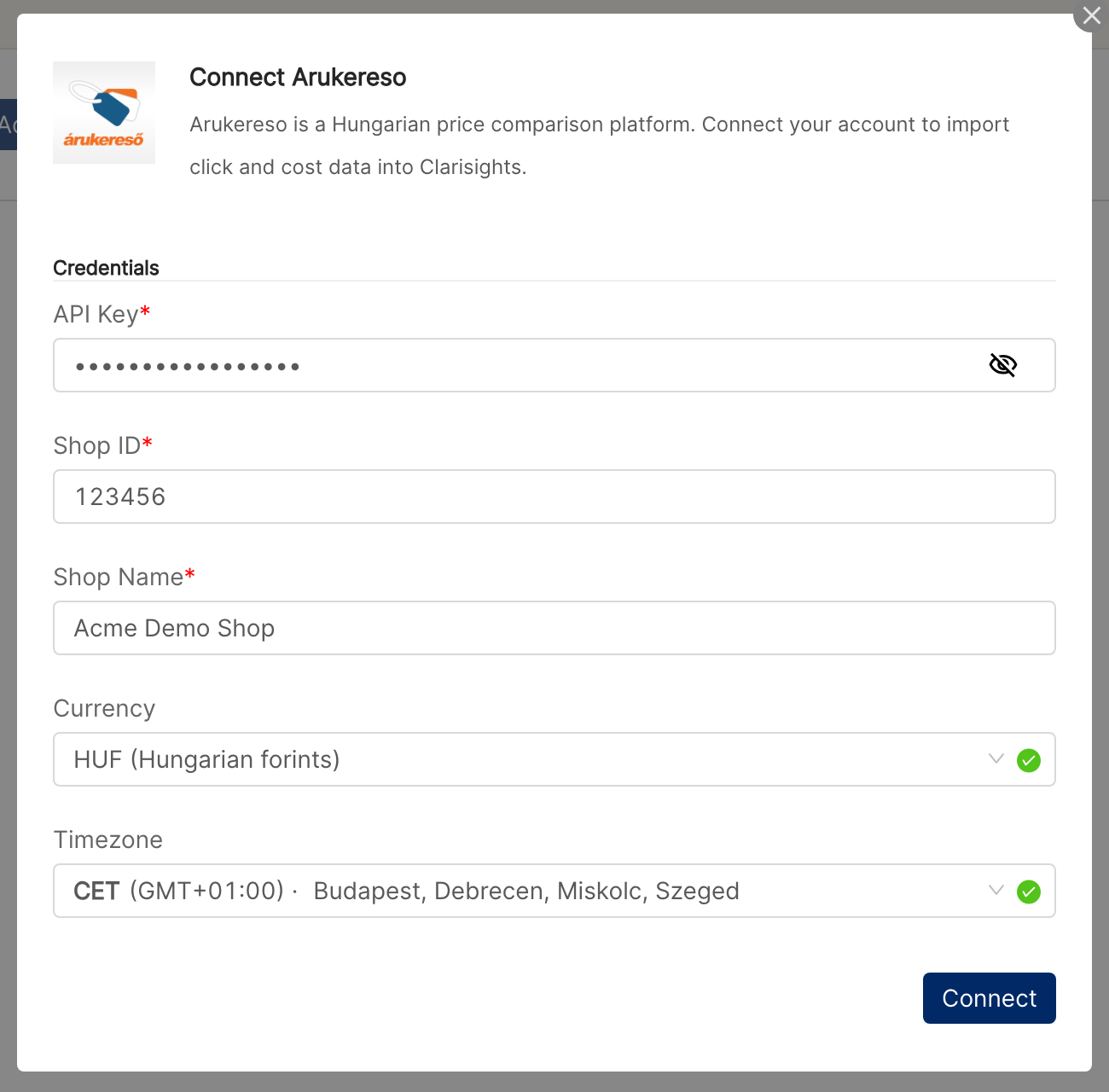
Provide:
API Key: from Arukereso
Shop ID: numeric ID of your Arukereso merchant
Shop Name: human-readable name for the connection
Currency: pick the currency your Arukereso costs are in (typically HUF)
Timezone: pick your shop's time zone (typically Budapest, CET)
Click Connect. Clarisights validates the API key with Arukereso and creates the account on success.
⚠ "Invalid Arukereso API key or the calling IP is not whitelisted" → Either the API key is wrong or the Clarisights egress IP is not whitelisted on the Arukereso side. Confirm both with your Arukereso account manager and retry.
⚠ "Too many requests to Arukereso. Please try again in a minute." → You are hitting the Arukereso API rate limit. Wait a minute and retry. If the error persists during normal use, contact Clarisights support.
Verify the connection
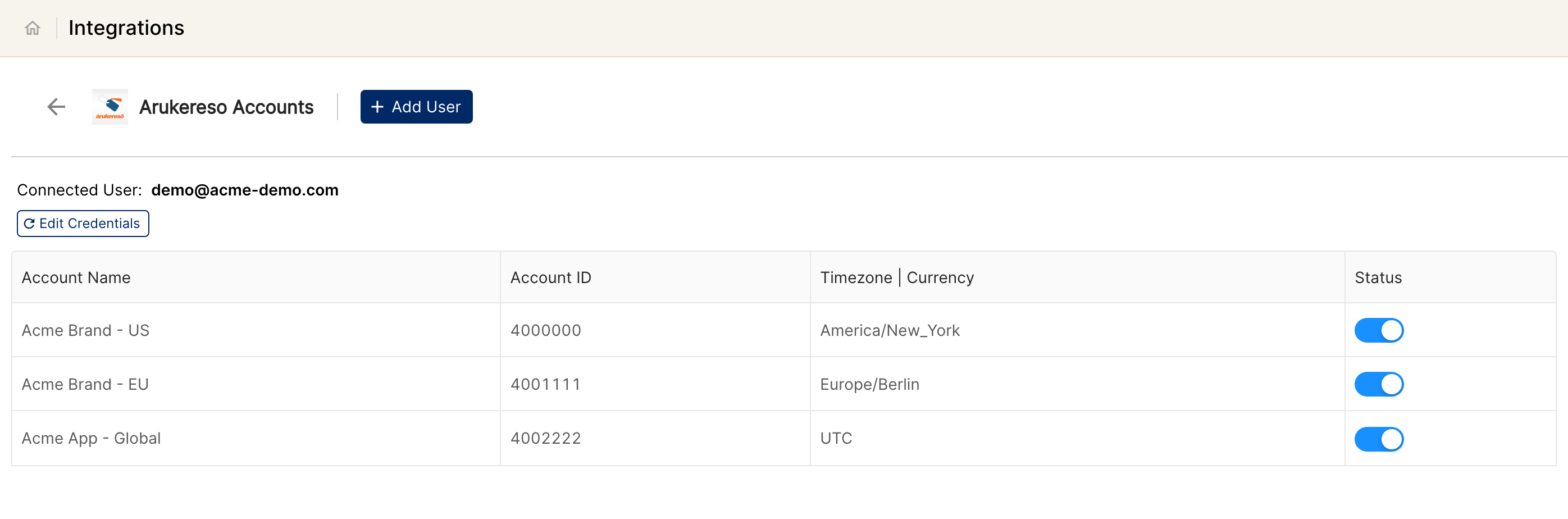
Open Arukereso under Manage connected channels on the Integrations page. Your shop should be listed with its status switched on.
First data appears within about 24 hours (Arukereso data syncs daily).
Quick start: create a new report, add Arukereso as the data source, and add Account · Product Name · Data Source · Clicks · Spend.
Data available
Hierarchy
Arukereso returns one row per product per day, with no native concept of campaigns or ad groups. Clarisights normalizes the merchant to Account and stores per-product rows at the Campaign level. The Data Source dimension distinguishes native Arukereso clicks (AKONLY) from Google CSS clicks routed through Arukereso (CSSONLY).
Native level (Arukereso) | Clarisights level |
Merchant / Shop | Account |
Product (per-row in the export) | Campaign (Arukereso has no native Campaign / Ad Group / Ad) |
Dimensions
Dimension | Level | Description |
Account | Account | Arukereso shop name and shop ID |
Product ID | Campaign | Arukereso product identifier |
Product Name | Campaign | Product name as listed on Arukereso |
Data Source | Campaign |
|
Metrics
Metric | Description |
Clicks | Clicks delivered to your shop |
Spend | Cost paid for those clicks, in your declared currency |
Limitations & known constraints
One shop per credential: An Arukereso API key is scoped to a single merchant and Arukereso cannot list shops for a key. To connect multiple shops, request a separate API key per merchant and add each as a separate connection in Clarisights.
IP whitelisting required: Arukereso requires API callers to come from a whitelisted static IP. Without the Clarisights egress IP whitelisted on the Arukereso side, every request will fail with an authentication error.
30-day pull window: Clarisights pulls today and the last 30 days on every refresh. Older historical data requires a support backfill (Arukereso limits each export to 30 days, so long backfills are split into 30-day chunks automatically).
CSSONLY requires Google CSS enrollment: If your shop is not enrolled in the Arukereso Google CSS Program, the CSSONLY data source is unavailable and is skipped (only AKONLY data flows). Other errors on CSSONLY data (rate limits, authentication, server errors) are not skipped; they are retried and reported like any other error.
No campaign / ad-group / ad level: Arukereso does not expose a campaign concept. Per-product data is stored at the Campaign level in Clarisights.
Two metrics only: Arukereso exposes clicks and click cost. Impressions, conversions, and revenue are not available.
Currency & timezone are user-declared: The Arukereso API does not return currency or timezone. The values you enter on connect drive how Clarisights interprets the data, so double-check both before connecting.
Rate limits: Arukereso limits how many reports can be requested per minute. Backfills run within these limits automatically, so long backfills take longer.
Operating notes
Refresh schedule: daily.
Lookback: last 30 days re-pulled on every refresh, so late-arriving Arukereso updates are picked up automatically.
Multi-account: each API key connects exactly one Arukereso merchant. Add multiple connections to onboard additional shops.
Currency conversion: spend is stored in your declared currency and converted by Clarisights to your reporting currency on ingest.
Credential rotation: rotate the Arukereso API key from the Arukereso page in Integrations with Edit Credentials, then click Update Credentials. The static key has no built-in expiry, so rotate it when your Arukereso account manager re-issues one.
Need help?
When contacting support from the in-app messenger, please include:
The integration name and shop name (from the Arukereso page in Integrations)
The exact error message or screenshot
The step where the issue occurred
When the issue started