
Connecting Buzzvil on Clarisights
Buzzvil is an AI-powered full-funnel mobile advertising platform popular in Korea and APAC. Connecting Buzzvil to Clarisights lets you blend Buzzvil spend, impressions, clicks, and conversion performance with your other paid channels and analyze it side-by-side with attribution data.
At a glance
| Authentication | Buzzvil-issued API token |
| Permissions needed | An API token with read access to your ad groups, line items, and creative sets and their reports |
| Account discovery | Single account per token: one Clarisights account is created for each Buzzvil API token |
| Data freshness | Daily |
| Lookback window | 7 days on every scheduled run |
| Backfill on connect | Last 7 days; longer windows available on request |
| Timezone | UTC (Etc/UTC) |
| Currency | Account currency preserved on ingest as Cost (Local Currency); Cost is converted to your reporting currency by Clarisights |
| Levels supported | Account · Campaign · Ad Group · Ad |
| Limited rollout | No |
Prerequisites
An active Buzzvil advertiser account
An API token issued by Buzzvil, requested from your Buzzvil account manager
The token must have read access to your ad groups, line items, and creative sets
Each token must be unique: the same token cannot be connected twice in the same Clarisights workspace
Steps to Connect
Step 1: Obtain your API token
Contact your Buzzvil account manager to issue an API token for your advertiser. Copy the full token value; you will paste it into Clarisights in Step 3.
Treat your API token like a password. It grants read access to all campaigns, ad groups, and creatives owned by the linked Buzzvil account.
Step 2: Add Buzzvil in Clarisights
In Clarisights, open Integrations, search for Buzzvil under Set up new connection and click + Connect. If Buzzvil is already connected, open it from Manage connected channels and click + Add Account.
Step 3: Enter credentials
Provide a friendly Account Name (this becomes the Clarisights account name) and paste your API Token. Click Submit.
Clarisights checks the token with Buzzvil, then creates a single account using your account name as the label.
⚠ "Token already in use" → The same Buzzvil API token is already connected on another user record in this workspace. Use a different token, or remove the existing connection first.
⚠ "Invalid token. Please check your authentication credentials and try again." → Buzzvil rejected the token. Confirm the token has not been rotated or revoked in the Buzzvil portal. Re-issue a token from your Buzzvil account manager and retry.
Step 4: Confirm the account
Buzzvil creates exactly one Clarisights account per token, using the Account Name you supplied. There is no multi-account selector. If you manage multiple Buzzvil advertisers under separate logins, repeat Steps 2-3 with each token.
Verify the connection
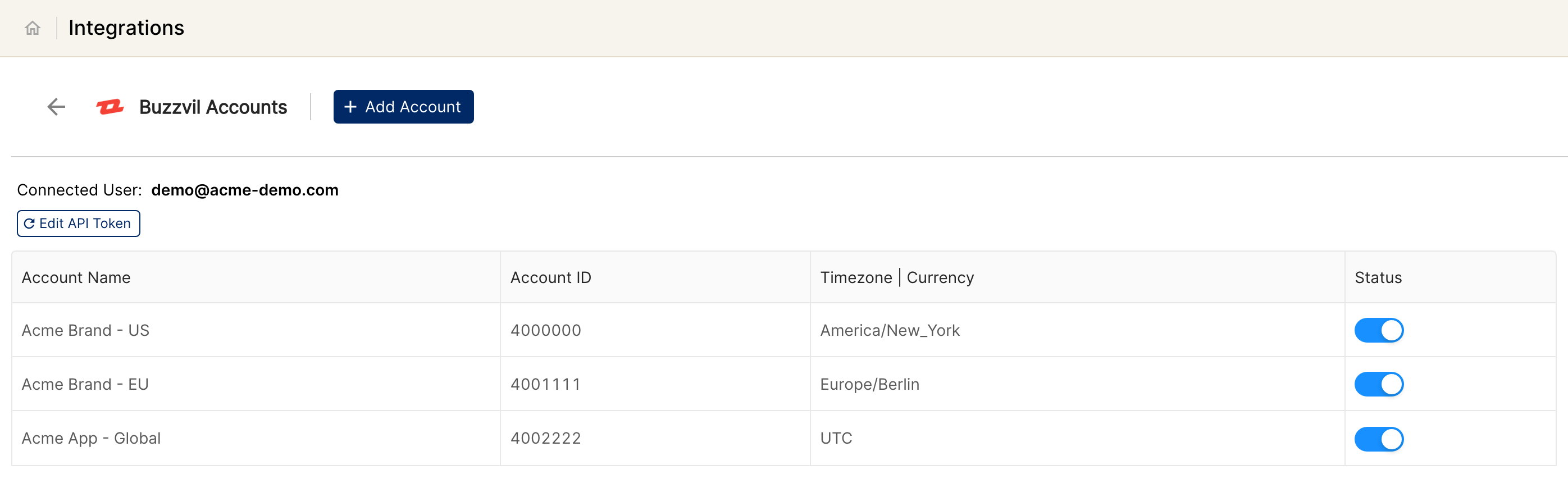
Go to Integrations → Buzzvil. The connected account should be listed with its status switched on.
First data appears within about 24 hours of the next scheduled pull (data is pulled daily with a 7-day lookback).
Quick start: create a new report, add Buzzvil as the data source, and add Account · Campaign · Ad Group · Impressions · Clicks · Cost.
Data available
Hierarchy
Buzzvil's native naming differs from the Clarisights standard. Each native level shifts down by one in Clarisights so the standard four-level hierarchy is preserved:
Native level (Buzzvil) | Clarisights level |
Ad Group | Campaign |
Line Item | Ad Group |
Creative Set | Ad |
Report metrics are fetched at the Creative Set level and rolled up to Line Item and Ad Group by Clarisights, so Campaign / Ad Group / Ad totals all reconcile.
Dimensions
Dimension | Level | Description |
Account | Account | Account name supplied during connection |
Campaign / Campaign ID | Campaign | Buzzvil Ad Group name and ID, surfaced as Campaign in Clarisights |
Campaign Currency | Campaign | Currency of the Buzzvil ad group |
Ad Group / Ad Group ID | Ad Group | Buzzvil Line Item name and ID, surfaced as Ad Group in Clarisights |
Ad Group Type | Ad Group | Line Item type |
Ad Group Start Date / End Date | Ad Group | Flight dates of the Line Item |
Ad Group Platform | Ad Group | Target platform (iOS/Android/Web) |
Ad Group Country | Ad Group | Target country |
Ad Group Revenue Type | Ad Group | Revenue model (CPC, CPM, CPI, etc.) |
Ad Group Objective | Ad Group | Campaign objective |
Ad Group Active | Ad Group | Whether the Line Item is active |
Ad Group Unit Price | Ad Group | Configured unit price (CPC/CPM/CPI bid) |
Ad Group Currency | Ad Group | Currency of the Line Item; also drives the per-row currency for cost conversion |
Ad Group Budget | Ad Group | Configured Line Item budget |
Ad / Ad ID | Ad | Buzzvil Creative Set name and ID, surfaced as Ad in Clarisights |
Metrics
Metric | Description |
Impression | Total impressions |
Click | Total clicks |
Conversion | Total conversion events |
Cost | Total cost converted to your Clarisights reporting currency |
Cost (Local Currency) | Total cost in the Buzzvil ad group's native currency, preserved as-is |
Limitations & known constraints
One account per token: Buzzvil's API does not expose a multi-account endpoint. Each token connects exactly one Clarisights account, named after the Account Name you supplied. Multi-advertiser companies must onboard each Buzzvil login separately.
Tokens must be unique: re-using the same token across two Clarisights user records in the same workspace is rejected ("Token already in use").
Naming differs from Clarisights standard: Buzzvil's Ad Group, Line Item, and Creative Set are remapped to Campaign, Ad Group, and Ad respectively. Reports authored against generic Campaign / Ad Group / Ad levels work out of the box, but raw API field names will not match.
Large accounts: reports are fetched per Creative Set, then rolled up. Accounts with very large numbers of creative sets can take longer to backfill.
Limited segment breakdowns: the public Buzzvil API exposes Line Item-level platform and country, but does not return per-impression demographic, device, or placement breakdowns.
Sparse public docs: Buzzvil's API documentation is not publicly indexed. Schema changes typically require a coordinated update by Clarisights.
Operating notes
Refresh schedule: daily.
Lookback: 7 days on every run, so late-arriving conversions and corrections within the last week are picked up automatically.
Currency conversion: each row carries the Buzzvil Ad Group's native currency. Clarisights converts Cost to your reporting currency and preserves Cost (Local Currency) for reconciliation against the Buzzvil portal.
Credential rotation: update the API token any time from Integrations → Buzzvil → Edit API Token.
Need help?
When contacting support from the in-app messenger, please include:
The integration name and account ID (Integrations → Buzzvil)
The exact error message or screenshot
The step where the issue occurred
When the issue started