
Connecting InMobi on Clarisights
InMobi DSP is a global mobile programmatic advertising platform. Connecting InMobi to Clarisights lets you blend mobile DSP spend, impressions, clicks, and creative performance with your other paid channels and analyze it side-by-side with attribution and conversion data.
At a glance
Authentication | Client ID + Client Secret (OAuth-style token exchange) |
Permissions needed | Client credentials with read access to the InMobi DSP Advertiser Reporting API |
Account discovery | Set up by Clarisights: the advertiser/app combinations with activity in the last 90 days are connected for you after you submit your credentials |
Data freshness | Daily |
Lookback window | 30 days |
Backfill on connect | Last 30 days |
Timezone | UTC (Etc/UTC) for all accounts |
Currency | USD by default; converted to your reporting currency by Clarisights |
Levels supported | Account (Advertiser + App) · Campaign · Ad |
Limited rollout | No |
Prerequisites
An active InMobi DSP advertiser account
A Client ID and Client Secret issued by InMobi; request these from your InMobi account manager
Credentials must have read access to the InMobi DSP reporting API
Steps to Connect
Step 1: Obtain your API credentials
Contact your InMobi account manager and request an API Client ID and Client Secret for your advertiser. You can also find these under Account Settings in the InMobi DSP portal once enabled. Copy both values; you will paste them into Clarisights in Step 3.
Treat your Client Secret like a password. It grants read access to all advertiser/app combinations linked to it.
Step 2: Add InMobi in Clarisights
In Clarisights, open Integrations, search for InMobi under Set up new connection and click + Connect. If InMobi is already connected, open it from Manage connected channels and click + Add User.
Step 3: Enter credentials
Paste your Client Id and Client Secret into the form and click Submit. Clarisights uses them to sign in to InMobi and find every advertiser/app combination with reporting activity in the last 90 days.
⚠ "Failed to retrieve token" → Confirm the Client ID and Client Secret have not been rotated or revoked in the InMobi DSP portal. Re-issue credentials from your InMobi account manager and retry.
⚠ No accounts discovered → InMobi discovers accounts from the last 90 days of reporting data. If your advertiser had no activity in that window, no accounts will be returned. Run a small test campaign or contact support so we can extend the discovery window manually.
Step 4: Clarisights connects your accounts
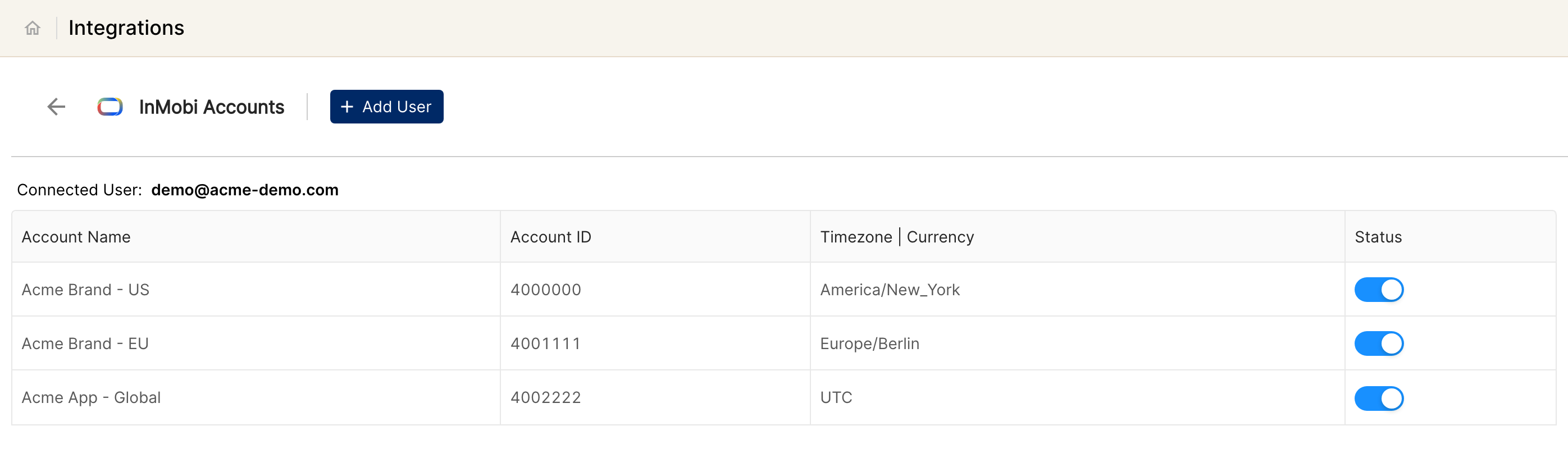
The Clarisights team sets up the accounts for you. Until then, the InMobi page shows "We will reach out to you once accounts are fetched" under your user. Each account represents one advertiser/app pair (InMobi Account ID / App Bundle), and has a status switch you can use to pause or resume it.
Verify the connection
Go to Integrations → InMobi. Each connected advertiser/app should be listed with its status switched on.
First data appears within about 24 hours.
Quick start: create a new report, add InMobi as the data source, and add Advertiser · App · Campaign · Impressions · Clicks · Spend.
Data available
Hierarchy
How InMobi DSP's native levels map to the standard Clarisights levels:
Native level (InMobi) | Clarisights level |
Advertiser + App (InMobi Account ID + App Bundle) | Account (one Clarisights account per advertiser/app pair) |
Campaign | Campaign and Ad Group (InMobi DSP has no native Ad Group; Ad Group fields alias to Campaign) |
Ad | Ad |
Dimensions
Dimension | Level | Description |
Advertiser ID | Account | InMobi Account ID |
Advertiser | Account | Advertiser display name |
App ID | Account | Advertiser App Bundle (iOS/Android bundle ID) |
App | Account | Advertiser App Name |
Campaign / Campaign ID | Campaign | Campaign name and ID |
Ad / Ad ID | Ad | Creative name and ID |
Creative Type | Ad | Ad format (banner, video, native, etc.) |
Metrics
Metric | Description |
Impressions | Total impressions delivered |
Clicks | Total clicks |
Spend | Total media cost in account currency |
Limitations & known constraints
No Ad Group level: InMobi DSP's API does not expose Ad Groups. Ad Group fields in Clarisights map to Campaign.
No segment breakdowns: geography, device, OS, or audience-level breakdowns are not available.
Limited conversion metrics: Clarisights imports Impressions, Clicks, and Spend (InMobi media cost). Installs, Events, CTR, CR, IPM and other native InMobi measures are available from the API but are not exposed by default. Contact support to add them.
7-day API request cap: InMobi's reporting API does not allow date ranges greater than 7 days per request. Clarisights splits longer ranges automatically, but very long backfills can take significantly longer to complete.
Account discovery via reporting: Accounts are discovered by scanning the last 90 days of reporting data. An advertiser/app pair with no activity in that window will not appear in the account selector.
UTC only: All accounts are stored in UTC. There is no per-account timezone override.
Operating notes
Refresh schedule: daily.
Lookback: 30 days on every run, so late-arriving conversions and corrections within the last 30 days are picked up automatically.
Tokens: InMobi access tokens are short-lived. Clarisights refreshes them automatically using your stored Client ID and Client Secret, so no manual rotation is needed unless those credentials change.
Multi-account: a single Client ID/Secret pair can connect every advertiser/app combination linked to it. Use separate credentials to onboard advertisers managed by different InMobi account managers.
Currency conversion: account currency (USD by default) is preserved on ingest and converted to your reporting currency by Clarisights.
Credential rotation: if your Client ID or Client Secret changes, contact Clarisights support from the in-app messenger to update them.
Need help?
When contacting support from the in-app messenger, please include:
The integration name and account ID (Integrations → InMobi)
The exact error message or screenshot
The step where the issue occurred
When the issue started