
Connecting Mediago on Clarisights
Mediago is Baidu's global native advertising platform. Connecting Mediago to Clarisights lets you blend native traffic into your performance reporting and analyze spend, conversions, and creative performance side-by-side with your other paid channels.
At a glance
| Authentication | API token issued by Mediago |
| Permissions needed | An API token with read access on the manage / reporting endpoints |
| Account discovery | Automatic: every advertiser linked to your token is added |
| Data freshness | Refreshed on a regular schedule; each refresh re-pulls the last 60 days |
| Lookback window | 60 days |
| Backfill on connect | Last 60 days |
| Timezone | Account-specific (UTC0 default; UTC+8 and EST are also supported) |
| Currency | USD by default; account-level overrides supported |
| Levels supported | Account · Campaign · Ad (no Ad Group) |
| Limited rollout | No |
Prerequisites
An active Mediago advertiser account
An API token issued by Mediago, requested from your Mediago / Baidu account manager
Token must have read access on Mediago's manage and reporting endpoints
Steps to Connect
Step 1: Obtain your API token
Contact your Mediago account manager to issue an API token for your advertiser. Copy the full token value; you'll paste it into Clarisights in Step 3.
Treat your API token like a password. It grants read access to all advertisers linked to it.
Step 2: Add Mediago in Clarisights
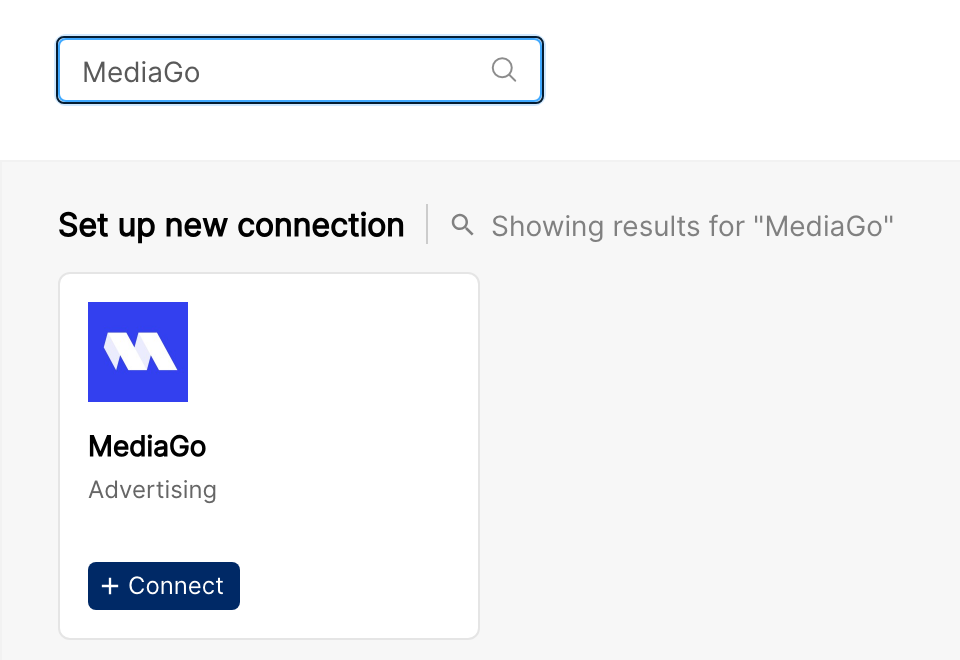
In Clarisights, open Integrations from the left sidebar, search for MediaGo under Set up new connection, and click + Connect.
Step 3: Enter credentials
In the Provide MediaGo Credential form, enter the Account Name you use for your MediaGo login and paste your API Token. Click Submit.
Clarisights authenticates with Mediago and retrieves every advertiser linked to the token.
⚠ "Invalid token" on validate → Confirm the token has not been revoked or expired in Mediago. Tokens are auto-refreshed during normal use, but a token that has been idle for an extended period or rotated server-side will fail. Re-issue a token from Mediago and retry.
Step 4: Advertisers are added automatically
Every advertiser linked to the token is added as an account in Clarisights. Use the status switch on each account to stop importing any account you don't need.
Verify the connection
Go to Integrations → MediaGo. Each advertiser should be listed with its status switched on.
First data appears after the next scheduled refresh.
Quick start: create a new report, add MediaGo as the data source, and add Account · Campaign · Impressions · Clicks · Spend.
Data available
Hierarchy
How Mediago's native levels map to the standard Clarisights levels:
Native level (Mediago) | Clarisights level |
Account | Account |
Campaign | Campaign and Ad Group (Mediago has no native Ad Group; Ad Group fields alias to Campaign) |
Ad | Ad |
Dimensions
Dimension | Level | Description |
Account / Account ID | Account | Advertiser name and ID |
Campaign / Campaign ID | Campaign | Campaign name and ID |
Campaign Status | Campaign | Active or Paused |
Campaign Objective | Campaign | Campaign goal (traffic, conversions, etc.) |
Optimization Goal | Campaign | App Install, Purchase, View Content, etc. |
Bidding Strategy Type | Campaign | CPC, CPM, etc. |
Daily Budget / Max CPC / Target CPA | Campaign | Configured pacing and bid caps |
Budget Pacing | Campaign | ASAP or Uniformly |
Campaign Start Time / End Date | Campaign | Flight dates |
Landing Page | Campaign | Primary destination URL |
Language | Campaign | Target language |
Product Type | Campaign | Product category for the campaign |
Campaign IP Targeting | Campaign | Configured IP targeting rules |
UTM Tracking | Campaign | UTM parameter configuration |
Adgroup / Adgroup ID | Campaign | Aliased to Campaign / Campaign ID for cross-channel compatibility |
Ad / Ad ID | Ad | Creative name and ID |
Ad Title / Brand Name | Ad | Headline and brand |
Ad Preview | Ad | URL to creative preview |
Ad Width / Ad Height | Ad | Creative dimensions in pixels |
Metrics
Metric | Description |
Impressions | Total impressions |
Clicks | Total clicks |
Spend | Total spend in account currency |
Conversions | Total conversion events |
Purchase / Add to Cart / Add Payment Info / Add to Wishlist / Start Checkout | Commerce conversion events |
App Install / Complete Registration | Onboarding conversion events |
View Content / Search / Leads | Engagement and lead events |
Others | Other tracked conversion events |
Limitations & known constraints
No Ad Group level: Mediago's API does not expose Ad Groups. Adgroup fields in Clarisights map to Campaign.
No segment breakdowns: Mediago does not expose breakdowns by geography, demographics, device, or behavior.
No video metrics: Video-specific engagement metrics are not available via the API.
60-day lookback: Mediago's API only returns the last 60 days of data.
Limited timezones: Reporting timezone is set per advertiser. Supported timezones are UTC0, UTC+8, and EST. Other timezones default to UTC0.
Operating notes
Refresh schedule: regular scheduled refreshes, each covering the last 60 days.
Lookback: 60 days.
Multi-account: a single API token can connect every advertiser linked to it. Use separate tokens to onboard advertisers managed by different Mediago account managers.
Currency conversion: account currency (default USD) is preserved on ingest and converted to your reporting currency by Clarisights.
Credential rotation: update the API token any time from Integrations → MediaGo → Edit API Token.
Need help?
When contacting support from the in-app messenger, please include:
The integration name and account ID (Integrations → MediaGo)
The exact error message or screenshot
The step where the issue occurred
When the issue started