
Integrating Taboola on Clarisights
Connect your Taboola Backstage account to monitor native and discovery campaign performance (spend, clicks, impressions, conversions, and item-level engagement) alongside the rest of your marketing stack.
At a glance
| Authentication | OAuth 2.0 (Client Credentials grant) |
| Permissions needed | Backstage API credentials (client_id and client_secret) tied to a user with access to the desired Taboola accounts |
| Account discovery | Automatic: sub-accounts are discovered from the Taboola network account and added when you connect, then re-checked daily |
| Data freshness | Daily |
| Lookback window | 30 days |
| Backfill on connect | Last 30 days |
| Timezone | UTC |
| Currency | Account native currency (auto-converted via Currency Conversion) |
| Levels supported | Account · Campaign · Item (Content) · Site |
| Limited rollout | No |
Prerequisites
An active Taboola advertiser account managed in Taboola Backstage
Backstage API credentials: a
client_idandclient_secret. If you have not used the Taboola API before, request these from your Taboola account representative.The email address associated with the Backstage user that the credentials were generated for
💡 Note: The
client_idandclient_secretmust be associated with the email ID you use during the integration. Mismatched credentials will fail validation.
Steps to Connect
Step 1: Open the Taboola integration in Clarisights
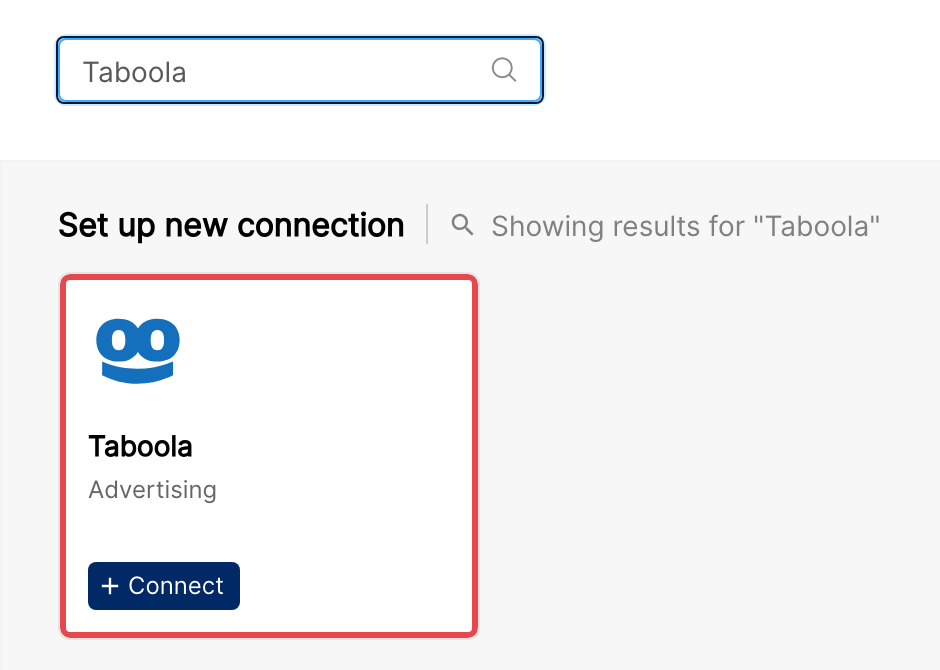
In Clarisights, open Integrations from the left sidebar, search for Taboola under Set up new connection, and click + Connect.
Step 2: Enter your Taboola credentials
Fill in the Connect a Taboola Source form with the following and click Connect Source:
Email ID: the email associated with your Taboola Backstage user
Client Id
Client Secret Key
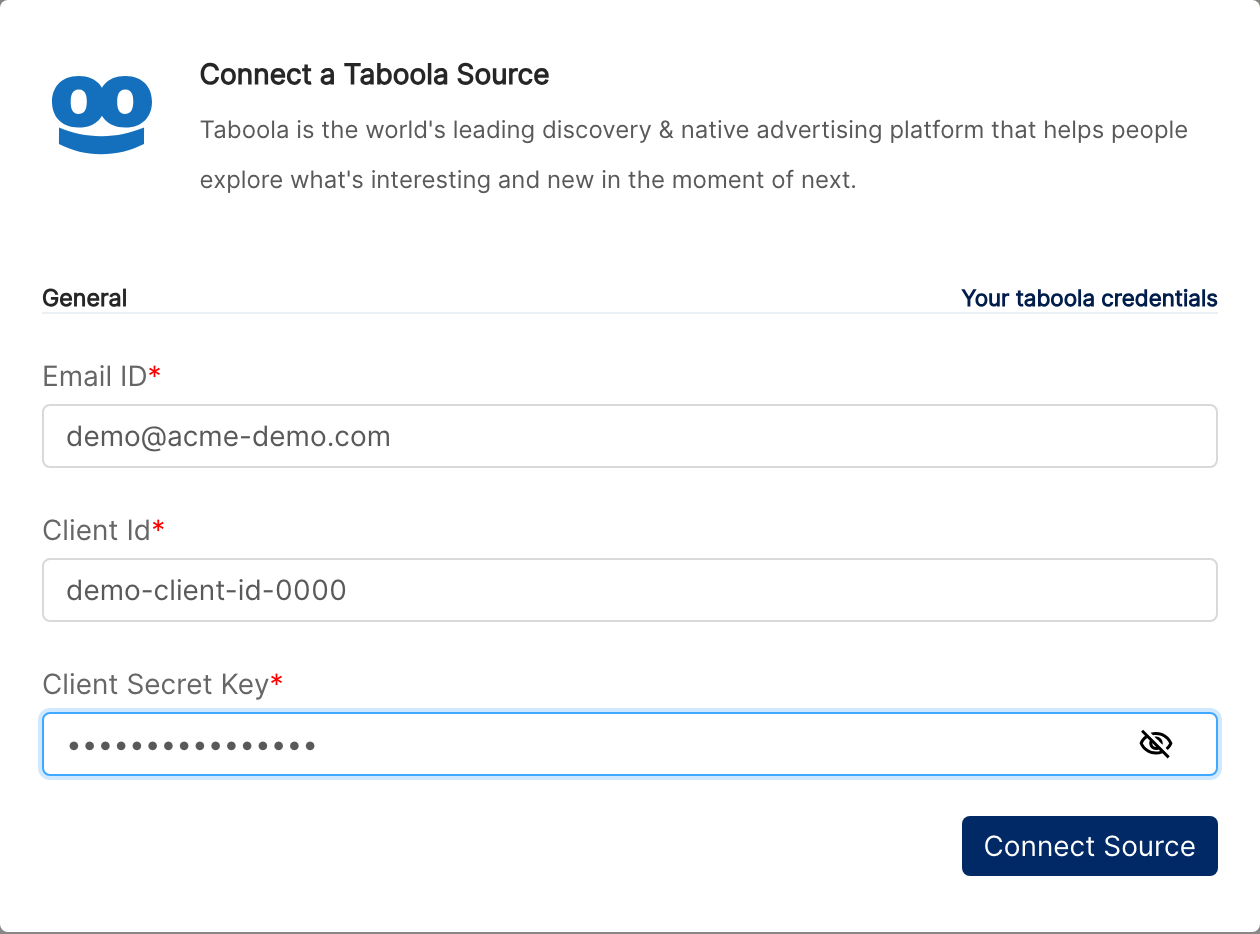
⚠ Common error: "Invalid token. Please check credentials." → Either the
client_id/client_secretpair is wrong, or it is not associated with the email you entered. Re-check both with your Taboola account rep before retrying.
Step 3: Review discovered accounts
Clarisights queries the Taboola Backstage network account behind your credentials and adds every sub-account (advertiser account) it has access to. Network accounts themselves are excluded because they don't run campaigns. Use the status switch on each account to stop importing any account you don't need.
Verify the connection
Go to Integrations → Taboola. Each discovered account should be listed with its status switched on.
First data appears within 24 hours of the next scheduled sync. The initial backfill covers the last 30 days, so the size of the run depends on your account volume.
Quick start: create a new report, add Taboola as the data source, and add Account · Campaign · Item · Impressions · Clicks · Spend.
Data available
Hierarchy
How Taboola's native levels map to the standard Clarisights levels:
Native level (Taboola) | Clarisights level |
Advertiser Account (sub-account of the network account) | Account |
Campaign | Campaign |
Item / Content (creative) | Ad |
Site (publisher placement) | Reported as a Site dimension on the Campaign level |
Dimensions
Dimension | Level | Description |
Account Name | Account | Taboola advertiser account name |
Account ID | Account | Backstage advertiser account identifier |
Account Currency | Account | Billing currency configured for the account |
Campaign Name | Campaign | Campaign name set in Backstage |
Campaign ID | Campaign | Backstage campaign identifier |
Campaign Status | Campaign | Running, Paused, Pending Approval, Rejected, etc. |
Branding Text | Campaign | Branding label shown on Taboola placements |
Bid Type | Campaign | Pricing model (CPC, smart bidding, etc.) |
Start Date | Campaign | Campaign start date |
Marketing Objective | Campaign | Campaign objective configured in Backstage |
Site | Campaign / Site | Publisher site where the ad was served |
Site ID | Campaign / Site | Backstage site identifier |
Item Title | Item | Headline of the Taboola item / content |
Item ID | Item | Backstage item identifier |
Thumbnail URL | Item | Image used as the item thumbnail |
Landing URL | Item | Destination URL for the item |
Item Active Flag | Item | Whether the item is currently active |
Item Status | Item | Approved, Pending, Rejected, etc. |
Metrics
Delivery
Metric | Description |
Impressions | Total ad displays |
Visible Impressions | Impressions where the ad met Taboola's viewability threshold |
Clicks | Total clicks on Taboola items |
Spend
Metric | Description |
Spend (Local currency) | Spend in account native currency |
Spend | Spend converted to your reporting currency |
Conversions
Metric | Description |
Conversions | Total CPA actions reported by Taboola |
Conversions Value (Local currency) | Total value attributed to those conversions (account currency) |
Conversions Value | Conversions value in your reporting currency |
Clarisights also computes CPM, vCPM, CTR, vCTR, CPA, CVR, and RoAS from the metrics above.
Limitations & known constraints
Network accounts are excluded: the top-level network account that Taboola issues with your API credentials cannot run campaigns. Clarisights only ingests its sub-accounts. This is by Taboola's API design.
Rate limits: Taboola does not publish a fixed rate-limit ceiling. If Taboola throttles requests, Clarisights waits and retries automatically.
Item-level dimensions require a separate API call to enrich top-content reports, so there can be a brief lag before newly-launched items show up with full metadata.
Operating notes
Refresh schedule: data is pulled daily.
Lookback: 30 days.
Adding new sub-accounts: when Taboola provisions a new sub-account under your network, Clarisights picks it up in its daily account check.
Currency conversion: native amounts are pulled as-is and converted to your reporting currency by Clarisights.
Credential rotation: Clarisights stores the Backstage
client_idandclient_secretand refreshes the access token automatically. Re-enter credentials only if Taboola rotates yourclient_secret.
Need help?
When contacting support from the in-app messenger, please include:
The integration name and Taboola account ID (Integrations → Taboola)
The exact error message or screenshot
The step where the issue occurred
When the issue started