
Connecting Podscribe on Clarisights
Podscribe is an independent podcast, audio, and CTV ad attribution and verification platform. Connecting Podscribe to Clarisights lets you blend pixel-based attribution (impressions, visits, leads, signups, purchases, and modeled outcomes) with your paid media performance and analyse podcast spend alongside your other channels.
At a glance
| Authentication | API token (long-lived JWT bearer) |
| Permissions needed | A Podscribe API token with read access to the by-campaign / creative report |
| Account discovery | Automatic. Advertisers are auto-populated from the report on the first scheduled run (no manual selection) |
| Data freshness | Daily |
| Lookback window | Standard daily lookback; advertiser discovery uses 90 days |
| Backfill on connect | Standard daily lookback once accounts are auto-created |
| Timezone | America/New_York (default for Podscribe accounts) |
| Currency | USD (default for Podscribe accounts) |
| Levels supported | Account (Advertiser) · Campaign (with creative, show, and episode dimensions) |
| Limited rollout | No |
Prerequisites
An active Podscribe account with at least one advertiser configured
A Podscribe API token, available from your Podscribe account settings, or request one from your Podscribe account manager
Access to the Clarisights Integrations page
Steps to Connect
Step 1: Get your Podscribe API token
Sign in to app.podscribe.com and copy your API token from your account settings. If you don’t see a token, ask your Podscribe account manager to issue one.
Treat your API token like a password: it grants read access to every advertiser visible to that token.
Step 2: Add Podscribe in Clarisights
In Clarisights, open Integrations from the left sidebar, search for Podscribe under Set up new connection, and click + Connect.
Step 3: Paste the API token and connect
Paste the token into the API Token field and click Connect. Clarisights validates the token with Podscribe and saves the connection. You will see “Podscribe connected! Advertisers will be populated automatically on the next data sync.”
⚠ “Invalid credentials. Please verify your Podscribe API token.” → Podscribe rejected the token (HTTP 401 / 403). Re-copy the token from Podscribe (no leading or trailing whitespace) and retry. If the issue persists, ask Podscribe to issue a new token.
⚠ “Too many requests” (429) → Podscribe is rate-limiting validation calls. Wait a few minutes and retry.
⚠ “Podscribe is currently unavailable” → Podscribe’s API returned a 5xx. Retry later; if it persists, contact support.
Step 4: Wait for advertiser discovery
Unlike most channels, you do not pick advertisers manually. On the next scheduled run (within ~24 hours) Clarisights pulls a 90-day report, extracts the unique advertisers, and creates one Clarisights account per advertiser. You don’t need to do anything else.
Verify the connection
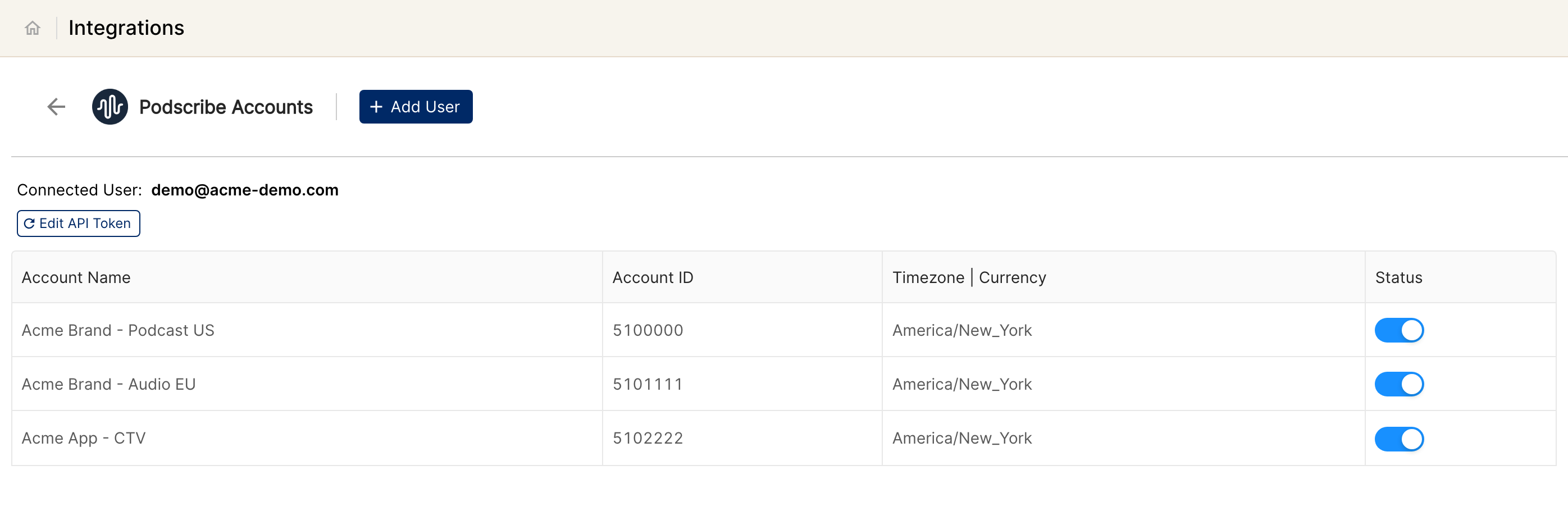
Right after connecting, go to Integrations → Podscribe. The user should appear as connected.
Within ~24 hours, advertiser accounts auto-populate under that user; first data appears alongside them.
Quick start: create a new report, add Podscribe as the data source, and add Campaign · Show · Episode · Spend · Podcast & Streaming Impressions · Purchases.
Data available
Hierarchy
How Podscribe’s native levels map to the standard Clarisights levels:
Native level (Podscribe) | Clarisights level |
Advertiser | Account (auto-discovered; account ID is a slug derived from the advertiser name) |
Campaign | Campaign |
Creative | Surfaced as Ad ID dimension at Campaign level (Podscribe does not expose a separate Ad level; reports are by-campaign / creative) |
Show / Episode | Campaign-level dimensions (Podscribe inventory) |
Publisher | Campaign-level dimension |
Dimensions
Dimension | Level | Description |
Account / Account ID | Account | Advertiser name and slugified account ID |
Campaign | Campaign | Campaign name |
Campaign External ID / Campaign ID | Campaign | Podscribe campaign IDs (external + internal) |
Ad ID | Campaign | Creative ID surfaced at campaign level |
Campaign Type / Media Type | Campaign | Podscribe campaign and media classification |
Tags | Campaign | Operator-defined tags |
Campaign Geo | Campaign | Geographic targeting |
Campaign Promo | Campaign | Configured promo / discount code |
Campaign Start Date / End Date / Expected Date | Campaign | Flight and forecast dates |
Product / Initiative / Business Line | Campaign | Operator-defined hierarchy in Podscribe |
Campaign & Initiative | Campaign | Concatenated campaign+initiative label |
Publisher / Publisher ID | Campaign | Podcast network / publisher |
Show | Campaign | Podcast show name |
Episode | Campaign | Episode title |
Publish Date | Campaign | Episode publish date |
Metrics
Metric | Description |
Spend | Campaign spend in account currency |
Podcast & Streaming Impressions | Audio impressions across podcast and streaming inventory |
YouTube Views | Views from YouTube placements |
Rumble Impressions | Impressions on Rumble |
Spotify Video Impressions | Impressions on Spotify video |
Clicks | Total clicks |
Promo Codes | Promo code redemptions attributed to the campaign |
Visitors / Visits | Unique visitors and total visits attributed to the campaign |
Leads / Installs / Signups / Purchases | Conversion events attributed by Podscribe’s pixel |
Revenue | Revenue from attributed purchases |
Visitors Modeled / Visits Modeled / Leads Modeled / Installs Modeled / Signups Modeled / Purchases Modeled / Revenue Modeled | Modeled equivalents of the above attribution metrics (Podscribe’s incrementality / modeled outputs) |
Limitations & known constraints
Slug-based account IDs: Podscribe does not expose a numeric advertiser ID, so Clarisights derives the account ID by slugifying the advertiser name. Names that differ only in punctuation or casing (e.g. “Coca-Cola” vs “Coca Cola”) collide; if a collision is detected the second name is skipped and reported.
Async report generation: each Podscribe report submission is a task that takes about 90 to 120 seconds (sometimes longer) before the CSV is ready. Clarisights waits for the report to be ready before importing it.
Bearer-token-only auth: Podscribe issues long-lived tokens with no refresh endpoint. Rotated tokens must be updated in Clarisights via Edit API Token.
Single Ad level: Podscribe’s API exposes the report at the campaign / creative level, so creative is surfaced as an Ad ID dimension on the Campaign row rather than a separate Ad level.
Default timezone & currency: every account is created with America/New_York timezone and USD currency by default. To use a different timezone or currency, contact support after onboarding.
Operating notes
Refresh schedule: daily.
Lookback: standard daily lookback per run; advertiser auto-discovery uses a 90-day window on first run.
Multi-account: a single Podscribe API token covers every advertiser visible to it. To split advertisers across teams, request separate tokens from Podscribe and add them as separate Clarisights users.
Currency conversion: account currency (default USD) is preserved on ingest and converted to your reporting currency by Clarisights.
Credential rotation: update the API token any time from Integrations → Podscribe → Edit API Token.
Need help?
When contacting support from the in-app messenger, please include:
The integration name and advertiser name (Integrations → Podscribe)
The exact error message or screenshot
The step where the issue occurred
When the issue started