
Connecting Fluent on Clarisights
Fluent is a performance-marketing and customer-acquisition platform that monetises self-declared first-party intent across owned media networks (operating on the HasOffers / TUNE Advertiser API). Connecting Fluent to Clarisights lets you ingest offer-level performance (clicks, impressions, conversions, and spend) broken out by country and device OS, and analyse it side-by-side with your other paid channels.
At a glance
| Authentication | API key (one per Fluent account) |
| Permissions needed | An API key from fluentpartner.com → Support → API with read access to the Advertiser stats report |
| Account discovery | Manual: the operator names the account when adding the user; the API key scopes the connection to that one Fluent advertiser |
| Data freshness | Daily (runs once per day on a 30-day lookback) |
| Lookback window | 30 days per scheduled run; each run is split into ≤ 30-day slices to respect Fluent rate limits |
| Backfill on connect | Last 30 days |
| Timezone | Inherited from the Fluent account |
| Currency | USD (sent as the report currency by default) |
| Levels supported | Account · Campaign (Offer) · Ad Group (Country + Device OS) |
| Limited rollout | No |
Prerequisites
An active Fluent advertiser account at fluentpartner.com
An API key with read access to the Advertiser report, available from fluentpartner.com → Support → API. If you don’t have one, contact your Fluent account manager.
Access to the Clarisights Integrations page
Steps to Connect
Step 1: Retrieve your Fluent API key
Sign in to fluentpartner.com, open Support → API, and copy the API key. If the section is empty, request a key from your Fluent account manager.
Treat your API key like a password: it grants read access to every offer in your Fluent advertiser account.
Step 2: Add Fluent in Clarisights
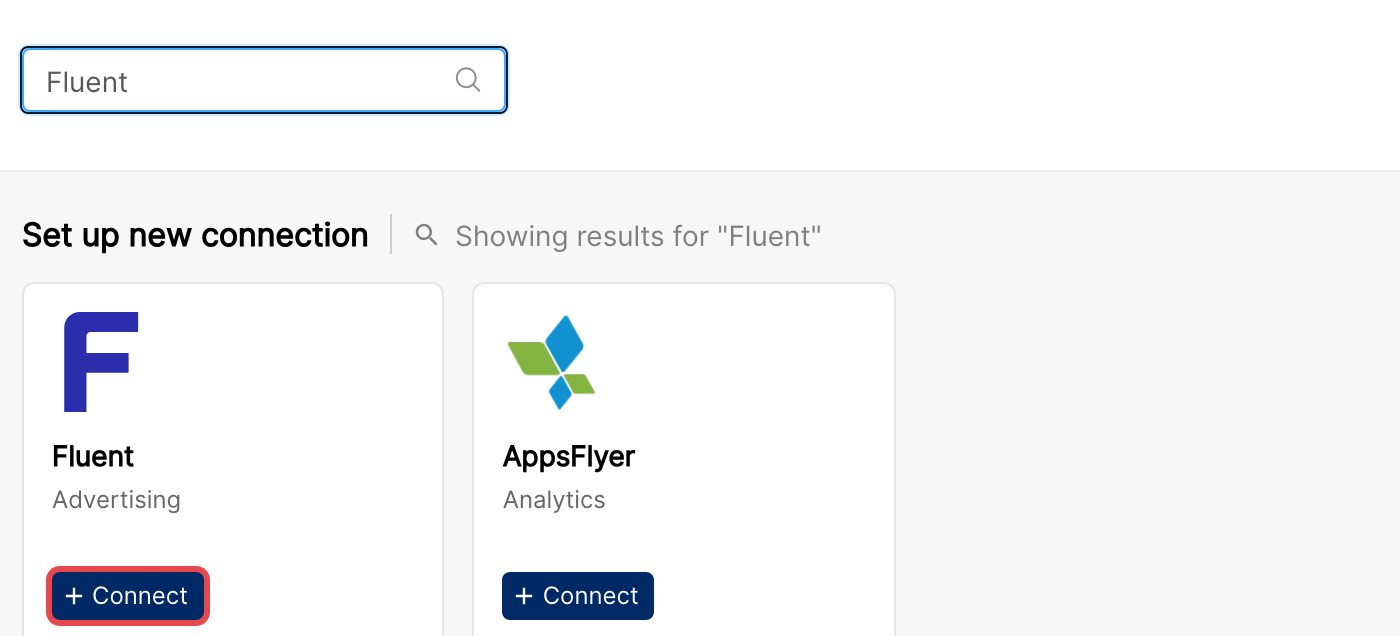
In Clarisights, open Integrations from the left sidebar, search for Fluent under Set up new connection, and click + Connect.
Step 3: Enter credentials
In the Connect a Fluent Source form, provide an Account Name (this is how the account will appear in Clarisights; it must be unique and cannot be changed later) and paste your API key. Click Connect Source.
Clarisights validates the key with a small test request to Fluent for the previous day.
⚠ “Invalid API Key” → Fluent rejected the key. Confirm the key is copied with no leading / trailing whitespace and that it has access to the Advertiser report. If you recently rotated the key in Fluent, contact support to update it in Clarisights.
⚠ Account name already in use → Account names must be unique within Clarisights. Pick a different name (account name cannot be changed after creation).
Step 4: Wait for first ingest
Once validated, the account is registered. Data starts ingesting on the next scheduled run (within ~24 hours) covering the last 30 days.
Verify the connection
Go to Integrations → Fluent. The new user / account should be listed.
First data appears within ~24 hours.
Quick start: create a new report, add Fluent as the data source, and add Account · Campaign (offer name) · Country · Impressions · Clicks · Conversions · Spend.
Data available
Hierarchy
How Fluent’s native objects map to the standard Clarisights levels:
Native object (Fluent / TUNE) | Clarisights level |
Advertiser account (one per API key) | Account, named at connection time |
Offer (offer ID / offer name) | Campaign |
Country + Device OS combination | Ad Group (Fluent has no native ad group; Clarisights builds one from Country and Device OS) |
Offer URL | Campaign-level dimension (no native Ad level) |
Dimensions
Dimension | Level | Description |
Account | Account | The account name set during connection |
Campaign / Campaign ID | Campaign | Offer name and Fluent offer ID |
Offer URL ID | Campaign | Specific offer URL variant |
Country | Ad Group | Country reported by Fluent |
Device OS | Ad Group | Device operating system reported by Fluent |
Adgroup | Ad Group | Country and Device OS combination (Fluent has no native ad group) |
Additional Fluent columns can be enabled on request; contact your Clarisights account manager.
Metrics
Metric | Description |
Impressions | Offer impressions reported by Fluent |
Clicks | Total clicks on the offer |
Conversions | Total conversions attributed to the offer |
Spend | Cost reported by Fluent, in USD |
Limitations & known constraints
One advertiser per connection: each Fluent API key maps to a single advertiser account. To onboard more than one Fluent advertiser, add a separate user per account.
30-day lookback per run: each daily run pulls the last 30 days, sliced into 30-day chunks; longer historical backfills require a manual one-off pull from support.
USD-only ingest: Clarisights requests the report in USD; Fluent currency overrides are not currently supported.
Synthesised Ad Group: Fluent has no native Ad Group level. Clarisights builds one by combining Country and Device OS, so per-country / per-device breakdowns appear as Ad Groups in reporting.
Account name is permanent: the Account Name set at connect time is used as the Clarisights account label and cannot be edited later.
Rate limits: Fluent limits how quickly its API can be queried, so very large date ranges take longer to import.
Operating notes
Refresh schedule: daily.
Lookback: 30 days per run.
Multi-account: each Fluent advertiser is its own user / account, so add one connection per advertiser.
Currency conversion: data is ingested in USD and converted to your reporting currency by Clarisights.
Credential rotation: the API key cannot be edited from the Integrations page; if you rotate it in Fluent, contact support to update it.
Need help?
When contacting support from the in-app messenger, please include:
The integration name and account name (Integrations → Fluent)
The exact error message or screenshot
The step where the issue occurred
When the issue started