
Integrating Braze on Clarisights
Braze is a customer engagement platform for cross-channel messaging across push, email, in-app, content cards, SMS, and webhooks. Connecting Braze to Clarisights brings campaign and canvas performance (sends, opens, clicks, conversions, and revenue) into the same reports as your paid media so you can analyze CRM and paid acquisition together.
At a glance
| Authentication | Braze REST API key (per app group) |
| Permissions needed | API key with permissions for campaigns.list, campaigns.data_series, campaigns.details, canvas.list, canvas.details, canvas.data_series |
| Account discovery | Each Braze app group is connected with its own API key + REST endpoint |
| Data freshness | Daily |
| Lookback window | 7 days |
| Backfill on connect | Last 7 days; ask your Clarisights account manager for a longer backfill |
| Timezone | UTC |
| Currency | EUR by default for each app group (contact support to change it); converted to your reporting currency by Clarisights |
| Levels supported | App Group (Account) · Campaign / Canvas · Variant · Step / Message |
| Limited rollout | No |
Prerequisites
An active Braze workspace with at least one app group
A Braze user that can create REST API keys
The Braze REST endpoint for your workspace (e.g. https://rest.iad-01.braze.com)
Steps to Connect
Step 1: Create a REST API key in Braze
In the Braze dashboard, go to Settings → APIs and Identifiers → REST API Keys → Create New API Key. Give the key a name (e.g. "Clarisights") and grant exactly these permissions:
campaigns.list
campaigns.data_series
campaigns.details
canvas.list
canvas.details
canvas.data_series
See Braze's REST API Keys guide for the full procedure.
For steps to create a REST API key and select its permissions, see Braze's documentation: REST API Key Overview.
Treat the API key like a password. It grants read access to all campaigns and canvases in the app group.
Step 2: Note your REST endpoint and app group name
Your REST endpoint depends on which Braze instance hosts your workspace (e.g. https://rest.iad-01.braze.com, https://rest.fra-01.braze.com). Find it in Settings → APIs and Identifiers. Also note the App Group Name the API key is scoped to.
Step 3: Connect in Clarisights
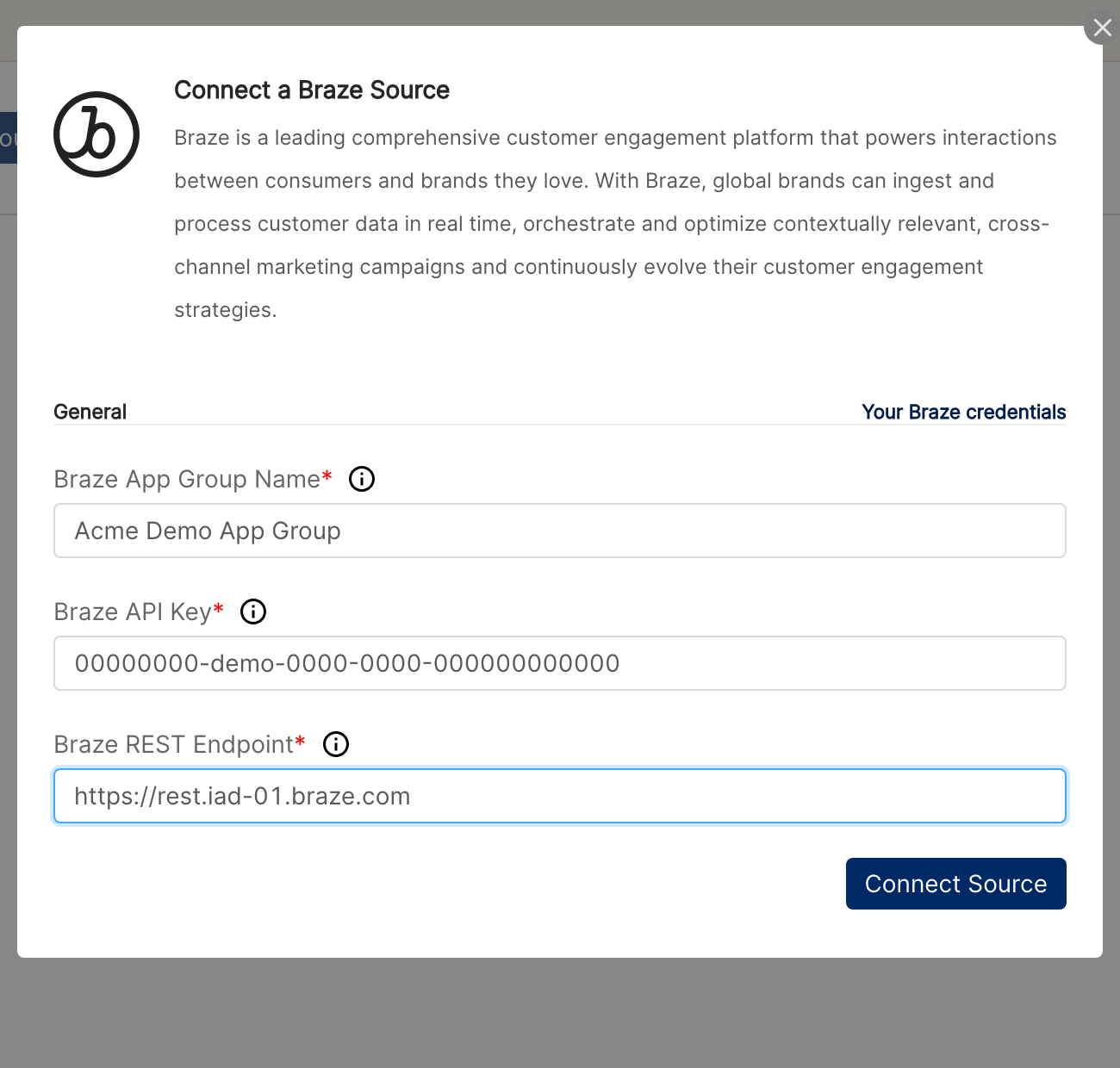
Open Integrations from the left sidebar, search for Braze under Set up new connection, and click + Connect. In the Connect a Braze Source form, provide:
Braze App Group Name
Braze API Key
Braze REST Endpoint
Click Connect Source.
⚠ "Authentication failed" on submit → Verify the API key matches the REST endpoint (keys are tied to a specific Braze instance) and that all six permissions are granted. Re-check the key for leading/trailing whitespace.
Step 4: Connect each app group separately
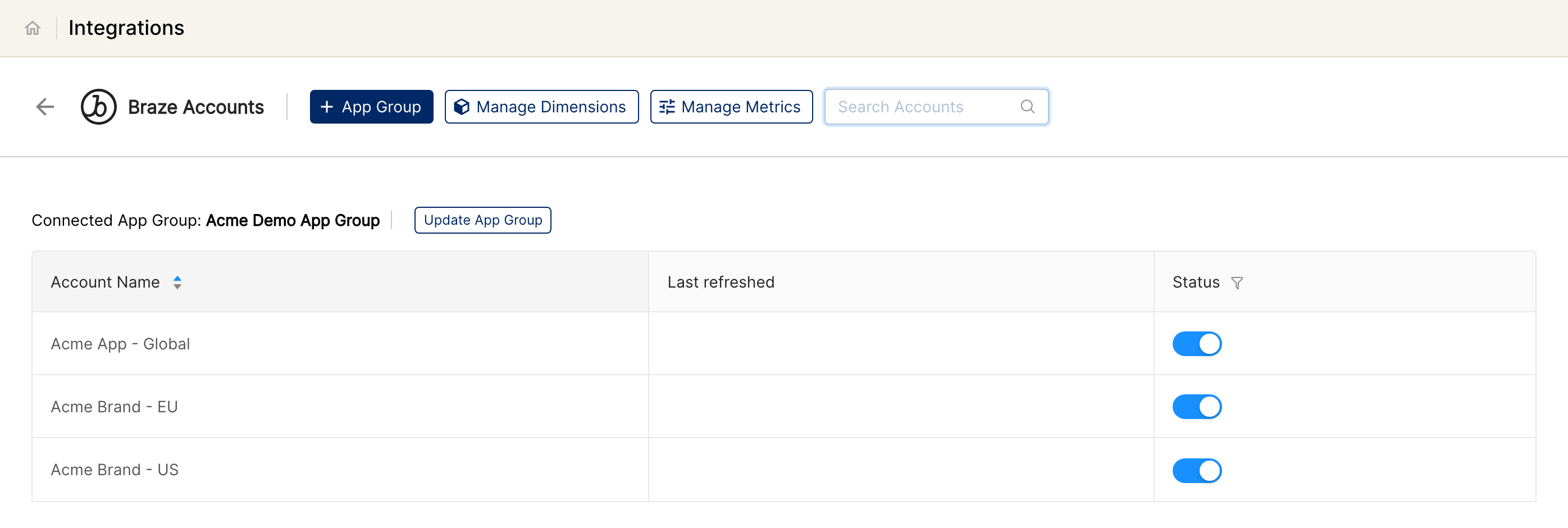
If you manage multiple app groups, repeat Steps 1 to 3 for each (on the Braze accounts page, use + App Group). After a successful connection, the page lists every connected app group.
Refer to Braze's Clarisights partner doc for additional context on locating these values.
Verify the connection
Go to Integrations → Braze. Each connected app group should show a "Connected" status.
First data appears within ~24 hours of the next scheduled sync.
Quick start: create a new report, add Braze as the data source, and add Account · Campaign/Canvas · Type · Sent · Total Opens · Total Clicks.
Data available
Braze has two messaging functionalities: Campaigns and Canvases. Both surface in the same Clarisights data source. Campaigns are single messaging actions; Canvases are multi-step user journeys.
Hierarchy
Native level (Braze) | Clarisights level |
App Group | Account |
Campaign / Canvas | Campaign |
Variant (within a Campaign or Canvas) | Ad Group |
Step (Canvas only) / Message | Ad |
About Campaign/Canvas equivalence: Clarisights exposes a unified Campaign/Canvas dimension so you can chart both in a single widget, plus a Type dimension (values: Campaign or Canvas) so you can split or filter when needed.
Dimensions
Campaign-only dimensions
Dimension | Description |
Campaign | Campaign name |
Campaign ID | Braze campaign API ID |
First Sent Date | Earliest send time observed for the campaign |
Last Sent Date | Most recent send time observed for the campaign |
Canvas-only dimensions
Dimension | Description |
Canvas | Canvas name |
Canvas ID | Braze canvas API ID |
Step | Step name within the canvas |
First Entry Date | Earliest user entry into the canvas |
Last Entry Date | Most recent user entry into the canvas |
Common dimensions (Campaigns and Canvases)
Dimension | Description |
Campaign/Canvas | Unified dimension to view both side-by-side in a widget |
Campaign/Canvas ID | Unified ID |
Type | Campaign or Canvas; use to filter or split the unified dimension |
Variant | Variant name (e.g. A/B test arm) |
Send Channel | Email, SMS, iOS Push, Android Push, Web Push, Webhook, In-App Message, Content Cards, News Feed |
Message | Individual message within a multi-channel campaign or canvas step |
Primary Conversion Event | The campaign-specific Conversion A event definition |
Conversion Events B / C / D | Additional configured conversion events |
Created Date | Object creation timestamp |
Updated Date | Object last-modified timestamp |
From | Sender (Email and SMS) |
Subject | Email subject line |
Title | Email title |
Metrics
Each metric is only meaningful for the messaging channels that emit it; the Applicable Channels column tells you where the metric will populate.
Send and delivery
Metric | Applicable Channels | Definition |
Sent | Email, SMS, Android Push, iOS Push, Webhook | Total messages sent |
Delivered | Email, SMS | Messages accepted by the receiving server / carrier |
Bounces | All Push, Email, Web Push, iOS Push | Messages that failed delivery |
Sent to Carrier | SMS | Sum of confirmed deliveries, rejections, and unconfirmed sends |
Rejected | SMS | SMS rejected by the carrier |
Delivery Failed | SMS | SMS that could not be sent due to long/short code throughput limits |
Reported Spam | Delivered emails marked as spam by recipients | |
Errors | Webhook | Errors returned by webhook events |
Engagement
Metric | Applicable Channels | Definition |
Total Opens | Email, iOS Push, Android Push, Web Push, All Push | Total times messages were opened |
Unique Opens | Distinct users who opened a delivered email at least once (7-day window) | |
Direct Opens | iOS Push, Android Push | Pushes that were opened directly from the notification |
Total Clicks | Email, News Feed, Content Cards | Total clicks (excludes unsubscribe-link clicks) |
Unique Clicks | Email, News Feed, Content Cards | Distinct users who clicked at least once (7-day window for Email; includes Braze-provided unsubscribe link clicks) |
Body Clicks | Android Push, iOS Push | Clicks on the notification body (excludes message-expansion and action-button clicks) |
Button 1 Clicks | In-App Message | Clicks on Button 1 |
Button 2 Clicks | In-App Message | Clicks on Button 2 |
Unsubscribes | Recipients who unsubscribed via the Braze unsubscribe URL | |
Opt Out | SMS | Users who opted out |
Help | SMS | Users who messaged HELP |
Unique Recipients | iOS Push | Users who received a particular message in a day |
Funnel and audience
Metric | Applicable Channels | Definition |
Entries | Canvas (canvas/variant level) | Total users who entered the canvas / variant |
Enrolled | Control Group variants only | Users enrolled in a control group of a variant |
Revenue | Content Cards, Email, In-App Message, News Feed, Web Push, iOS Push, Android Push, Webhook, SMS | Total revenue from campaign recipients within the primary conversion window (in your selected currency) |
Conversions
Each campaign and canvas can have up to four conversion events (A, B, C, D). They surface as named metrics:
Metric | Applicable Object | Definition |
Conversion Events A, B, C, D | Campaign / Canvas | Conversion counts for the four event slots |
Conversion Events A to D (Send Time) | Campaigns only | Conversions attributed to the campaign send time |
Conversion Events A to D (Entry Time) | Canvases only | Conversions attributed to the canvas entry time |
Frequently asked questions
Why aren't conversion metrics available for every message?
For multi-channel campaigns Braze only exposes conversion metrics at the overall campaign level. Multi-variate campaigns expose conversions at the variant/message level. The Braze API does not return conversion metrics for individual messages within a canvas.Why are some metrics missing on Clarisights?
A handful of metrics aren't available from the Braze API at all, e.g., Sends for Control Groups, and Deliveries / Influenced Opens for iOS and Android Push campaigns.Why isn't Variant Type available for Canvases?
Braze's API doesn't provide a type dimension for Canvases. It's only available for Campaigns today.
Limitations & known constraints
API key permissions are not validated until first sync: if any of the six required permissions is missing, the integration will validate but data fetches will fail. Verify all six permissions are granted before connecting.
REST endpoint must match the API key: Braze hosts workspaces in multiple regions. Using a key from iad-01 with the fra-01 endpoint (or vice versa) returns an authentication error.
Channel-specific metrics: each metric only populates for its applicable channels (see the Metrics tables). For example, Unique Opens only exists for Email.
Conversion granularity: see the FAQ above. Conversion metrics are not always available at variant or message granularity.
Type dimension on Canvases: not provided by Braze's API; only Campaigns expose type.
7-day rolling pull window: each scheduled sync pulls the last 7 days. Late-arriving stats older than 7 days will not update existing rows; ask your Clarisights account manager about a backfill if you need it.
Operating notes
Refresh schedule: daily, re-pulling today and the previous 7 days.
Lookback: 7 days.
Multi-account: connect each Braze app group separately; each becomes its own Clarisights account.
Currency: each app group uses EUR for revenue metrics unless support changes it for you. Clarisights converts to your reporting currency.
Credential rotation: rotate the REST API key in Braze, then edit the app group under Integrations → Braze and enter the new key.
Adding new app groups: create a separate API key for each app group and connect them individually.
Adding new conversion events: a new Conversion B/C/D added to an existing campaign in Braze automatically surfaces in Clarisights at the next sync.
Need help?
When contacting support from the in-app messenger, please include:
The Braze App Group Name and REST endpoint (Integrations → Braze)
The Campaign or Canvas ID and Send Channel affected
The metric or dimension that's wrong/missing
The exact error message or screenshot
When the issue started