
Data Harmonization & Classification 1: Custom Dimensions
What is "harmonization"?
Harmonization means bringing together data from different sources, with varying levels of detail, naming conventions and columns, and transforming it into one cohesive data set. By centralising your data in one place, Clarisights lets you unify your marketing data and create classifications that add dimensions that don't exist in your source data.
Two features in Clarisights let you harmonize data across sources: custom dimensions (covered here) and custom metrics (covered in Part 2).
Custom Dimensions
For every data channel on Clarisights (except Custom Analytics), you can create simple logical rules in a no-code interface to build classifications relevant to your business logic.
Each channel has a few default dimensions, arranged in hierarchical levels. The most common one is:
Account → Campaign → Ad Group → Ad
Other common channel hierarchies are:
Advertiser → Publisher → Site
Advertiser → Insertion Order → Line Item → Creative
Account → Campaign → Ad Group → Asset
Account → TV Channel → Spot
Account → Campaign → Ad Set → Ad
Custom dimensions exist on a single level
When you create a custom dimension on Clarisights, you group Accounts, Campaigns, Ad Groups and so on based on rules that classify your data. This adds more attributes than the source provides, "enriching" your data.
The custom dimension is an attribute of the object on that level. If your rules use parameters from different levels, the custom dimension exists on the lowest common level.
The best way to picture this is to imagine that each level of the hierarchy is a separate table. For example, in the campaigns table for Facebook, each row is a single campaign with all its attributes.
Say you create a custom dimension "Country" whose values are countries, with rules based on the campaign naming convention, such as "Campaign contains GB" for United Kingdom. You are adding a column to the Campaign table, with a value for each campaign based on your rules. All campaigns that meet the condition get the Country value United Kingdom.
When a channel has multiple parallel paths or hierarchies, parallel levels can't be used together. Widgets that use them show no data for one of the dimensions, or show that no data is available.
For example, the dimensions Ad and Asset can't be used together with the Google Ads channel, because they are parallel levels in the same channel with no direct relationship.

For the same reason, you can't create custom dimensions whose rules use dimensions from two parallel levels in the same channel, such as the Asset and Ad levels in Google Ads.
Other levels of detail
Data from ad channels has one more type of level, called segments (also known as Breakdowns). For example, if one campaign targets multiple countries or genders, it isn't practical to put that in the campaign naming convention. Instead, you can use a dimension that segments campaigns further, like Country Breakdown or Gender Breakdown, depending on which segments are available. These exist on a level below the Campaign level.

It's a good idea to keep parameters you control for campaign optimization in your ad object names. For parameters you don't control during campaign management, rely on the segments provided by the ad channel.
Setting Up Custom Dimensions
Approach custom dimensions with the question "how do we want to slice our data?"
Some example classifications you can create with custom dimensions to group data in various ways:
Business Classifications
Brand
Country
Vertical
Region
Partner
Cost Center
Market Segment
Marketing Classifications
Channel
Sub Channel
Buy Type
Audience
Bidding Strategy
Campaign Type
Brand vs Non-Brand
Demographic Classifications
Devices
Operating System
Platform
Country
Region
Language
Age
Gender
Other Custom Classifications
Creative Concepts
Voucher Code
Offer Type
Product Category
Page Category
Tip: a dependable naming pattern for your Accounts, Campaigns, Ad Groups and Ads across channels makes it much easier to manage custom dimensions and add detail the source data doesn't carry natively. For example, use "retargeting" in campaign names on every channel, so you can later track the performance of retargeting campaigns across channels in Clarisights.
All of these example classifications can be cross-channel and usable by anyone in the workspace. Example rules look like this:
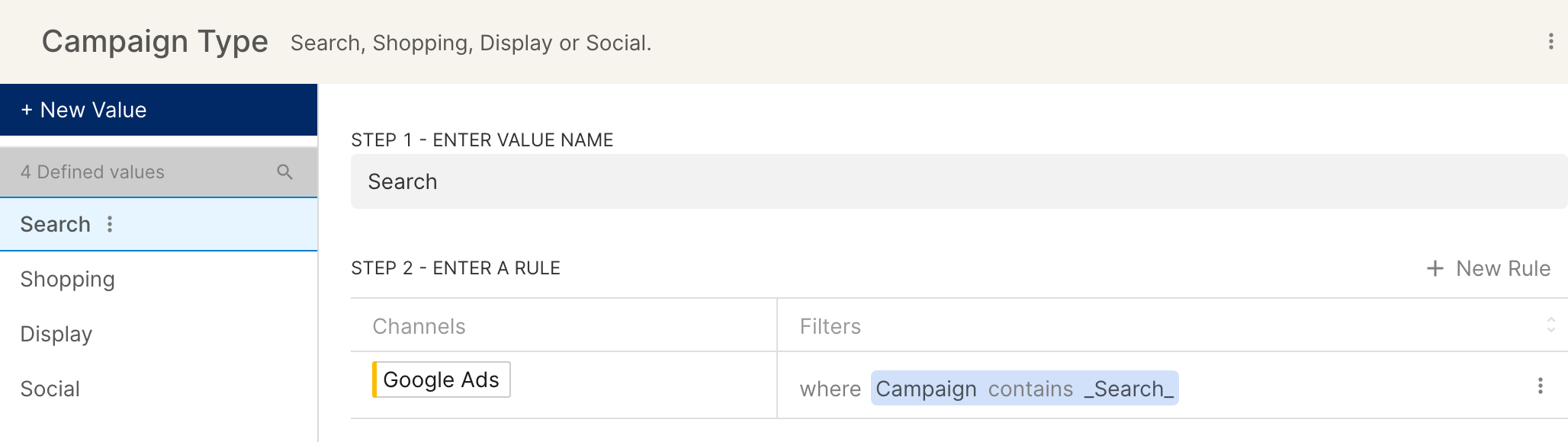
Team-specific dimensions
Once you have your main cross-channel dimensions, users may need other custom dimensions that are team-specific or relevant to a particular use case. Follow a naming convention for these, and add descriptions that explain where each dimension is useful, to keep the workspace clean and clutter-free.
Example: the Display advertising team needs to slice their cost data by a "Network" parameter that is part of the campaign name. This could be a new custom dimension on Clarisights called [DIS] Network, with rules such as:
![Custom dimension [DIS] Network with rules for the value Google Display Network](https://prod-uk-services-workspac-workspacefilespublicbuck-vs4gjqpqjkh6.s3.amazonaws.com/w_01JMCEAH666WZVXDQZWHB0K66C/wFile_01M40PC9R82FXYWFQ9CE41ECJ2)
Your list of dimensions doesn't need to be final: you can always create new classifications and change existing ones. You can also import custom dimension values in bulk from a Google Sheet, or reach out to your Clarisights Customer Success Manager for help.
Next, normalize metrics across channels and create new KPIs to track with custom metrics: Data Harmonization & Classification 2: Custom Metrics.