
Data Import Schedules and Freshness
Clarisights automatically pulls data from your connected channels on a recurring schedule. This article explains when data arrives, how to check freshness, and what to do if data seems incomplete.
How Imports Work
Every connected channel is refreshed automatically, at least once a day. Each refresh does not only fetch the latest day: it re-pulls a rolling window of recent days, called the lookback window, so that late-arriving conversions and attribution updates are picked up. The length of the window depends on the channel.
Channel Type | Refresh Schedule | Lookback Window |
Advertising and analytics channels (Facebook, Google Ads, TikTok, AppsFlyer, GA4, etc.) | Set by Clarisights for each channel | Depends on the channel. See Integration data retrieval time range (lookback window) |
Custom channels (Google Sheets, Amazon S3, Google Cloud Storage, BigQuery) | You choose it in the channel's settings: "Data Refresh Interval" (every few hours, up to once every 24 hours; fixed for BigQuery) and, for a daily refresh, "Data Refresh Time" | You choose it in the channel's settings ("Look Back Period", 60 days by default) |
Note: exact schedules vary by channel and configuration. Contact your Clarisights team for your specific schedule.
How to Check When Data Was Last Updated
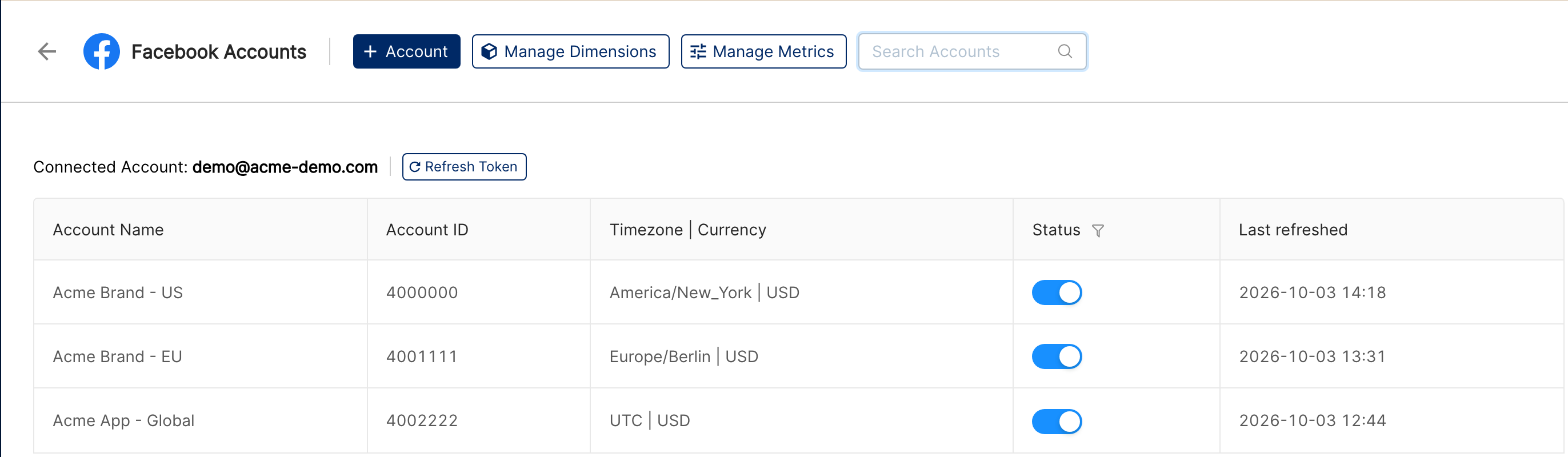
Advertising and analytics channels: open Integrations (the database-stack icon in the left sidebar), click the channel under "Manage connected channels", and check the "Last refreshed" column for each account.
Custom channels: each custom channel card on the Integrations page shows when it was last updated (for example "Updated 2 hours ago"). Hover over the card to see its fetch logs or to start a fetch right away with Fetch Now.
Why Does Today's Data Look Incomplete?
If today's data seems low, this is expected:
The day isn't over yet. Data for today accumulates throughout the day and will increase with each refresh.
Timezone differences. Clarisights reports each account's data by day in that account's own timezone (shown in the "Timezone | Currency" column on the channel's Integrations page). If your accounts use a timezone that is behind or ahead of yours, "today" may not align exactly with your own day.
Source API delays. Some platforms, such as Google Ads and Apple Search Ads, take hours to finalize data for the current day.
For the most accurate numbers, look at yesterday or earlier.
What If Yesterday's Data Is Also Missing?
Check when the accounts were last refreshed. Go to Integrations, open the channel and look at the "Last refreshed" column. Also make sure the "Status" switch of the account is on: accounts that are switched off are not imported.
Check if the account owner is still active. If the person who connected the integration has left your organization or lost access to the ad accounts, the connection may be broken. See What to Do When an Account Owner Leaves.
Check for platform outages. Occasionally, source platforms (Facebook, Google, etc.) have API outages that delay data delivery.
Contact us via the chat widget with the report URL and date range, and we'll check the import.
Once a broken connection is fixed, the next refresh automatically fills in any missing days that are inside the channel's lookback window.
Can I Change the Import Schedule?
For custom channels, yes: open the channel on the Integrations page and change "Data Refresh Interval", "Data Refresh Time" or "Look Back Period" in its settings. If you need a longer look back period than the limit shown, contact Clarisights support. For advertising and analytics channels, the schedule is set by Clarisights and optimized for data completeness. Contact your Clarisights team if you need data at a specific time.