
How Custom Dimensions and Filters Affect Data Visibility
A common reason for "missing" data in Clarisights is that the data exists in the system, but is not visible in a specific dashboard due to custom dimension rules or tab/widget filters. This article explains how to diagnose and fix these issues.
Scenario: Data Shows in One Report but Not Another
You can see data in a general overview dashboard, but a country-specific or channel-specific tab shows "No Data Available" or missing rows. This typically means:
The custom dimension used for filtering (for example "Country" or "Channel") doesn't have a rule that matches the campaigns you're looking for, or
A tab-level filter is actively excluding the data
Step 1: Check Tab and Widget Filters
Open the report and click on the tab that's missing data.
Click the tab filter (the funnel icon next to the tab name) and each widget's "Filter" option. Are there any active filters?
Check if any filter is excluding your data. For example, a filter like
Campaign does not contain "Reach"would hide all campaigns with "Reach" in the name.Try removing all filters temporarily to see if data appears.
Step 2: Check Custom Dimension Rules
Custom dimensions in Clarisights use rules to categorize campaigns, ad groups, or ads into values like countries, business lines, or product categories. Each value has one or more rules, made of the channels it applies to and filters such as Campaign contains "_US". If no rule matches a campaign, that campaign won't appear when filtering by that custom dimension.
Common examples:
A new country (for example Greece) was added to your campaigns, but the "Country" custom dimension doesn't have a rule like
Campaign starts with "GR_".A new channel (for example Reddit) was added, but the "Channel" custom dimension's rules don't include that channel yet. Rules only apply to the channels selected in them.
To check and add rules:
Open Custom Dimensions from the left sidebar
Find the dimension you're using to filter (for example "Country") and click it to see its values and rules
Click Edit and look for whether there's a rule that would match your missing campaigns, for the right channels
If not, add a new rule (+ New Rule) to an existing value, or create a new value (+ New Value), based on your campaign naming convention
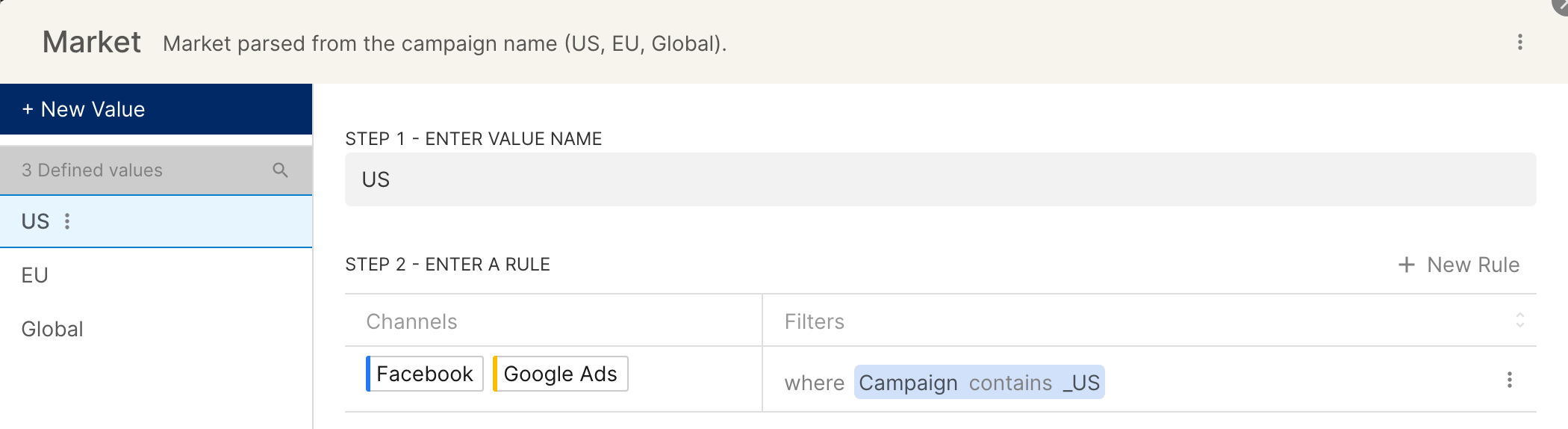
For a full guide, see Extractor in Custom Dimensions and Data Harmonization: Custom Dimensions.
Tip: Campaign Naming Conventions Matter
Custom dimensions work best when your campaigns follow a consistent naming convention. For example:
UK_Brand_Google_Search_Spring2026
DE_Performance_Meta_Conversions_Q2
This makes it easy to create rules like Campaign starts with "UK_" → Country = UK.
If your campaigns don't follow a consistent pattern, consider working with your team to standardize naming, or import custom dimension values in bulk to assign values to individual campaigns.