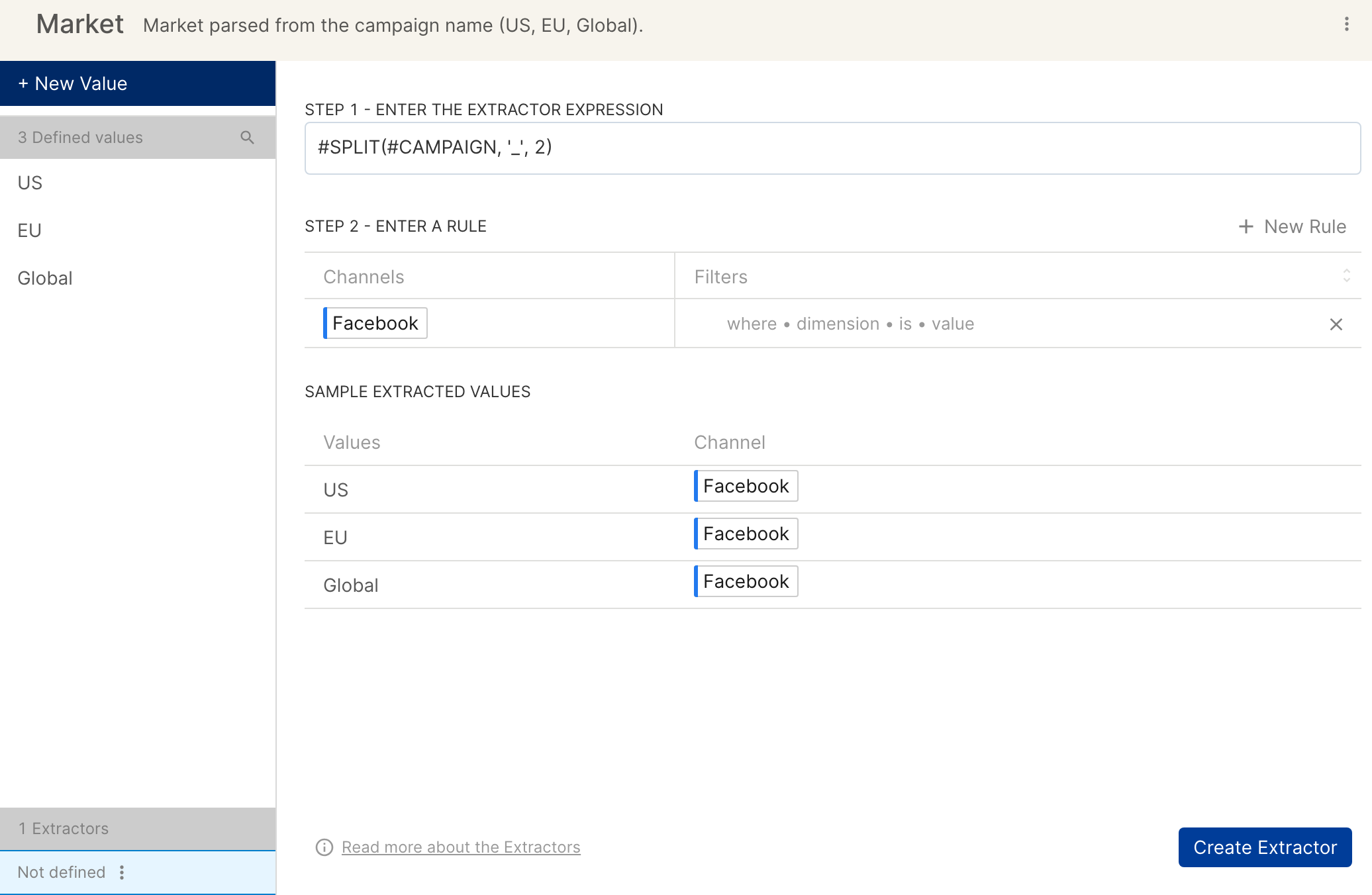
Extractor in Custom Dimensions
Extractors automatically extract values from a dimension, using functions on Clarisights. The functions run across all dimensions in the extractor expression. You can also limit the extractor to certain values by adding a rule filter.
For example, say your campaigns are named like sem_india_M_25 or sem_australia_F_26, and you want to get the country name from them. Use the #SPLIT extractor function: #SPLIT ( #DIM(CAMPAIGN), '_', 1) returns india and australia respectively.
Functions
Six functions are currently supported. To refer to a dimension in a formula, write it as #DIM(CAMPAIGN) or use the short form #CAMPAIGN.
#EXTRACT
Returns the segment between the first prefix and the suffix.
Syntax:
#EXTRACT (string, prefix_string, suffix_string)Example: for the Campaign
dis_reach_web_[FI_ALL_XX_[RR]_[ST]_GELA_NFA_LPA, the expression#EXTRACT(#DIM(CAMPAIGN), '[', ']')returnsFI_ALL_XX_[RR.
#SPLIT
Splits a string around a specified character or string, and returns the nth segment. n starts from 0.
Syntax:
#SPLIT(string, delimiter, occurrence_number)Example: for the Account
10_network_ios, the expression#SPLIT(#DIM(ACCOUNT), '_', 2)returnsios.
#SUB
Returns the segment of a string between two positions. Positions start from 0, and both the start and end positions are included in the result.
Syntax:
#SUB (string, starting_index, ending_index)Example: for the Campaign
Promo_Instagram_Engagement, the expression#SUB(#DIM(CAMPAIGN), 0, 4)returnsPromo.
#CONCAT
Joins strings together.
Syntax:
#CONCAT (string 1, string 2, string 3, ..., string n)Example: for the Campaign
ios_brand the AccountEurope,#CONCAT(#DIM(CAMPAIGN), #ACCOUNT)returnsios_brEurope.
#STRREPLACE
Replaces part of a string with another string.
Syntax:
#STRREPLACE (#DIM(dimension), string_to_replace, replacement)Example: for the Campaign
Category_Age_Geo, the expression#STRREPLACE(#DIM(CAMPAIGN), 'Age', 'Gender')returnsCategory_Gender_Geo.
#LEN
Returns the length of a string. You can use LEN as an input to other extractor functions, but not on its own.
Syntax:
#LEN(#DIM(dimension))Example: for the Campaign
Brand_1,#LEN(#CAMPAIGN)returns 7.
Advanced use cases
You can combine extractor functions. For example, for the Campaign dis_reach_web_[FI_ALL_XX_[RR]_[ST]_GELA_NFA_LPA, the expression #SPLIT(#EXTRACT(#DIM(CAMPAIGN), 'web_', '_GELA'), '[', 0) returns FI_ALL_XX_.
Steps for setting up Extractor Expressions
On the Custom Dimensions page, click a custom dimension to expand it, then click Edit to open the editor, where you can view, add or update values and rules.
Click + New Value, then Extract Values, to start defining the functions and the dimensions they run on.
Type
#followed by any of the extractor functions above. You also see the expected values for these functions.Enter the extractor expression.
Select channels to proceed. The list only shows channels that have the specified dimension.
Click Extract Sample Values to see the resulting values for a selected sample size.
Click Create Extractor (or Save Extractor when you edit an existing extractor) to save your changes.