
Integrating AWIN into Clarisights
AWIN is a global affiliate marketing network. Connecting AWIN to Clarisights lets you analyze publisher performance, voucher / creative-level activity, and transaction-level affiliate data alongside the rest of your paid stack.
At a glance
| Authentication | AWIN API token (Bearer) |
| Permissions needed | Token must belong to a user with read access on the advertisers you want to connect (publisher reports, creative reports and transactions) |
| Account discovery | Automatic: every advertiser linked to the token is offered on connect; you select the ones to onboard |
| Data freshness | Daily (publisher and creative reports plus transactions are pulled on each refresh) |
| Lookback window | 2 days on each refresh (today and yesterday); historical backfills handled separately |
| Backfill on connect | Recent days only; ask your Clarisights account manager for a longer backfill (fetched in 30-day chunks, AWIN's API limit) |
| Timezone | Per-account, set when you connect each advertiser |
| Currency | Per-account, set when you connect each advertiser; converted to your reporting currency by Clarisights |
| Levels supported | Account · Publisher · Creative · Transaction (object) |
| Limited rollout | No |
Prerequisites
An active AWIN advertiser account (login with API access).
An AWIN API token. Generate one in your AWIN dashboard following AWIN's API authentication guide.
The token must have access to every advertiser you want to connect.
Steps to Connect
Step 1: Generate an AWIN API token
In your AWIN dashboard, create a personal API token and copy the full token value. For instructions, see Awin's guide: API Authentication.
Treat your API token like a password. It grants read access to every advertiser the AWIN user can see.
Step 2: Add AWIN in Clarisights
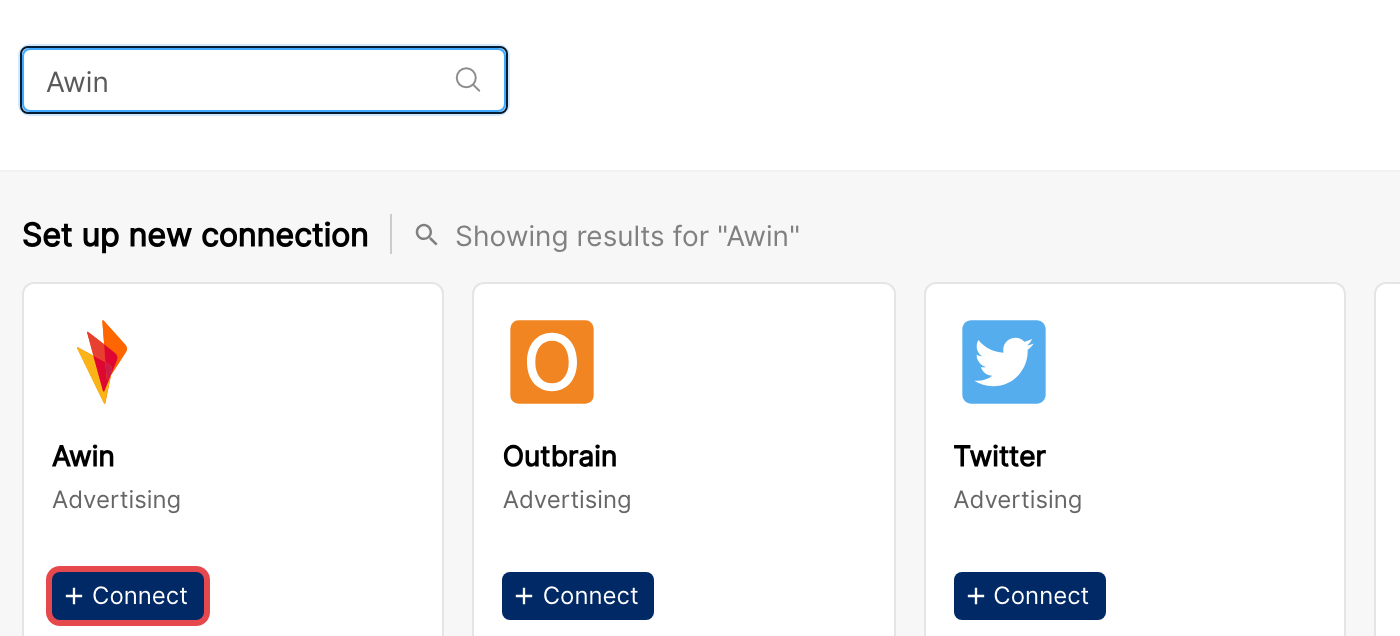
In Clarisights, go to the Integrations page (database icon in the left sidebar), search for Awin under Set up new connection, and click + Connect. To add another token later, open Awin Accounts and click + User.
Step 3: Enter the API token
Paste your AWIN API token and click Connect Source. Clarisights validates the token and lists every advertiser it can access under New Accounts.
⚠ "Authentication failed" / 401 → The token is invalid, expired, or revoked. Re-issue from AWIN and retry.
⚠ "Access denied" / 403 → The token's underlying user does not have read access on the advertisers. Ask the AWIN account owner to grant access and re-issue the token.
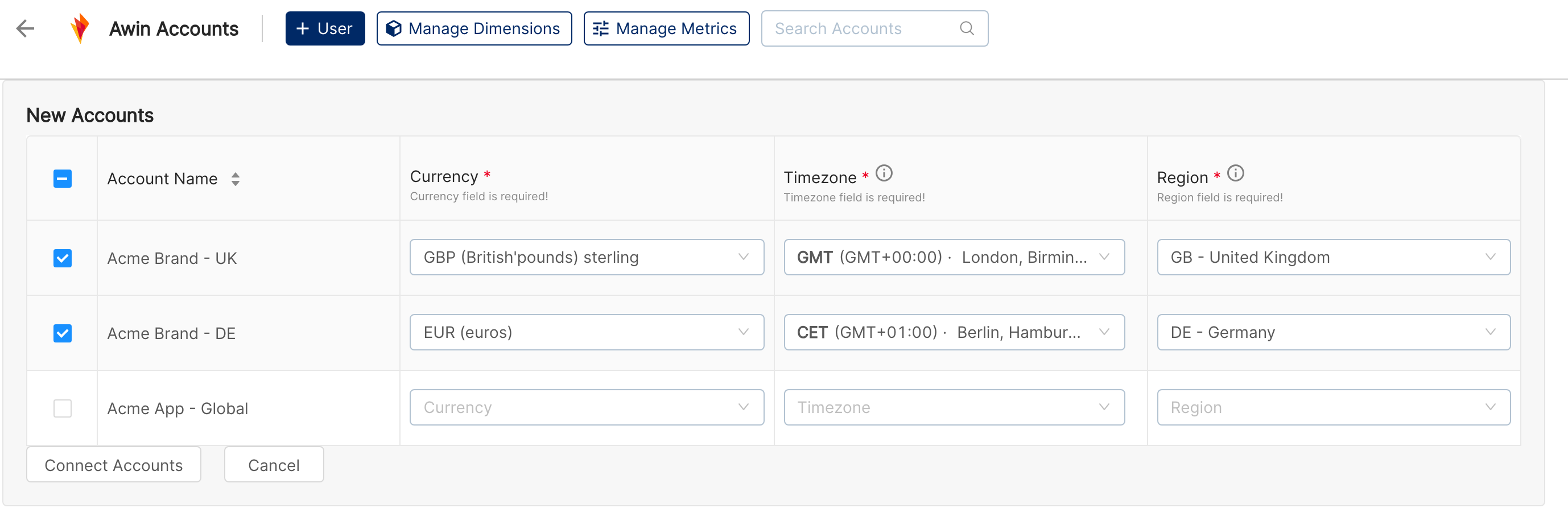
Step 4: Select advertisers and set timezone, region, currency
You'll see the full list of advertisers AWIN returned. For each advertiser you want to connect, set:
Timezone: reporting timezone the advertiser uses in AWIN
Region: the advertiser's AWIN region (for example GB - United Kingdom), used to fetch creative-level reports
Currency: the account's reporting currency
Tick the advertisers to connect. All three fields are mandatory for every advertiser you onboard. Click Connect Accounts.
Verify the connection
Go to Integrations → Awin. Each connected advertiser should show with its timezone, region, and currency.
First data appears within about 24 hours, after the next daily refresh.
Quick start: create a new report, add Awin as the data source, and add Account · Publisher · Sale Amount · Total Transactions.
Data available
Hierarchy
How AWIN's native levels map to the standard Clarisights levels:
Native level (AWIN) | Clarisights level |
Advertiser | Account |
Publisher | Publisher (treated as the primary spend-bearing level; aggregates sit at this level via AWIN's publisher report) |
Creative / Voucher | Creative (a child of Publisher; populated from AWIN's creative report) |
Transaction | Object (a child of Publisher capturing transaction-level dimensions like voucher code, customer country, transaction device, commission status, etc.) |
Note: AWIN does not have a Campaign / Ad Group concept; the Publisher level fills the role of "Campaign" in standard cross-channel reports.
Dimensions
Dimension | Level | Description |
Account / Account ID | Account | AWIN advertiser name and ID |
Region | Account | AWIN region selected on connect |
Account Type / User Role | Account | AWIN account type and the role of the connecting user |
Publisher / Publisher ID | Publisher | AWIN publisher name and numeric ID |
Creative / Creative ID | Creative | Creative (banner / link / voucher) name and ID |
Tag Name | Creative | AWIN tag name associated with the creative |
Voucher Code | Transaction | Voucher / promo code used in the transaction |
Site Name | Transaction | Publisher site that drove the transaction |
Advertiser Country | Transaction | Country of the advertiser as reported by AWIN |
Customer Country | Transaction | Country of the end customer |
Transaction Device / Click Device | Transaction | Device used at click and at transaction |
Transaction Type | Transaction | Sale, lead, etc. |
Commission Status | Transaction | Pending / approved / declined |
Commission Group | Transaction | AWIN commission group name |
Decline Reason | Transaction | Reason a transaction was declined |
Publisher URL | Transaction | Source URL on the publisher site |
Custom Parameters | Transaction | Free-form custom parameters AWIN passes through (extracted as Custom Parameter Key / Value pairs) |
Metrics
Metric | Category | Description |
Clicks | Traffic | Total clicks (publisher / creative levels) |
Impressions | Traffic | Total impressions (publisher / creative levels) |
Total Transactions | Transactions | All recorded transactions for the period |
Pending Transactions / Pending Amount / Pending Commission | Transactions | Transactions still awaiting validation |
Confirmed Transactions / Confirmed Amount / Confirmed Commission | Transactions | Validated transactions and the associated sale value and commission |
Declined Transactions / Declined Amount / Declined Commission | Transactions | Rejected transactions and their associated values |
Bonus Transactions / Bonus Amount / Bonus Commission | Transactions | Bonus / override commissions |
Sale Amount | Revenue | Total sale value attributed to AWIN (sum of all transactions) |
Commission Amount | Cost | Total commission paid to publishers |
Advertiser Cost | Cost | Total advertiser cost (commission + AWIN fees) at the transaction level |
Old Sale Amount / Old Commission Amount / Original Sale Amount | Transactions | Pre-edit values for transactions where AWIN later corrected the amount |
All currency metrics are stored both in the local advertiser currency and converted to your Clarisights reporting currency.
Limitations & known constraints
30-day API window: AWIN rejects queries larger than 30 days. Clarisights pages requests in 30-day chunks, so larger backfills take multiple runs.
20 calls per minute per user: AWIN throttles each token to 20 requests / minute. Connections with many advertisers will be paced automatically; a single token can connect dozens of advertisers but very large estates may want to split across multiple tokens.
Region is mandatory: AWIN's creative-level reporting requires a region. If region is not set, creative-level data won't ingest.
No Campaign / Ad Group concept: AWIN's data model is Advertiser → Publisher → Creative / Transaction. Cross-channel reports show Publisher in the Campaign slot.
Operating notes
Refresh schedule: daily.
Lookback: 2 days on each refresh (today and yesterday) keeps late-validated transactions current. Ask your Clarisights account manager if you need a longer backfill.
Multi-account: a single AWIN token can onboard every advertiser the underlying user can access. Use separate tokens to keep different teams' advertisers in separate Clarisights connectors.
Currency conversion: each advertiser's local currency is preserved on ingest and converted to your reporting currency by Clarisights using the daily FX rate.
Credential rotation: re-generate the AWIN token any time and update it in Integrations → Awin by editing the user.
Need help?
When contacting support from the in-app messenger, please include:
The integration name and advertiser account ID
The exact error message or screenshot
The step where the issue occurred
When the issue started