
Integrating your Apple Search Ads accounts
Connect your Apple Search Ads accounts to bring App Store search campaign performance (including ad-level reporting with Creative and Custom Product Page breakdowns) into Clarisights alongside your other marketing channels.
At a glance
| Authentication | Apple Search Ads API key: Clarisights generates a public key, you upload it in Apple Search Ads and paste back the Client ID, Team ID and Key ID |
| Permissions needed | API Account Read Only or API Account Manager role on each Apple Search Ads org. Account Admin alone is not sufficient. |
| Account discovery | Automatic: every org (account) the API user has access to is added and activated when you connect |
| Data freshness | Hourly |
| Lookback window | Last 3 days (today and the 2 previous days) are re-fetched on every sync |
| Backfill on connect | Longer history is available on request: contact Clarisights support with the date range you need |
| Timezone | The org's time zone as set in Apple Search Ads (shown on the Integrations page) |
| Currency | The org's currency, converted to your Clarisights reporting currency |
| Levels supported | Account (Org) · Campaign · Ad Group · Keyword · Ad |
| Limited rollout | No |
Prerequisites
An active Apple Search Ads account in the Apple Search Ads UI
A user on that account with the API Account Read Only or API Account Manager role. Account Admin alone will not work, so you may need to invite or create a dedicated API user.
Access to the Apple Search Ads Account Settings → API page so you can paste a public key and copy the resulting clientId, teamId and keyId
Steps to Connect
Step 1: Add an API user in Apple Search Ads
In your Apple Search Ads account, invite or create a user with the API Account Read Only role (API Account Manager also works). This user is the one whose credentials Clarisights will use.

Step 2: Generate a public key in Clarisights
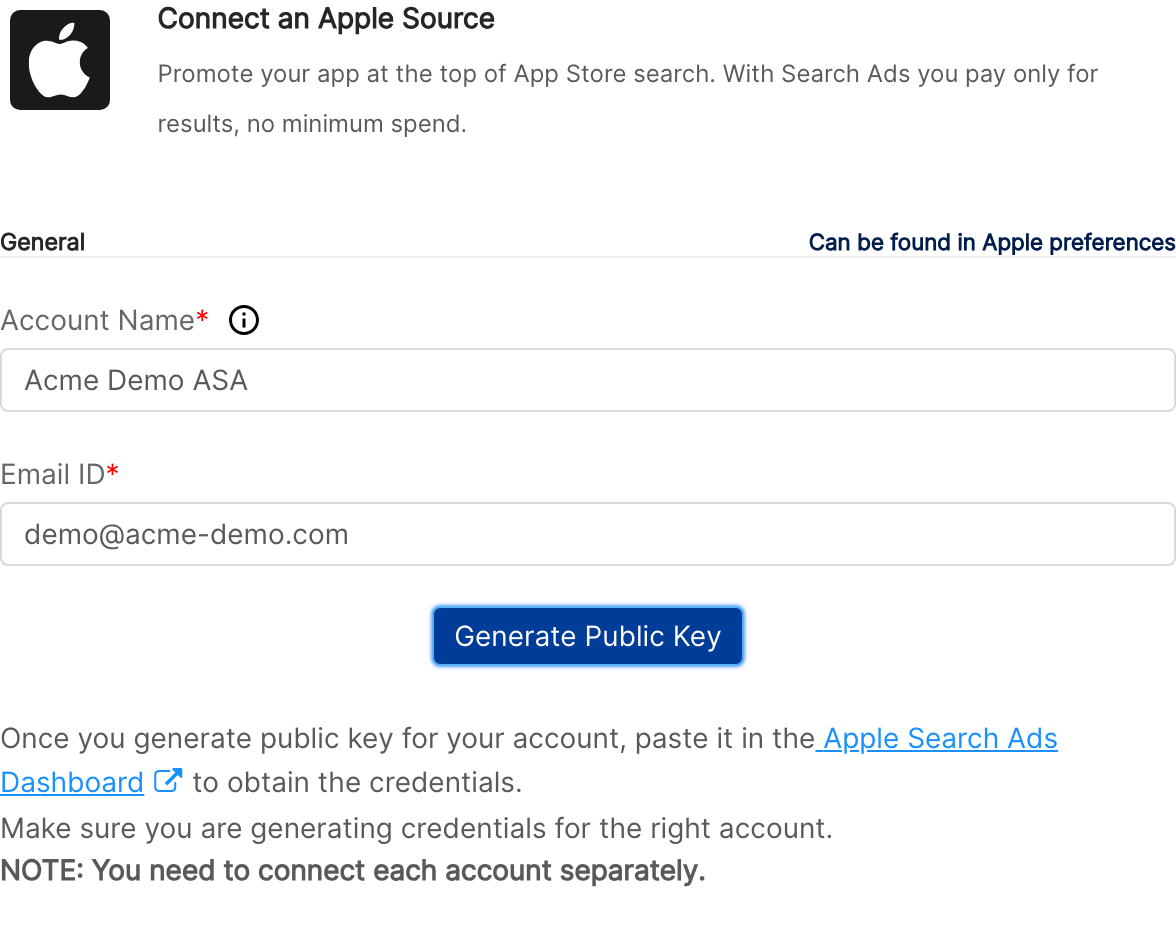
In Clarisights, open the Apple Search Ads integration page (or click + Connect on the Apple Search Ads card on the Integrations page). Enter an Account Name for this connection and the API user's Email ID, then click Generate Public Key. Clarisights generates a public/private key pair for this user. The private key never leaves Clarisights; only the public key is shown to you.
Step 3: Upload the public key to Apple Search Ads
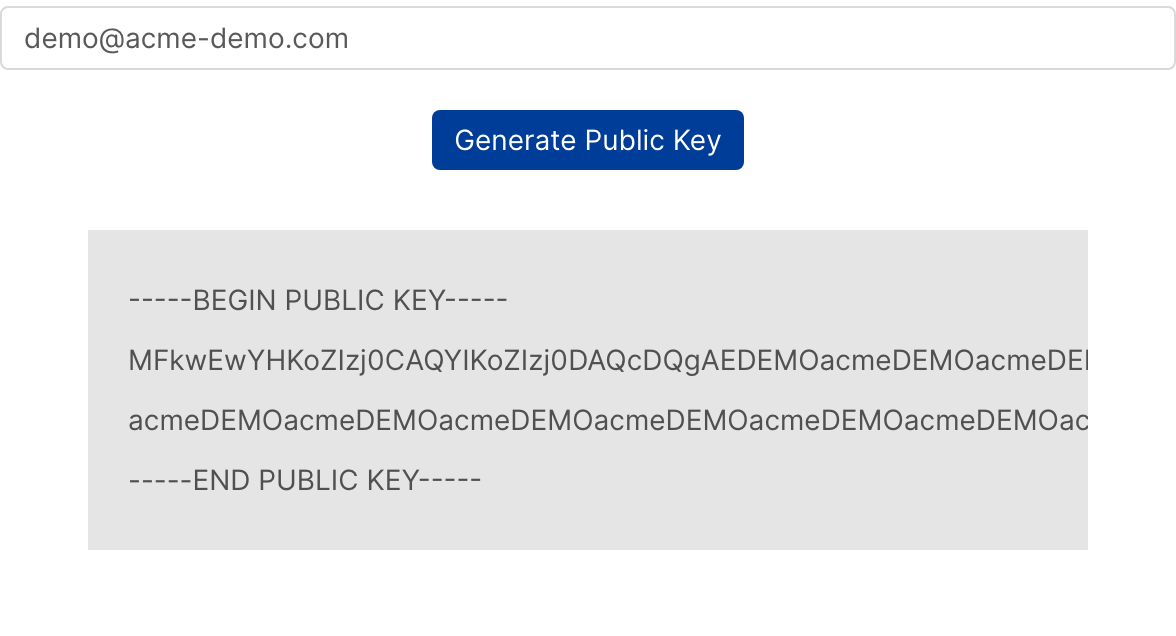
Click the generated key in Clarisights to copy it. Make sure you include the BEGIN PUBLIC KEY and END PUBLIC KEY lines with their dashes.
In Apple Search Ads, go to Account Settings → API and paste the key into the Public Key field, then click Save.

Apple will display three values above the public key field:
clientId
teamId
keyId
Common error: "Invalid public key" on Apple's side: Most often caused by missing the BEGIN/END lines or pasting only the body of the key. Copy the full block (including the dashes) and try again.
Step 4: Paste credentials back into Clarisights
Return to the Apple Search Ads form in Clarisights and paste the values into the Client ID, Team ID and Key ID fields, then click Connect Source. Clarisights validates the credentials with Apple and then automatically adds every org the API user has access to. All of them are activated and start syncing.
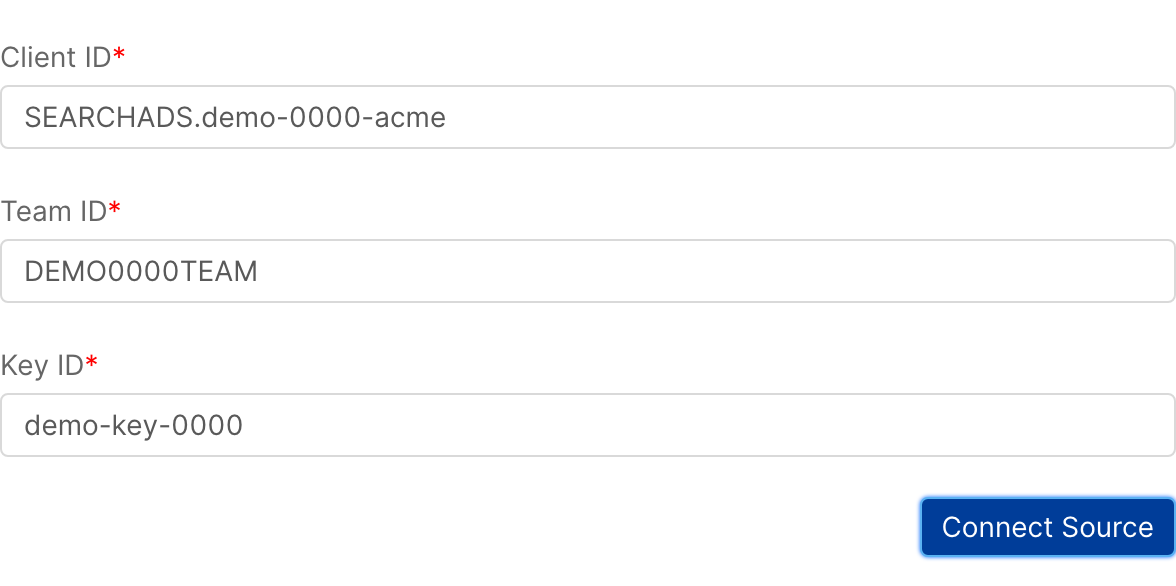
Common error: "Accounts couldn't be fetched for this user": One of the Client ID, Team ID or Key ID values is wrong, Apple hasn't yet propagated the public key, or the user is an Account Admin without an API role. Wait a minute, double-check the three values and the user's role in Apple Search Ads (it must be API Account Read Only or API Account Manager), and click Connect Source again.
Step 5: Review the connected orgs
The connected orgs appear on the Apple Search Ads page in Integrations. If there are orgs you don't want in Clarisights, switch off their Status toggle.
Verify the connection
Open Apple Search Ads under Manage connected channels on the Integrations page. Each connected org should show as active with the correct currency and timezone.
First report data appears within one or two hourly sync cycles after activation.
Quick start: open a new report, choose Apple Search Ads as the data source, and add Account · Campaign · ASA: Impressions · ASA: Taps · ASA: Cost.
Data available
Hierarchy
How Apple Search Ads' native levels map to the standard Clarisights levels:
Native level (Apple Search Ads) | Clarisights level |
Org | Account |
Campaign | Campaign |
Ad Group | Ad Group |
Keyword (targeted) | Keyword (sub-level under Ad Group) |
Ad (with Creative and Custom Product Page) | Ad |
Both the Keyword and Ad branches sit under Ad Group. You can pivot reports either by Keyword or by Ad (with Creative and Custom Product Page breakdowns) depending on what you want to analyse.
Dimensions
Dimension | Level | Description |
Adam Id | Campaign | The App Store ID of the app being advertised |
Total Budget | Campaign | Lifetime campaign budget |
Daily Budget | Campaign | Daily spend cap |
Campaign Status, Campaign Serving Status, Campaign Serving State Reasons | Campaign | Status set by the advertiser, current serving status, and the reasons for it |
Campaign Start Date, Campaign End Date, Campaign Modification Date | Campaign | Campaign schedule and last change date |
Campaign Channel Type, Placement, Campaign Billing Event | Campaign | Where and how the campaign runs and is billed |
Countries or Regions | Campaign | Storefronts the campaign targets |
Ad Group Bid | Ad Group | Default bid for the ad group |
CPA Goal, Bidding Type, Automated Keywords Opt In | Ad Group | Ad group bidding and keyword settings |
Ad Group Status, Ad Group Serving Status, Ad Group Deletion Status | Ad Group | Ad group status fields |
Ad Group Start Date, Ad Group End Date, Ad Group Modification Date | Ad Group | Ad group schedule and last change date |
Keyword | Keyword | The targeted keyword (exact match keywords are shown in brackets) |
Unique Keyword | Keyword | Super dimension. The keyword text without match type and case, so you can see aggregate performance for a keyword across multiple ad groups and match types. Not available natively in Apple Search Ads. |
Keyword Match Type | Keyword | Broad or Exact |
Keyword Bid, Keyword Status, Keyword Deletion Status | Keyword | Keyword bid and status fields |
Ad, Ad ID | Ad | The name and unique identifier of the ad |
Ad Defined Status | Ad | Status set by the advertiser (for example ENABLED or PAUSED) |
Ad Serving Status, Ad Serving State Reasons | Ad | Current serving status of the ad and the reasons for it, when applicable |
Ad Start Date, Ad Deletion Status | Ad | When the ad was created and whether it was deleted |
Ad Creative Type | Ad | Type of creative (for example custom product page) |
Creative ID, Creative Name, Creative State | Ad | The creative associated with the ad and its current state |
Product Page ID, Product Page Name, Product Page State | Ad | The custom product page linked to the ad and its current state |
Product Page Deep Link | Ad | Deep link URL for the product page |
Image, Video | Ad | Preview of the first screenshot or app preview video of the product page |
Italicised dimensions are Clarisights super dimensions, derived in Clarisights and not directly available in the Apple Search Ads UI.
Note on "default ad": ad groups that serve without an explicit ad object will show a default ad entry in reports. This is Apple's standard behaviour for ad groups using the default App Store listing.
Country or region breakdown: a Country Code (Breakdown) dimension at the Ad Group level is available on request. Contact Clarisights support to enable it.
Metrics
Core performance
Metric | Description |
ASA: Impressions | The number of times your ad appears in App Store search results within the reporting period. |
ASA: Taps | The number of times users tap your ad within the reporting period. |
ASA: Cost | The total spend within the reporting period, converted to your reporting currency. |
ASA: Conversions | Tap-through installs (the same value as ASA: Installs (Tap)). |
Derived rates
Metric | Description |
ASA: Tap Through Rate | Taps divided by impressions in the same window. |
ASA: Conversion Rate | Conversions divided by taps in the same window. |
ASA: Avg CPT | Average cost per tap (cost / taps). |
ASA: AVG CPA | Average cost per acquisition (cost / conversions). |
Installs
Metric | Description |
ASA: Installs (Tap) | New downloads and re-downloads attributed to a tap on your ad. |
ASA: Installs (View) | New downloads and re-downloads attributed to a view of your ad. |
ASA: Total Installs | Installs (Tap) plus Installs (View). |
ASA: New Downloads (Tap), ASA: New Downloads (View) | Downloads from users who never previously installed your app, by tap or view attribution. |
ASA: Total New Downloads | New Downloads (Tap) plus New Downloads (View). |
ASA: Re-Downloads (Tap), ASA: Re-Downloads (View) | Re-installs from users who previously had your app, by tap or view attribution. |
ASA: Total Redownloads | Re-Downloads (Tap) plus Re-Downloads (View). |
ASA: Installs (LAT Disabled), ASA: Installs (LAT Enabled) | Installs from users without and with Limit Ad Tracking enabled. Available for historical data only, as Apple no longer reports this split. |
Pre-orders
Metric | Description |
ASA: Pre-Orders Placed (Tap) | Pre-orders placed via tap-through conversions. |
ASA: Pre-Orders Placed (View) | Pre-orders placed via view-through conversions. |
Can't find a dimension or metric you need? Email support@clarisights.com.
Limitations & known constraints
Permission scope: the API user must have API Account Read Only or API Account Manager. Account Admin without an explicit API role is rejected by Apple's API.
Public key rotation: Clarisights renews the short-lived access credentials automatically. If the public key is revoked or replaced on Apple's side, you'll need to repeat steps 2 to 4.
Keywords: keyword-level data exists only for Search Results campaigns. Campaigns on other placements (for example Today tab or Search tab) have no keywords.
Default ad rows: ad groups that don't have an explicit ad object surface as default ad in ad-level reports. This is by design from Apple.
Reporting delay: most metrics are available within an hour but some attribution metrics can take up to 24 hours to fully reconcile.
Operating notes
Refresh schedule: data is pulled hourly. Once a day, Clarisights also refreshes the name, currency and time zone of each connected org from Apple.
Multi-account behaviour: a single API user can authorise multiple orgs, and each org syncs independently, so a problem with one org doesn't block the others.
Currency conversion: amounts are pulled in the org's native currency and converted to your reporting currency by Clarisights.
Adding a new org later: new orgs are not picked up automatically. Grant the existing API user access in Apple Search Ads, then repeat the connection in Clarisights with the same Account Name and Email ID and the same Client ID, Team ID and Key ID. Newly accessible orgs are added; existing ones are kept. If you get stuck, contact support.
Need help?
When contacting support from the in-app messenger, please include:
The API user's email and the affected org name or ID (from the Apple Search Ads page in Integrations)
The exact error message or a screenshot
The step where the issue occurred
When the issue started, and whether it was working previously