
Integrating your Seznam accounts
Seznam (Sklik) is the leading search and display advertising platform in the Czech Republic. Connecting Seznam to Clarisights brings campaign, ad group, ad, and keyword performance from Sklik alongside your other paid-search channels for unified reporting.
At a glance
Property | Value |
|---|---|
Authentication | Sklik username (email) + Sklik API token (no OAuth) |
Permissions needed | A Sklik user with access to every Sklik account you want connected. A dedicated read-only user is recommended. |
Account discovery | Automatic: every Sklik account the user has access to is connected when you submit the credentials |
Data freshness | Daily. Each refresh re-pulls the most recent 3 days, and a periodic re-pull covers the last 7 days to pick up late changes |
Lookback window | 3 days on each daily refresh, 7 days on the periodic re-pull |
Backfill on connect | Last 3 days; longer historical backfills are available on request via Clarisights support |
Timezone | Europe/Prague |
Currency | Sklik reports in CZK; Clarisights converts cost and budgets to your workspace currency |
Levels supported | Account → Campaign → Ad Group → Ad / Keyword |
Limited rollout | No |
Prerequisites
An active Seznam (Sklik) advertising account.
The email (username) and an API token of a Sklik user that can access the accounts you want to connect. You can generate the token in Sklik under your account settings, in the Sklik API section. We recommend a dedicated read-only Sklik user rather than the personal credentials of an active campaign manager.
Steps to Connect
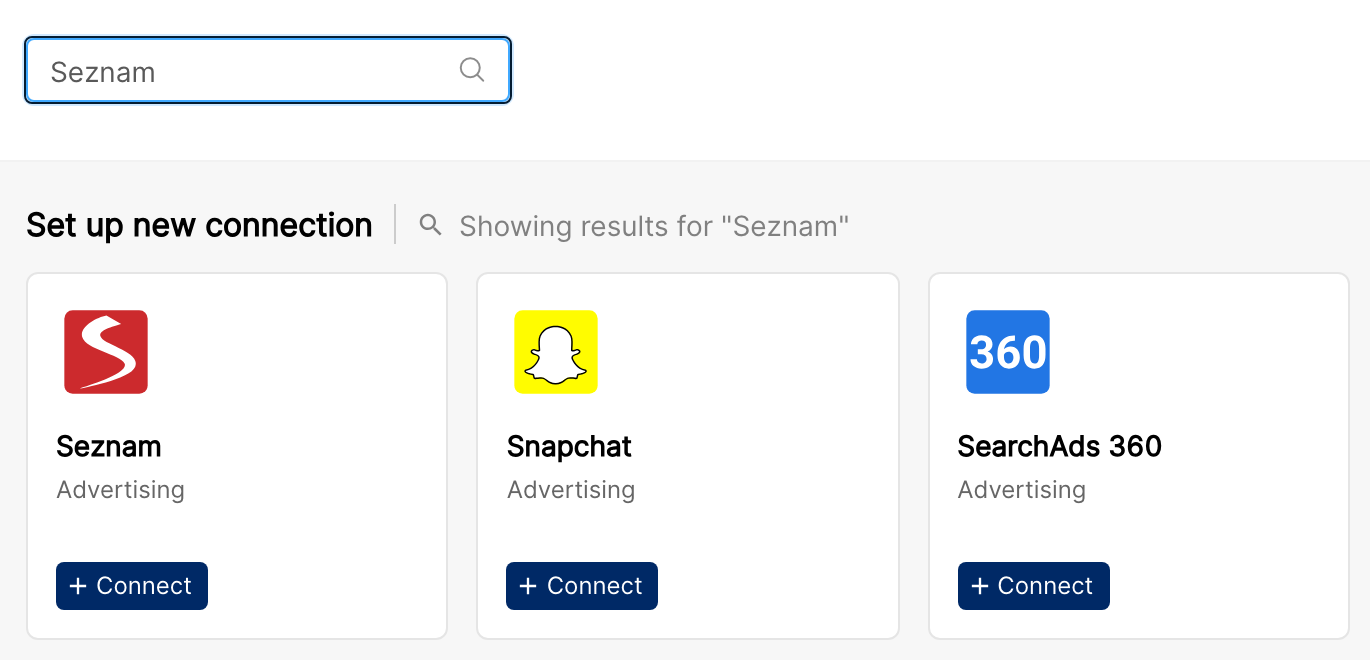
In Clarisights, open Integrations. Under Set up new connection, search for Seznam and click + Connect on the Seznam card.
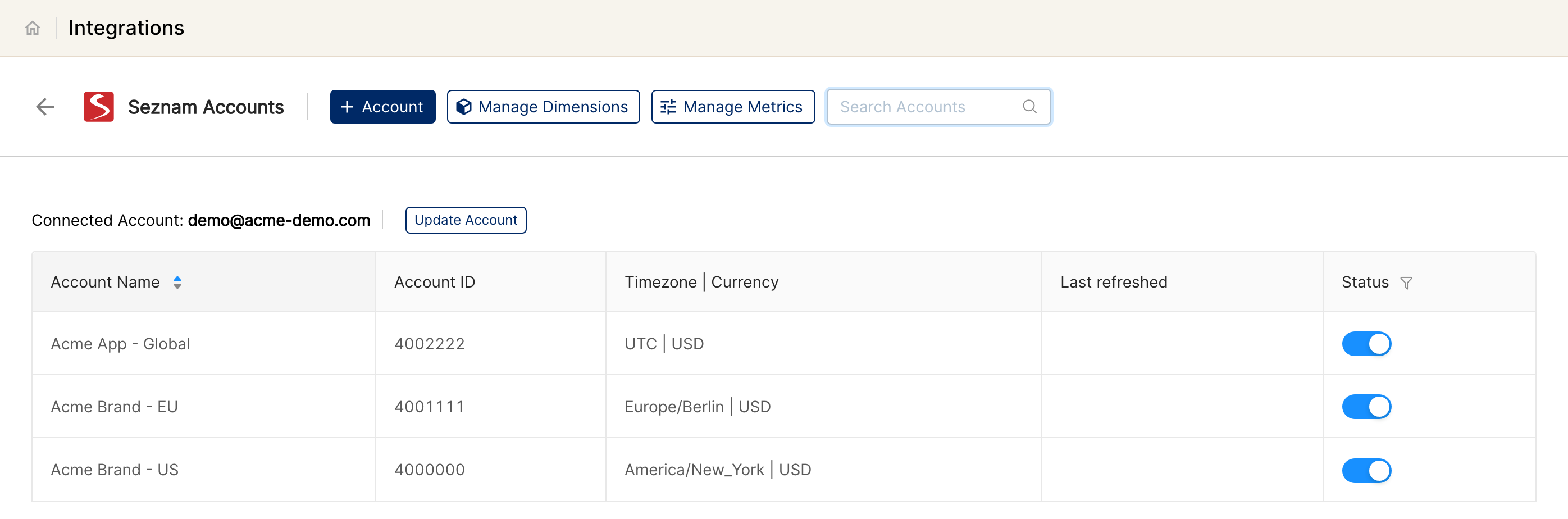
If Seznam accounts are already connected, you land on the Seznam Accounts page. Click + Account to add another Sklik user. Otherwise, the connection form opens directly.
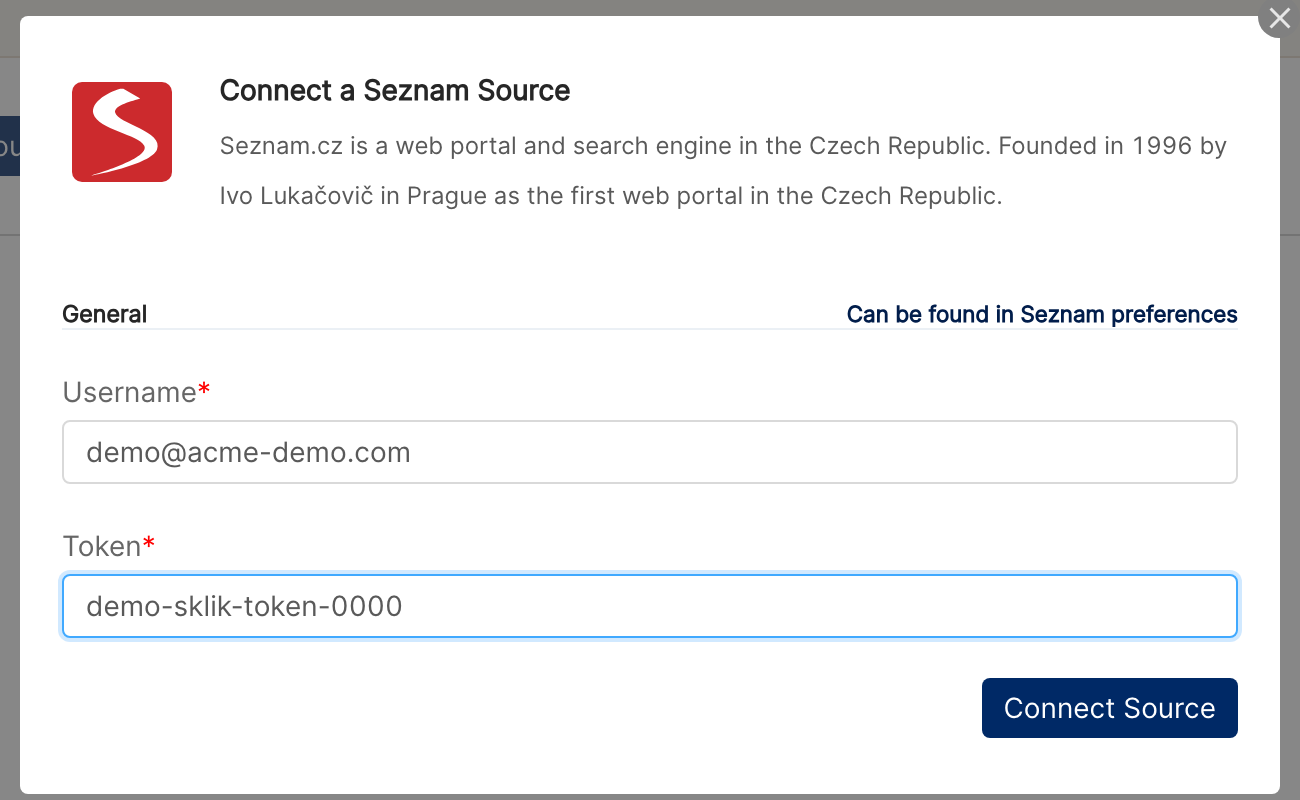
In the Connect a Seznam Source form, enter the Sklik user's email in Username and the API token in Token, then click Connect Source. Clarisights signs in to the Sklik API with these credentials to validate them.
If the connection fails with an invalid credentials error: check the email and token pair in Sklik. The token must belong to the same Sklik user as the email. If the token was regenerated in Sklik, the old one no longer works.
When the credentials are valid, every Sklik account the user has access to is discovered and connected automatically.
Verify the connection
Open Integrations and select Seznam under Manage connected channels. The connected Sklik accounts are listed on the Seznam Accounts page with their status switched on.
First data appears after the next scheduled refresh, usually within 24 hours.
Quick-start check: build a report with Account and Campaign and add SZ: Clicks, SZ: Impressions, SZ: Price, and SZ: Avg. CPC. You should see rows for the last few days.
Data available
Hierarchy
Ads and keywords are both children of an ad group, so Seznam data can be explored along two paths: Account → Campaign → Ad Group → Ad, and Account → Campaign → Ad Group → Keyword.
Native level (Sklik) | Clarisights level |
|---|---|
Account | Account |
Campaign | Campaign |
Group | Ad Group |
Ad | Ad |
Keyword | Keyword (under Ad Group) |
Dimensions
Dimension | Level | Description |
|---|---|---|
Account / Account ID | Account | Sklik account name and ID |
Channel | Account | The data source (Seznam) |
Campaign / Campaign ID | Campaign | Campaign name and ID |
Campaign Status | Campaign | Status of the campaign in Sklik |
Daily Budget | Campaign | Campaign daily budget, in your workspace currency |
Total Budget | Campaign | Campaign total budget, in your workspace currency |
Ad Group / Ad Group ID | Ad Group | Ad group name and ID |
Ad Group Status | Ad Group | Status of the ad group in Sklik |
Ad / Ad ID | Ad | Ad and its ID |
Ad Status | Ad | Status of the ad in Sklik |
Headline 1 | Ad | First headline of the text ad |
Headline 2 | Ad | Second headline of the text ad |
Description | Ad | Description line of the text ad |
Display URL | Ad | URL shown in the ad |
Landing Pages | Ad | Destination URL of the ad |
Keyword / Keyword ID | Keyword | Keyword text and ID |
Keyword Status | Keyword | Status of the keyword in Sklik |
Keyword Match Type | Keyword | Match type of the keyword |
Keyword Final URL | Keyword | Keyword-level destination URL, if set |
Metrics
Seznam metrics appear in Clarisights with the SZ: prefix.
Metric | Description |
|---|---|
SZ: Impressions | Number of times your ads were shown |
SZ: Clicks | Number of clicks on your ads |
SZ: Price | Cost (spend), converted from CZK to your workspace currency |
SZ: CTR | Click-through rate: clicks × 100 ÷ impressions |
SZ: Avg. CPC | Average cost per click: price ÷ clicks |
SZ: Conversions | Conversions tracked by Sklik |
SZ: Conv. value | Value of the conversions tracked by Sklik |
SZ: Conv. Rate | Conversions × 100 ÷ clicks |
SZ: Avg. Conversion Price | Cost per conversion: price ÷ conversions |
SZ: Avg. Conversion Value | Conversion value ÷ conversions |
SZ: Conversion Value/Conversion Price | Conversion value ÷ average conversion price |
SZ: PNO | Cost-to-revenue ratio (podíl nákladů na obratu): price × 100 ÷ conversion value |
SZ: Avg. Transaction Price | Cost per transaction: price ÷ transactions |
SZ: Avg. Transaction | Transactions per conversion: transactions ÷ conversions |
Limitations & known constraints
No OAuth. Sklik does not offer OAuth, so Clarisights connects with the Sklik username and API token. Use a dedicated read-only Sklik user so that personal credential changes don't break the integration.
Account discovery is all-or-nothing. Every Sklik account the connected user can access is added. To connect only some accounts, use a Sklik user that only has access to those accounts, or switch off the accounts you don't need on the Seznam Accounts page.
Fixed timezone and source currency. Seznam data is reported in the Europe/Prague timezone and in CZK. Cost and budgets are converted to your workspace currency.
Short refresh window. Each refresh re-pulls at most the last 7 days. Changes Sklik makes to older data are not picked up automatically; contact Clarisights support if you need older dates re-pulled.
Operating notes
Refresh schedule: daily. Each refresh re-pulls the most recent 3 days, and a periodic re-pull covers the last 7 days to recover late-arriving data.
Historical data: on connect, the last 3 days are loaded. Longer historical backfills are run on request via Clarisights support.
Adding new Sklik accounts: if the connected Sklik user gets access to a new account later, click + Account on the Seznam Accounts page and submit the same username and token again. New accounts are added automatically.
Credential rotation: if the Sklik API token changes, click Update Account on the Seznam Accounts page and enter the new token. The username cannot be changed in edit mode; to switch to a different Sklik user, add a new connection with + Account.
Need help?
When contacting support from the in-app messenger, please include:
The integration name and the Sklik Account ID (Integrations → Seznam)
The exact error message or a screenshot
The step where the issue occurred
When the issue started