
Connecting Pinterest on Clarisights
Connect your Pinterest Ads accounts to monitor Pin promotion performance, video and engagement metrics, checkout conversions, and audience activity alongside the rest of your marketing stack.
At a glance
| Authentication | OAuth 2.0 (Pinterest API v5) |
| Permissions needed | Analyst (or higher) role on each Pinterest ad account; ability to authorize the ads:read and user_accounts:read scopes |
| Account discovery | Automatic on credential validation (includes shared accounts) |
| Data freshness | Daily |
| Lookback window | Each daily refresh re-pulls the last 60 days plus today |
| Backfill on connect | Last 60 days |
| Timezone | UTC |
| Currency | Account native currency (auto-converted via Currency Conversion) |
| Levels supported | Account · Campaign · Ad Group · Ad (Pin Promotion / Product Group) |
| Limited rollout | No. Pinterest is available to all workspaces. |
Prerequisites
An active Pinterest business account managed in Pinterest Ads Manager
An Analyst, Campaign Manager, or Admin role on every ad account you want to connect
Permission to authorize third-party apps on your Pinterest profile
Steps to Connect
Step 1: Sign in with Pinterest from Clarisights
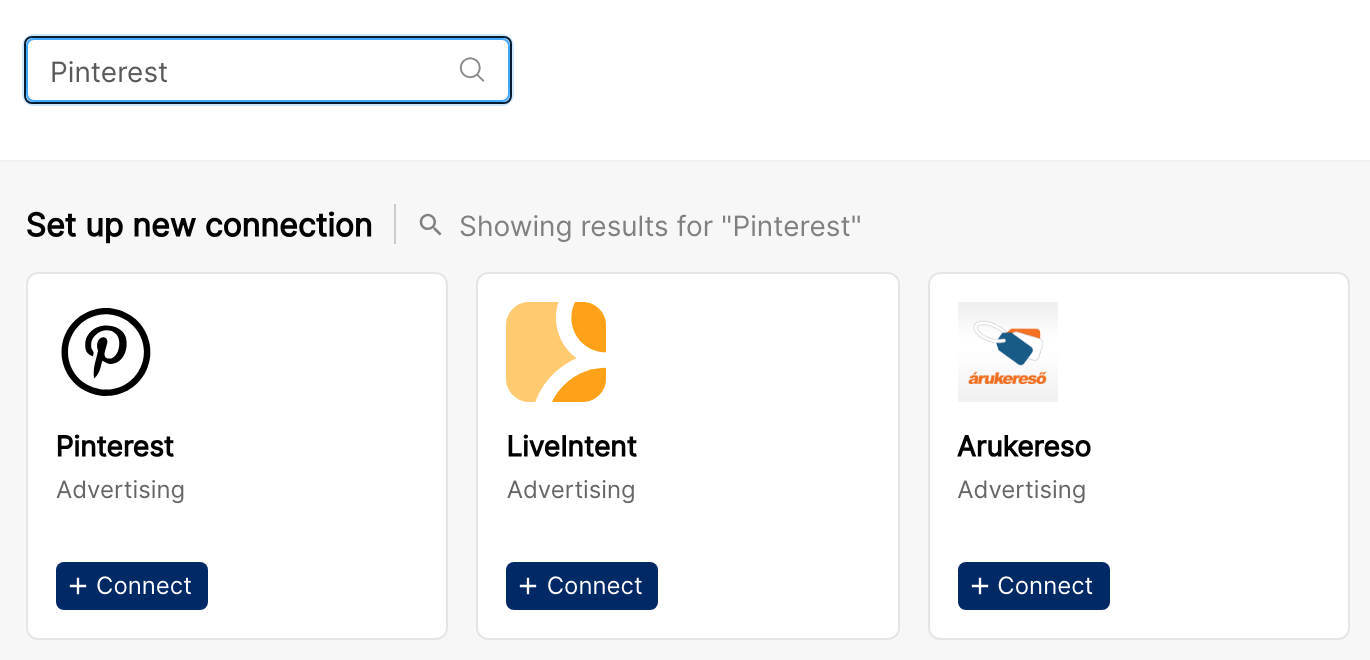
In Clarisights, open Integrations (the database-stack icon in the left sidebar). Under Set up new connection, search for Pinterest and click + Connect on the Pinterest card. A Pinterest sign-in window opens. Sign in with the user that has access to the ad accounts you want to connect.
Step 2: Authorize Clarisights
Pinterest displays a permission screen listing the access Clarisights requires (ads:read and user_accounts:read). Click Allow.
To learn what to check before granting a third-party platform access, see Pinterest's guide: Granting access to third party services.
⚠ Common error: "You don't have permission to authorize this app." → The Pinterest profile you're using has third-party app authorization disabled, or your business account admin restricts external apps. Ask the Pinterest business admin to enable third-party access, or sign in with a different user that has the required role.
Step 3: Select ad accounts
After authorization, Clarisights automatically discovers every ad account your Pinterest user can access (including shared business accounts). Select the accounts you want to connect and click Connect Accounts.
⚠ Common error: "No ad accounts found." → The user you authorized with does not have an Analyst or higher role on any ad account. In Pinterest Ads Manager, go to Business Access → People, grant the user the appropriate role, then re-run the connection flow.
Verify the connection
Open Integrations and, under Manage connected channels, open Pinterest. Each account you connected is listed under Connected Account with its Status switch turned on. After the first sync, the Last refreshed column shows when data was last pulled.
First data appears after the next scheduled sync (typically within 24 hours).
Quick start: create a new report, add Pinterest as the data source, and pull Account · Campaign · Impressions · Clicks · Spend.
Data available
Hierarchy
How Pinterest's native levels map to the standard Clarisights levels:
Native level (Pinterest) | Clarisights level |
Advertiser / Ad Account | Account |
Campaign | Campaign |
Ad Group | Ad Group |
Pin Promotion (or Product Group, for catalog campaigns) | Ad |
Dimensions
Dimension | Level | Description |
Campaign ID | Campaign | Pinterest's internal ID for the campaign |
Campaign Status | Campaign | Live serving status (Running, Paused, etc.) |
Campaign Entity Status | Campaign | Configured status set by the user |
Campaign Objective | Campaign | Awareness, Consideration, Video View, Web Conversion, Catalog Sales, Web Sessions |
Campaign Lifetime Budget | Campaign | Total lifetime spend cap configured for the campaign |
Campaign Daily Budget | Campaign | Daily spend cap configured for the campaign |
Adgroup | Ad Group | Ad group name |
Ad Group Status | Ad Group | Live serving status |
Ad Group Entity Status | Ad Group | Configured status set by the user |
Ad Status | Ad | Approved, Paused, Pending, Rejected, Archived, etc. |
Metrics
Core delivery
Metric | Description |
Impressions | Paid impressions delivered |
Total Impressions | Paid + earned impressions |
Gross Impressions | Impressions before deduplication |
Earned Impressions | Organic resharing of promoted Pins |
Clicks | Paid outbound clicks |
Pin Clicks | Total clicks on the Pin |
Paid Pin Clicks / Earned Pin Clicks / Gross Pin Clicks | Pin click breakdowns |
Spend | Total spend in account currency |
Earned Outbound Clicks | Outbound clicks driven by organic resharing |
Engagements & saves
Metric | Description |
Total Engagement | All engagement actions on the ad |
Paid Engagements | Engagements on paid impressions |
Earned Engagements | Engagements on organically reshared promoted Pins |
Paid Saves / Earned Saves | Pin saves attributed to paid vs. earned distribution |
Video
Metric | Description |
Video Views / Paid Video Views / Earned Video Views | Total video views (MRC standard) |
3s Video Views (Total / Paid / Earned) | 3-second video view variants |
Video Starts (Total / Paid / Earned) | Video play starts |
Video Played at 25% / 50% / 75% / 95% / 100% | Quartile completion (Total / Paid / Earned variants) |
Video Length | Length of the video creative |
Conversions
Pinterest reports conversions split by attribution type: click-through, view-through, engagement, and totals. Each conversion event also exposes an order value (in micro-dollars from the API, automatically scaled to whole-currency units in Clarisights).
Metric | Description |
Total Conversions | Sum of all conversion events |
Checkout Conversions / Order Value | Checkout events and total purchase value |
Click-through / Engagement / View-through Conversions (Checkout) | Checkout conversions by attribution path |
Click-through / Engagement / View-through Order Value (Checkout) | Order value by attribution path |
Total Lead Conversions / Leads | Lead-form fills and click-through / engagement / view-through variants |
Total Signup Conversions / Order Value | Signup conversions and signup order value (with attribution variants) |
Total Page Visit Conversions | Conversions categorized as page visits |
Click-through Conversions (Add to Cart) | Add-to-cart events from clicks (also engagement / view-through variants) |
Total Custom Conversions / Order Value | Customer-defined conversion events |
Checkout (Offline Conversions) | Checkouts attributed via offline conversion uploads |
Checkout (Pinterest Conversions) / Order Value | Conversions tracked via Pinterest tag |
Web conversions & sessions
Metric | Description |
Checkout Conversions (Web) | Web checkout events with click-through / engagement / view-through variants |
Checkout Order Value (Web) | Web checkout order value with the same attribution variants |
Sessions (Web) | Total web sessions driven by Pinterest ads |
Paid / Earned Web Sessions | Web sessions attributed to paid vs. earned distribution |
Conversion Quantity from Page Visit (Clicks) | Page-visit conversions attributable to clicks |
Custom metrics
Additional Pinterest reporting columns can be added to your channel as custom metrics. Ask your Clarisights contact to extend the schema with the specific Pinterest API column you need (e.g. specific conversion windows, repins, or new conversion events).
Limitations & known constraints
Report generation time: Pinterest builds reports asynchronously, so Clarisights requests each report and waits for Pinterest to finish it. For very large date ranges or many ad accounts, a refresh can take longer to complete.
Rate limits: Pinterest limits how often reports can be requested, so intraday refreshes of the current day are not available; data is pulled on the daily schedule.
Currency normalization: Pinterest returns monetary values for some metrics in micro-dollars. Clarisights automatically converts these to whole-currency units before storage.
Expiring access: Pinterest access expires 60 days after it was last renewed. Clarisights renews it automatically during the scheduled refreshes, so you only need to reconnect if you revoke access in Pinterest or the connection stays paused for a long time.
Product Group level: For catalog/shopping campaigns, the Ad level represents Product Groups rather than individual Pin Promotions. Pin-only fields such as the Pin ID and Pin promotion name do not apply at this level.
Operating notes
Refresh schedule: data is pulled once a day.
Lookback: the daily pull refreshes the last 60 days, so late-arriving conversions are picked up.
Multi-account behavior: every ad account the authorized Pinterest user can see (including shared business accounts) is discovered when you sign in. New ad accounts are not added automatically: open Pinterest from Manage connected channels, click + Account, sign in again, then select the new accounts and click Connect Accounts.
Currency conversion: native amounts are pulled as-is and converted to your reporting currency by Clarisights.
Reconnecting: if Pinterest data stops updating because access was revoked, expired, or the user was removed from the ad accounts, open Pinterest from Manage connected channels, click Refresh Token next to the connected user and sign in to Pinterest again.
Need help?
When contacting support from the in-app messenger, please include:
The integration name and account ID (Integrations → Pinterest)
The exact error message or screenshot
The step where the issue occurred
When the issue started