
Integrating Facebook Ads on Clarisights
Connect your Facebook (Meta) Ads accounts to report on campaign performance, audience and placement breakdowns, creative-asset reporting (image, video and text variants), catalog product reporting (beta), on-Facebook actions, Pixel and Conversions API events, custom conversions, mobile app events, video engagement, Meta Lift Studies and SKAdNetwork-attributed iOS results across every Meta surface (Facebook, Instagram, Messenger, Audience Network) alongside the rest of your marketing stack.
At a glance
Authentication | OAuth 2.0 (Facebook Login) |
Permissions needed | A role on each ad account (Admin, Advertiser or Analyst). Clarisights requests |
Account discovery | After you sign in, every ad account the Facebook user can access is listed for selection |
API version | Meta Marketing API |
Data freshness | Several refreshes per day; the current day is refreshed through the day |
Lookback window | Recent days are re-pulled on every refresh so late conversions are picked up; longer ranges are available as a backfill on request |
Backfill on connect | Recent history is loaded after you connect; ask support for longer historical ranges |
Timezone | Ad account timezone (Meta always reports in the ad account’s configured timezone) |
Currency | Ad account currency, converted to your reporting currency; native amounts are also available as (Local currency) metrics |
Levels supported | Account · Campaign · Ad Set · Ad · Asset (creative and product) · Breakdowns (campaign and ad set) |
Beta features | Product (catalog) reporting |
Limited rollout | No (core integration); breakdowns, product reporting and Lift Studies are enabled per company |
Prerequisites
An active Facebook (Meta) Ads account managed through Meta Business Suite / Business Manager or Ads Manager.
A user role with read access to each ad account: Admin, Advertiser, or Analyst (Analyst is sufficient for reporting).
Permission on your Facebook profile to authorize third-party apps. Some organisations restrict this at the Business Manager level, so check with your Meta admin first.
If you plan to report on Pixel or Conversions API events, they must already be set up and assigned to the relevant ad accounts in Events Manager.
For product reporting (beta): Advantage+ catalog ads (formerly Dynamic Product Ads) running on a Meta catalog, and a product feed file (CSV at a URL) that your Clarisights account team can register for you.
For Lift Studies: a brand lift or conversion lift study created in Meta Experiments in a Business Manager the connecting Facebook user belongs to. Lift Study reporting is enabled per company by your Clarisights account team.
Steps to Connect
Step 1: Start the connection from Clarisights
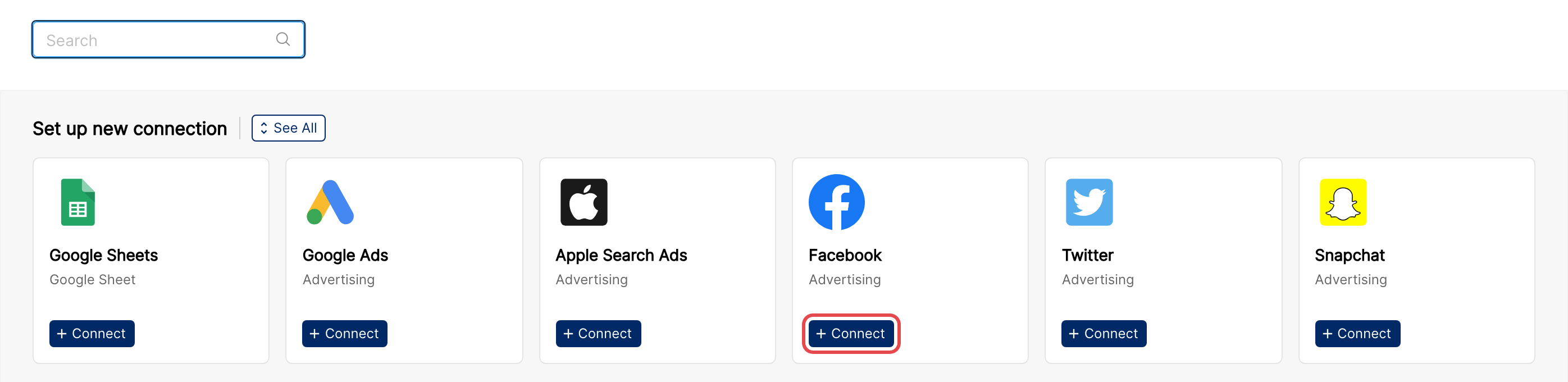
In Clarisights, open Integrations (the database-stack icon in the left sidebar). Under Set up new connection, find the Facebook card (use the search box or See All) and click + Connect.
Step 2: Sign in with Facebook
You will be redirected to Facebook. Sign in with the user that has access to the ad accounts you want to connect.
⚠ Common error: “You don’t have permission to perform this action.” → The Facebook user you signed in as does not have a role on the target ad accounts in Business Manager. Ask a Business Manager admin to assign you at least Analyst on every ad account you want to connect.
Step 3: Choose the Pages & Business assets to share
Facebook’s consent screen lists the businesses, Pages and ad accounts the app will be able to read. Keep all of them selected unless your organisation has a specific reason to limit them: ad accounts you deselect here will not be available in Clarisights.
To learn how Meta lets you grant an app access to your business assets, see Meta's documentation: Facebook Login for Business.
Step 4: Approve the requested permissions
Facebook will display a permission screen listing the access Clarisights requires:
ads_read: read campaign, insights, and conversion data from your ad accountspages_read_engagement: read engagement metrics on Pages associated with your adspages_show_list: list the Pages you manage (used to associate ads with their Page)business_management: only requested when Lift Study reporting is enabled for your company; used to read the lift studies owned by your businesses
Approve all listed permissions. If any are toggled off, several Clarisights reports will be missing data.
⚠ Common error: “Ad account owner has NOT granted ads_management or ads_read permission.” → The ad account’s owning Business Manager is restricting third-party app access, or
ads_readwas declined on the consent screen. Connect again and accept all permissions, and have a Business Manager admin check that Clarisights is allowed to access the affected ad accounts.
Step 5: Select the ad accounts to integrate
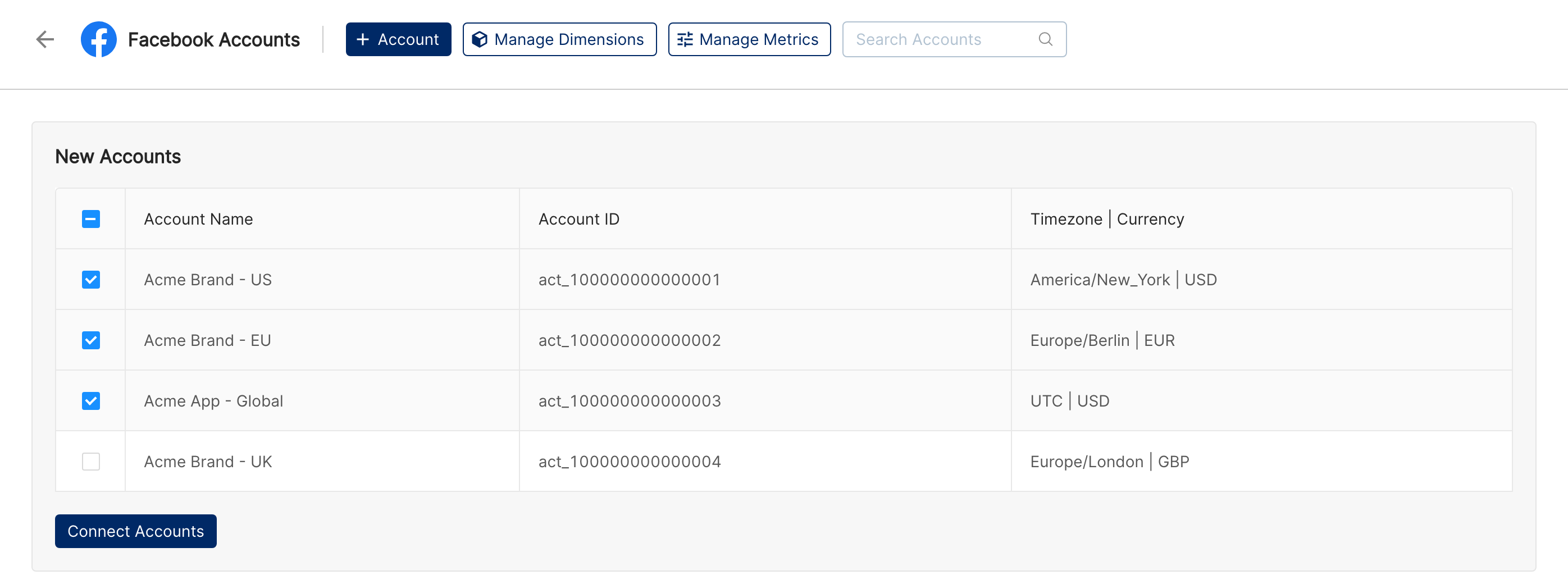
After you authorize, Clarisights lists every ad account your Facebook user can access (across all of its Business Managers) under New Accounts, with each account’s ID, timezone and currency. Select the accounts you want to connect and click Connect Accounts.
Step 6: Manage connected accounts
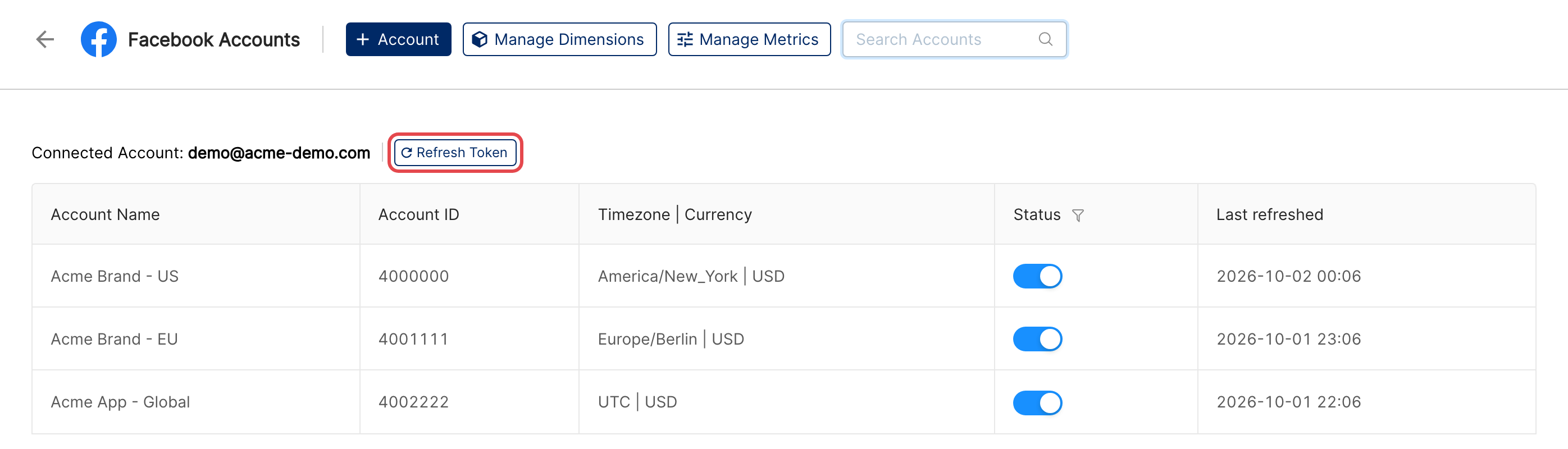
Connected accounts are listed on the Facebook Accounts page under the Facebook user that connected them. Use the Status toggle to pause or resume an account, and Refresh Token to sign in to Facebook again if access was revoked or expired. To connect another Facebook user, click + Account.
Verify the connection
Open Integrations and select Facebook under Manage connected channels. Each account you selected should be listed with its Status toggle on and the expected Timezone | Currency.
Last refreshed fills in once the first sync completes, usually within a few hours; deeper history is then filled in by the initial backfill.
Quick check: in a report, click Create Widget and build a table with Account and Campaign as dimensions and FB: Impressions, FB: Link Clicks and FB: Spend as metrics.
Data available
Hierarchy
How Facebook’s native levels map to the standard Clarisights levels:
Native level (Meta / Facebook) | Clarisights level |
Business Manager | Not a reporting level; available as the Business Name dimension |
Ad Account | Account |
Campaign | Campaign |
Ad Set | Ad Set (the ad group level) |
Ad | Ad |
Creative asset / catalog product | Asset (image, video, title, body, description, link URL, call to action, product) |
Insights breakdowns (age, country, placement, device, etc.) | Breakdowns, stored per campaign; value rule set breakdowns are stored per ad set |
Dimensions
Account-level
Dimension | Description |
Account | Ad account name |
Account ID | Ad account identifier |
Business Name | The business (Business Manager) the ad account belongs to |
Campaign-level
Dimension | Description |
Campaign | Campaign name |
Campaign ID | Campaign identifier |
Campaign Objective | The objective selected for the campaign (e.g., Sales, App promotion, Awareness) |
Campaign Status | Active, Paused, Archived, etc. |
Campaign Start Date / Campaign End Date | Scheduled start and end dates of the campaign |
Campaign Budget (Daily) | Daily budget set at campaign level (campaign budget) |
Campaign Budget (Lifetime) | Lifetime budget set at campaign level |
Campaign Spending Limit | Spending limit configured on the campaign |
Campaign Buying Type | Auction or Reservation |
Ad Set-level (incl. targeting)
Dimension | Description |
Ad Set | Ad set name |
Ad Set ID | Ad set identifier |
Ad Set Status | Active, Paused, etc. |
Ad Set Start Date | Date the ad set is scheduled to begin running |
Ad Set Budget (Daily) | Daily budget set on the ad set |
Ad Set Budget (Lifetime) | Lifetime budget set on the ad set |
Ad Set Bid Strategy | Highest volume, cost per result goal, bid cap, ROAS goal, etc. |
Optimization Goal | The outcome the ad set is optimised for (e.g., Offsite conversions, Link clicks) |
Optimization Goal Results | For conversion-optimised ad sets, the name of the conversion event the ad set optimises for |
Attribution Setting | The ad set’s attribution setting (e.g., 7-day click or 1-day view) |
Billing Event | Event you pay for (impressions, clicks, etc.) |
App Type | Mobile if the ad set promotes an app, otherwise Web |
Custom Audiences | Custom audiences targeted by the ad set |
Ad Group Audiences Excluded | Custom audiences excluded from the ad set’s targeting (up to 10 names, then “& Others”); named to match the equivalent Google Ads dimension |
Audience Types | Kind of targeting used, e.g. Interests, Behaviors, Open Targeting or DPA |
Locations | Locations targeted by the ad set |
Age Range | Age range targeted by the ad set |
Gender | Gender targeting (Male / Female / All) |
Interests | Interests targeted in detailed targeting |
Behaviors | Behaviours targeted in detailed targeting |
Publisher Platforms / Facebook Positions / Device Platforms / User OS | Placement and device targeting configured on the ad set |
Ad-level
Dimension | Description |
Ad | Ad name |
Ad ID | Ad identifier |
Ad Status | Active, Paused, Archived, etc. |
Ad Start Date | Date the ad is scheduled to begin running |
Ad Preview | Preview of the ad creative |
Body | Primary text on the ad |
Headline | Headline text shown on the ad |
Call To Action | Button label on the ad (e.g., Shop Now, Install Now) |
Images | Creative image(s) attached to the ad |
Video | Creative video attached to the ad |
Carousel Count | Number of cards in a carousel ad |
Landing Pages | Destination URL(s) people are sent to, including ads that use multiple creative assets |
Ad Type | Single image, video, carousel, collection, etc. |
Ad Format | Format of the creative (image, video, etc.) |
Facebook Post / Instagram Post | Link to the Facebook or Instagram post behind the ad |
Facebook Page ID / Instagram Account ID | The Facebook Page and Instagram account the ad runs from |
UTM Source / Medium / Campaign / Term / Content | UTM parameters read from the ad’s destination URL |
Creative assets
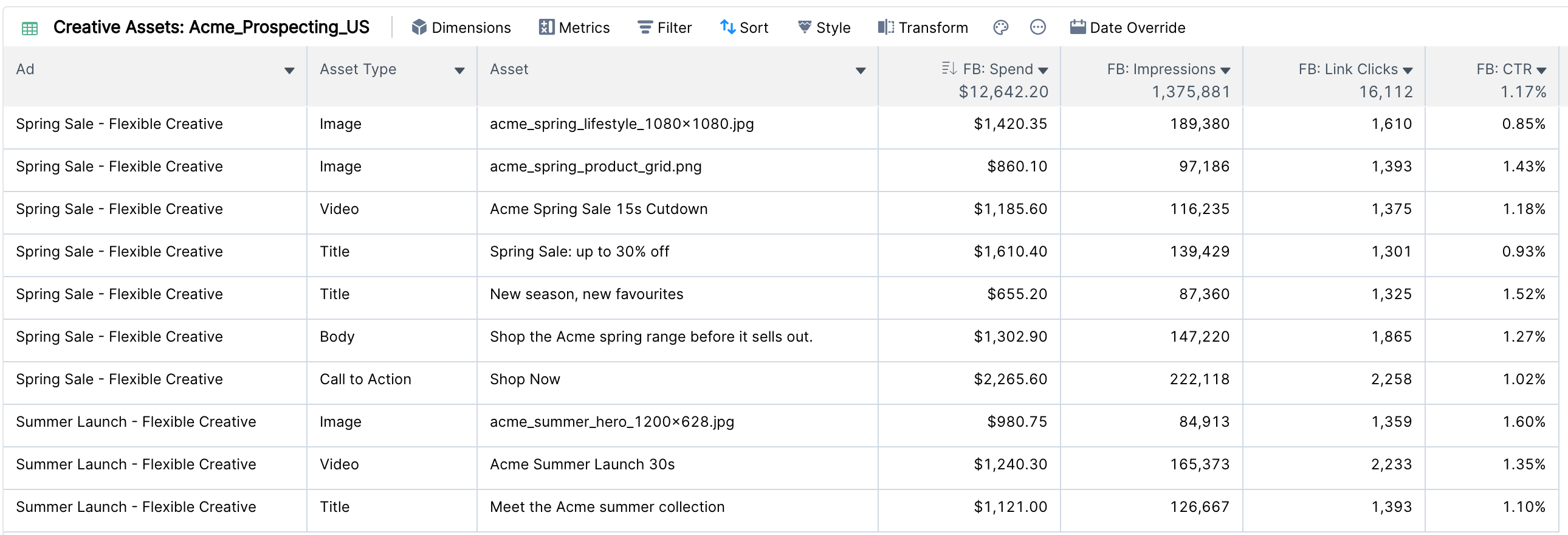
For ads that use multiple creative assets (Dynamic Creative, flexible format and similar Advantage+ creative options), Meta reports performance for each individual asset. Clarisights stores these as Asset rows below the Ad level, so a single ad produces one row per asset variant, per asset type.
The following asset types are supported:
Asset type | What is reported |
Image | Each image variant used by the ad |
Video | Each video variant used by the ad |
Title | Headline text variants |
Body | Primary text variants |
Description | Description text variants |
Link URL | Destination URL variants |
Call to Action | Button variants (Shop Now, Sign Up, Install Now, etc.) |
Product | Catalog products shown by Advantage+ catalog ads (see Product reporting (beta) below) |
Dimensions on each asset row:
Dimension | Description |
Asset Type | One of Image / Video / Title / Body / Description / Link URL / Call to Action / Product |
Asset | The image hash or video ID (shown with the asset’s name), the text for Title / Body / Description, the URL for Link URL, the button label for Call to Action, or the product name |
Asset ID | Meta’s identifier for the asset (the product ID for products) |
Asset Preview | A thumbnail of image and video assets |
Asset rows carry delivery metrics (spend, impressions, clicks, link clicks, engagement) and conversion metrics. Totals across assets do not add up to the ad total, because the same impression is reported once for each asset type it included, and Meta may withhold low-volume rows.
All asset types except Product are pulled by default; individual asset types can be switched off for your company on request.
Product reporting (beta)
Beta: Product reporting is enabled per company. Contact your Clarisights account team or support to opt in.
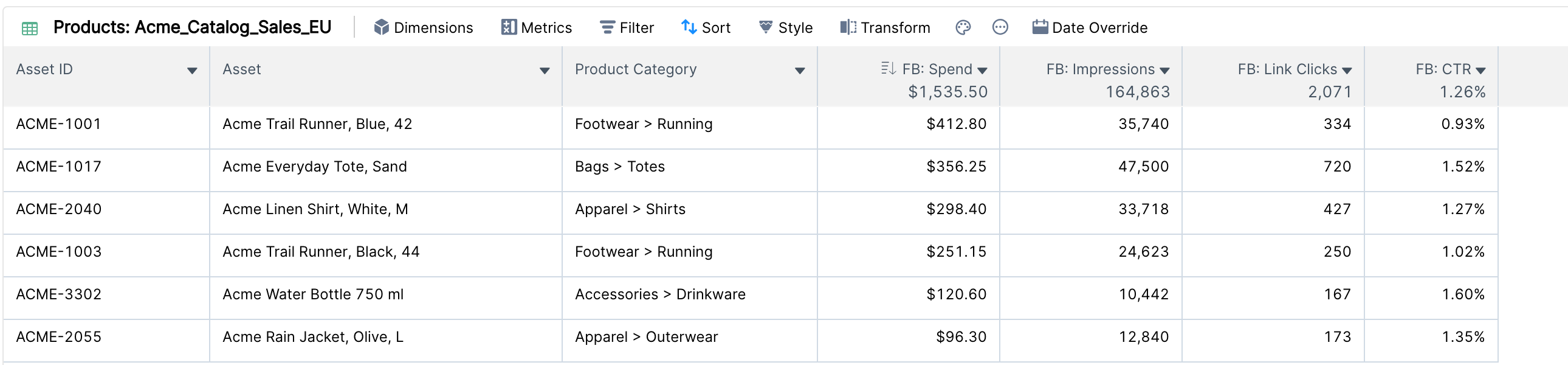
For Advantage+ catalog ads (formerly Dynamic Product Ads), Clarisights reports performance for each catalog product that was shown. Product rows appear as the Product asset type below the Ad level, for ads that use a catalog. Product data covers the last three days on every refresh.
Dimensions available on product rows:
Dimension | Description |
Asset ID | The product ID (the catalog item’s content ID / retailer ID) |
Asset | The product name |
Product feed attributes | Columns from your own product feed file (for example category, brand or price band), joined on the product ID. Your account team chooses which columns to show; image columns are shown as previews. The feed is downloaded on a schedule, daily by default. |
Product rows carry spend, impressions, clicks, link clicks, outbound clicks, Instant Experience clicks and engagement metrics (reactions, comments, shares, saves). Conversion metrics are not reported per product.
Note: Rows for products with no impressions are not stored. Product totals do not always match the parent ad totals because of Meta’s privacy thresholds.
Breakdown dimensions
Facebook breakdowns split a metric across an additional dimension (e.g., Spend by Country). They appear in the dimension picker with a (Breakdown) suffix, for example Country (Breakdown). Breakdowns are stored per campaign, so they can be combined with Account and Campaign dimensions but not with Ad Set or Ad dimensions.
Breakdown | Description |
Age / Gender / Age & Gender | Audience age bucket, gender, or both combined |
Country | Country where the impression was served |
Region | Sub-national region |
Comscore Market | US metro area as reported by Meta (Comscore market names). Meta retired the DMA breakdown in 2026; this replaces it |
Metro Area | The Comscore market mapped to standard US metro area (DMA) names, so it lines up with the Metro Area dimension on other channels such as Google Ads. Being rolled out per company |
DMA | Legacy US Designated Market Area breakdown; Meta no longer returns it, so it only holds historical data |
Device | Device the ad was viewed on (impression device) |
Device Type | Groups Device into Mobile and Desktop |
Device Platform | Mobile or desktop, as reported by Meta |
Publisher Platform | Meta surface: Facebook, Instagram, Audience Network, Messenger |
Platform Position | Placement within a platform (e.g., feed, stories, reels, in-stream video, Marketplace); available together with Publisher Platform |
Publisher Platform & Device / Publisher Platform & Platform Position / Publisher Platform & Platform Position & Device | Combined placement and device breakdowns |
Time of Day (Ad Account Time Zone) | Hour of day in the ad account’s timezone |
Time of Day (Viewer's Time Zone) | Hour of day in the viewer’s timezone |
Frequency Value | Number of times people saw the ad |
Product ID | Catalog product ID (campaign-level product breakdown) |
Ad set breakdown: value rule sets
For ad sets that use Meta value rules (bid adjustments for specific audiences), Clarisights can break ad set performance down by rule set, including conversions. This breakdown is stored per ad set, so it can be combined with Ad Set dimensions.
Breakdown | Description |
Rule Set ID (Breakdown) | Identifier of the value rule set applied to the delivery |
Rule Set Name (Breakdown) | Name of the value rule set as shown in Ads Manager |
Breakdowns are not enabled by default. Contact support to enable the ones you need.
Metrics
Facebook metrics are grouped by prefix: FB: (delivery, engagement, video and app), FB Pixel: (website events), FB App: (app events), FB Offline: (offline events), On Facebook: (actions completed on Meta surfaces) and FB OCC - AGG: (your custom conversions). Money metrics come in two versions: the plain metric is converted to your reporting currency, and the (Local currency) version keeps the ad account’s currency.
Performance & cost
Metric | Description |
FB: Impressions | Number of times your ads were on screen |
FB: Reach | Unique people reached |
FB: Frequency | Average impressions per person reached |
FB: All Clicks | All clicks on the ad (any clickable element) |
FB: Link Clicks | Clicks on ad links to destinations on or off Meta |
FB: Outbound Clicks | Clicks that took people off Meta-owned properties |
FB: CTR | Link clicks as a percentage of impressions |
FB: CPM | Cost per 1,000 impressions |
FB: Spend | Amount spent, in your reporting currency |
FB: Spend (Local currency) | Amount spent, in the ad account’s currency |
FB: Social Spend | Spend on impressions shown with social context |
FB: Full View Impressions | Full views of the Page’s posts driven by the ad |
FB: Results / FB: Results Value | Meta’s Results column is not available through the API, so Clarisights rebuilds it: for each ad set it takes the metric that matches the optimization goal, plus its value |
Engagement & on-Facebook actions
Metric | Description |
FB: Page Engagement | Total Page engagement attributed to the ad |
FB: Post Engagement / FB: Inline Post Engagement | Total post engagement attributed to the ad |
FB: Comments | Comments on the ad |
FB: Likes | Page likes attributed to the ad |
FB: Post Reactions | All reaction types (like, love, wow, etc.) |
FB: Post Shares | Times the ad was shared |
FB: Check-ins | Check-ins driven by the ad |
FB: Page Photo Views | Photo views on the Page driven by the ad |
FB: Event Responses | Event responses driven by the ad |
FB Pixel: Landing Page Views / FB Pixel: Unique Landing Page Views | Website landing page views after a click |
FB App: Landing Page Views | App landing page views after a click |
FB: Omni Landing Page Views | Landing page views across web and app as reported by Meta (not always equal to web plus app) |
FB: Instant Experience Clicks to Open / FB: Instant Experience Clicks to Start | Clicks that opened or started an Instant Experience |
Video
Metric | Description |
FB: Video Plays | Number of times the video started to play |
FB: 3-Second Video Plays | Plays of at least 3 seconds |
FB: 2-Second Continuous Video Plays | Plays of at least 2 continuous seconds |
FB: ThruPlays | Plays to completion, or for at least 15 seconds |
FB: 30-Second Video Views | Views of at least 30 seconds (or to the end if shorter) |
FB: Video Plays at 25% / 50% / 75% / 95% / 100% | Plays reaching each share of the video’s length |
FB: Video Average Time Watched | Average time the video was watched per play |
Mobile app & in-app ad metrics
Metric | Description |
FB: Mobile App Installs | App installs attributed to the ad |
FB: App Events | App events attributed to the ad |
FB: In-App Ad Impressions / FB: In-App Ad Clicks | Impressions and clicks of ads shown inside your app |
FB: Call Confirmation Clicks | Click-to-call confirmations |
Conversions API & Pixel
Website conversions recorded by the Meta Pixel (browser) and the Conversions API (server) appear under the FB Pixel: prefix. Meta combines both sources and removes duplicates (events sent by both with the same event ID) before reporting, so Clarisights shows one deduplicated count per event.
Standard events: View Content, Search, Add to Cart, Add to Wishlist, Initiate Checkout, Add Payment Info, Purchase, Lead, Registration, Contact, Customize Product, Donate, Find Location, Schedule, Start Trial, Submit Application, Subscribe, Recurring Subscription Payment and Cancel Subscription. Each has a count, a Unique count, and a Conversion Value (plus Conversion Value (Local currency)) metric.
Attribution window variants: each event is also available for individual windows, for example FB Pixel: Purchase - 7 days (click) or FB Pixel: Purchase - 1 day (view) (see Attribution windows below).
Custom conversions: custom conversions created in Events Manager are imported from each ad account automatically. They appear as FB OCC - AGG: <conversion name> and FB OCC - AGG: <conversion name> Revenue, combined across ad accounts that use the same name, with the same per-window variants.
Conversions: Pixel / Conversions API (web)
Metric | Description |
FB Pixel: Purchase / FB Pixel: Purchase Conversion Value | Purchases and revenue reported by the Pixel / Conversions API |
FB Pixel: Purchase - 1 day / 7 days / 28 days (click) | Click-attributed purchases for each window |
FB Pixel: Purchase - 1 day / 7 days / 28 days (view) | View-attributed purchases for each window |
FB Pixel: Add to Cart / Add to Wishlist / Add Payment Info | Cart-funnel events and their conversion values |
FB Pixel: Initiate Checkouts | Checkout starts and their conversion value |
FB Pixel: Leads / FB Pixel: Registrations | Lead and registration events and their conversion values |
FB Pixel: View Content / FB Pixel: Searches | Browsing events and their conversion values |
FB Pixel: Contact / Customize Product / Donations / Find Location / Schedule / Start Trial / Submit Application / Subscribe / Recurring Subscription Payment / Cancel Subscription | Other standard events, with counts and conversion values |
Conversions: App events
Metric | Description |
FB App: Activate App | App opens attributed to the ad |
FB App: Purchase / Purchase Conversion Value | In-app purchases and revenue |
FB App: Add To Cart / Add To Wishlist / Add Payment Info | In-app cart-funnel events and their values |
FB App: Initiated Checkout | In-app checkout starts and their value |
FB App: Complete Registration / Tutorial Completion / Level Achieved / Achievement Unlocked / Spent Credits / Rate / Search / Content View | Standard app events, each with a conversion value |
FB App: Uses / Game Plays / Custom Events | App engagement counts |
FB App: Contact / Customize Product / Donations / Find Location / Schedule / Start Trial / Submit Application / Subscribe / Recurring Subscription Payment / Cancel Subscription | Other standard app events, with counts and values |
Conversions: Offline
Metric | Description |
FB Offline: Offline Conversion Other | Offline conversions uploaded to Meta that use the “Other” event |
FB Offline: Offline Conversion Other - 1 day / 7 days / 28 days (click or view) | Offline conversions for each attribution window |
FB Offline: Contact / Customize Product / Donations / Find Location / Schedule / Start Trial / Submit Application / Subscribe / Recurring Subscription Payment / Cancel Subscription | Standard offline events |
On-Facebook conversions
Actions completed on Meta surfaces (Lead Ads forms, messaging ads, Shops and other on-Facebook destinations) appear under the On Facebook: prefix.
Metric | Description |
On Facebook: Leads (Form) / Cost per Lead (Form) | Lead form submissions and cost per submission |
On Facebook: Purchases | Purchases completed on Meta (e.g., Shops) |
On Facebook: Workflow Completion | Completed on-Facebook flows |
On Facebook: New Messaging Conversations / Blocked Messaging Conversations / Messaging Conversations Started | Conversations started or blocked from messaging ads |
On Facebook: Messaging User Subscribed | People who subscribed to messages from your business |
On Facebook: Post Saves | Times the ad post was saved |
On Facebook: Donations / Submit Application | Donations and applications completed on Facebook |
SKAdNetwork (iOS attribution)
For iOS app campaigns, Meta returns aggregated SKAdNetwork (SKAN) results, which Clarisights shows as a parallel set of (SKAN) metrics. Most have click-attributed and view-attributed variants too.
Metric | Description |
FB: Mobile App Installs (SKAN) / (SKAN) (click) / (SKAN) (view) | SKAN-attributed app installs |
FB: App Events (SKAN) / (SKAN) (click) / (SKAN) (view) | SKAN-attributed in-app events |
FB App: Purchase (SKAN), FB App: Activate App (SKAN), etc. | SKAN versions of the standard app events |
FB: In-App Ad Impressions (SKAN) / FB: In-App Ad Clicks (SKAN) | SKAN-attributed in-app ad impressions and clicks |
FB: Call Confirmation Clicks (SKAN) / (SKAN) (click) / (SKAN) (view) | SKAN-attributed call confirmations |
FB: Check-ins (SKAN) / FB: Page Photo Views (SKAN) | SKAN versions of on-platform actions where Meta supports them |
FB: Coarse Conversion Value (SKAN) | SKAN coarse conversion values |
For background on how Clarisights reports SKAN events, see Intro to SKAdNetwork (SKAN) reporting on Clarisights and SKAdNetwork: Changes to Facebook Data on Clarisights.
Attribution windows
Conversion metrics follow Meta’s attribution windows: a click-through window (1, 7 or 28 days) and a view-through window (1, 7 or 28 days), each of which can also be set to None. Unless your company has changed it, Facebook conversions use Meta’s default of 7-day click and 1-day view.
The company default is set by your admin. A report can use a different window: open the report’s menu and choose Attribution Window.
To compare windows side by side, add the per-window metric variants instead, for example FB Pixel: Purchase - 1 day (click) next to FB Pixel: Purchase - 7 days (click).
Additional attribution models can be enabled for your company on request. They appear as extra metric variants with a suffix such as:
(Incremental All Conversion) and (Incremental First Conversion)
1 day (engaged view), 1 day (engaged view all conversions) and 1 day (engaged view first conversion)
1 / 7 / 28 day (click first conversion) and 1 / 7 / 28 day (view first conversion)
(SKAN click 2nd postback) / (SKAN view 3rd postback)
(Inline) and (DDA)
Values are only filled in where Meta returns them for your ad account; otherwise they stay empty.
Lift Studies
Special integration: Lift Study reporting runs alongside the core Facebook Ads connection and is enabled per company by your Clarisights account team. Once it is enabled, the Facebook connection asks for the extra
business_managementpermission.
Once enabled, Clarisights imports the Brand Lift and Conversion Lift studies from the businesses the connected Facebook user belongs to and exposes them as a separate data source. Up to 720 days of study history is loaded when it is first enabled.
Dimensions | Description |
Study ID / Study Name / Study Type | The study’s identifier, name and type (brand lift or conversion lift) |
Study Business ID / Study Business Name | The business that owns the study |
Study Start Date / Study End Date / Study Cooldown Start Date / Study Results First Available Date / Study Observation End Time | Lifecycle dates for the study |
Study Created Date / Study Updated Date | When the study was created and last updated |
Cell ID / Cell Name / Cell Object Level / Cell Object IDs / Cell Object Names | The study cells, the level each cell is defined at (account, campaign or ad set) and the objects in it |
Objective ID / Objective Name / Objective Type | The objective measured for the cell |
Experiment ID | Meta’s experiment identifier (links cells in the same study) |
Per-cell metrics fall into three groups:
Group | Metrics |
Shared (brand and conversion lift) | Population Test / Control / Reached, Impressions, Spend |
Brand Lift | Frequency, Responders Test / Control, ScoreSum and ScoreMean (Test / Control / Incremental), Brand Lift CI Lower / Upper, Breakthroughs (Test / Control / Incremental), Cost Per Incremental Breakthrough (overall / Region / Vertical), ScoreMean Region / Vertical, Is Winner, Is Winner Confidence Level, Top N Ads ID and Spend Percentage (top 5) |
Conversion Lift | Conversions and Sales: Test, Control (scaled), Exposed, Not Exposed, Incremental (with lower and upper bounds and incremental share), Confidence, P-Value, multi-cell rank and confidence, Conversions CPiC and Sales ROAS |
Limitations & known constraints
Attribution model changes (2021): after Apple’s App Tracking Transparency changes, Meta moved to a 7-day click / 1-day view default and limited longer view windows. Historical data keeps the windows that applied when it was reported.
SKAdNetwork constraints: SKAN data is aggregated, delayed by Apple’s postback timers, and subject to privacy thresholds, so low-volume rows may be empty. SKAN totals do not match Pixel or MMP-attributed totals.
Breakdowns are stored per campaign: campaign breakdowns cannot be combined with Ad Set or Ad dimensions in the same widget; value rule set breakdowns are stored per ad set.
Breakdown thresholds: Meta withholds demographic and location rows below its minimum thresholds, so breakdown totals can be lower than the unbroken total.
Reporting delay and restatement: most metrics arrive within a few hours, but conversion and SKAN metrics can take up to about 72 hours to settle, and Meta restates recent days as late conversions arrive. Clarisights re-pulls recent days on every refresh to pick these up.
Conversions API coverage: on iOS Safari and other browsers that limit cookies, Pixel-only setups under-report; Meta recommends sending events through the Conversions API as well.
Asset rows need multi-asset ads: Meta only reports per-asset results for ads that use multiple creative assets (Dynamic Creative, flexible format and similar). Single-creative ads appear at the Ad level only.
Product reporting (beta): product rows exist only for Advantage+ catalog ads, carry no conversion metrics, and cover a rolling three-day window on each refresh.
Lift Studies need setup: lift study data does not appear until Lift Study reporting is enabled for your company, and results follow Meta’s publication timing for each study.
Additional attribution models: incremental, engaged-view, first-conversion and similar windows are only filled in where Meta returns them for your ad account.
Large accounts: Meta limits how much data an app can request per ad account. When an account is throttled, Clarisights pauses requests for it until the limit resets and retries automatically, so very large accounts can take longer to refresh.
Access revoked: if access is removed in Meta Business Manager, or the connecting user loses access to an ad account, that account stops syncing until someone with access reconnects with Refresh Token.
Operating notes
API version: Meta Marketing API
v26.0(Graph API). Clarisights follows Meta’s version schedule and moves to new versions as older ones are retired.Refresh schedule: reporting data is refreshed several times a day for all levels, and the current day is refreshed through the day. Account status and creative details are refreshed daily. Product reporting (beta) re-pulls the last three days on each run.
Lookback / backfill: routine refreshes cover recent days; longer historical ranges can be backfilled on request through support. Lift Studies load up to 720 days when first enabled.
Adding new ad accounts: ad accounts created or shared with the Facebook user after the first connection are not added automatically. Click Refresh Token (or + Account for a different Facebook user), sign in, and select the new accounts.
Multiple Business Managers: one Facebook user can connect ad accounts from several Business Managers in a single sign-in.
Currency conversion: spend and conversion values are pulled in the ad account’s currency and converted to your reporting currency; the (Local currency) metrics keep the original amounts. See Currency Conversion.
Access tokens: when you connect, Clarisights exchanges Facebook’s short-lived token for a long-lived one. Reconnect with Refresh Token if the token expires or is revoked, for example after a password change or a change to your Business Manager permissions.
Need help?
When contacting support from the in-app messenger, please include:
The integration name and ad account ID (from the Facebook Accounts page in Integrations)
The exact error message or screenshot
The step where the issue occurred
When the issue started
For data discrepancies: the date range, attribution window, and any breakdowns used in the widget you are comparing
For asset, product or Lift Study questions: the ad ID and the asset, product or study ID involved