
Integrating Tiktok Ads on Clarisights
Connect your TikTok Ads accounts to monitor campaign performance, video engagement, app installs, on-site/off-site conversions, and SKAN-attributed results across every TikTok ad format alongside the rest of your marketing stack.
At a glance
Authentication | OAuth 2.0 (TikTok Business Center) |
Permissions needed | Admin access to each connected ad account; Catalog Management or Ad Promotion access for any catalogs used |
Account discovery | Automatic: every advertiser account you authorize on the TikTok consent screen is listed for selection |
Data freshness | Twice a day |
Lookback window | Last 3 days on every refresh, plus a daily re-pull of the last 30 days to capture late conversions |
Backfill on connect | On request: contact support to backfill older history |
Timezone | Account native timezone |
Currency | Account native currency (auto-converted via Currency Conversion); both local and converted spend exposed |
Levels supported | Account · Campaign · Ad Group · Ad, plus campaign-level breakdowns (enabled per company) |
Limited rollout | No |
Prerequisites
An active TikTok Ads account managed in TikTok Ads Manager or TikTok Business Center
Admin permissions to all ad accounts you want to connect (a Business Center Admin role does not automatically grant admin access to individual assets, so check each ad account)
Catalog Management or Ad Promotion access on any catalogs used by the connected ad accounts (required for catalog-driven dimensions such as Catalog ID)
Permission to authorize third-party apps on your TikTok profile
Need to grant or check access?
Steps to Connect
Step 1: Start the connection from Clarisights
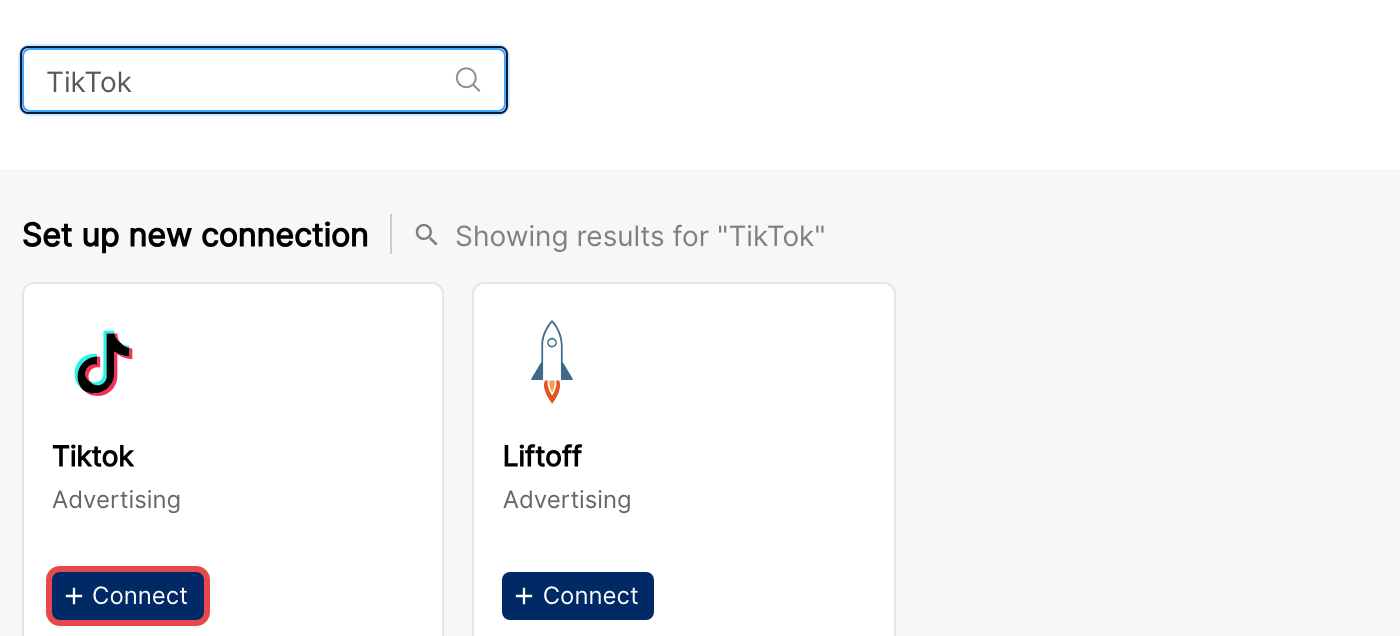
In Clarisights, go to Integrations and click + Connect below the TikTok icon.
Step 2: Authorize Clarisights on TikTok
You will be redirected to TikTok to log in and approve the access scopes Clarisights needs (read access to ad accounts, campaigns, ad groups, ads, reports, audiences, creatives, and catalog data). TikTok also asks which advertiser accounts to share; only the accounts you select there are available in Clarisights. Approve the request to continue.
[TODO: Screenshot needed: TikTok OAuth permission screen]
⚠ Common error: “Authorization Failure / no permission for advertiser.” → The TikTok user you authorized does not have admin permissions on one or more selected ad accounts. Ask a Business Center admin to assign the correct asset-level role and re-run the connection.
⚠ Common error: “Missing scopes.” → You unchecked one or more permissions on the TikTok consent screen. Restart the flow from Clarisights and accept all requested scopes.
Step 3: Wait for the redirect back to Clarisights
Do not refresh or close the window. TikTok will redirect you back to the Integrations page once authorization completes.
Step 4: Select the ad accounts to connect
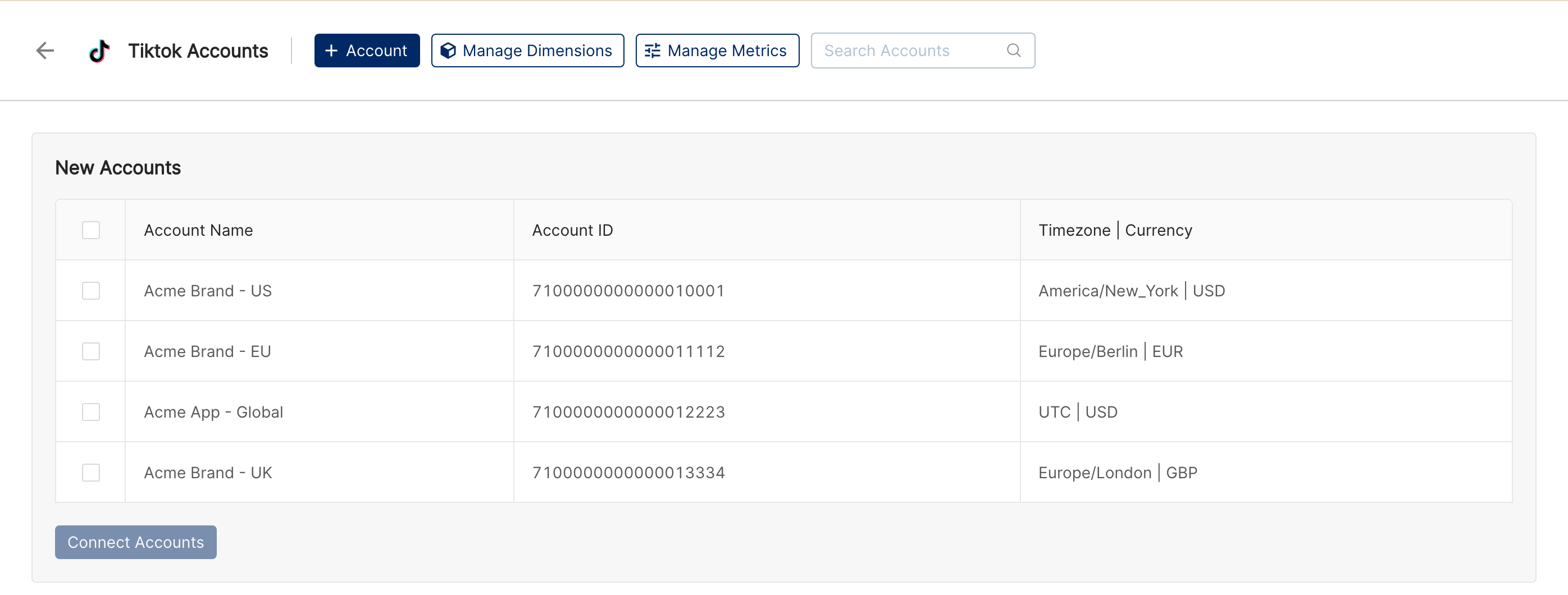
Clarisights lists every advertiser account you authorized under New Accounts on the Tiktok Accounts page. Select the accounts you want to connect and click Connect Accounts.
Step 5: Manage connected accounts
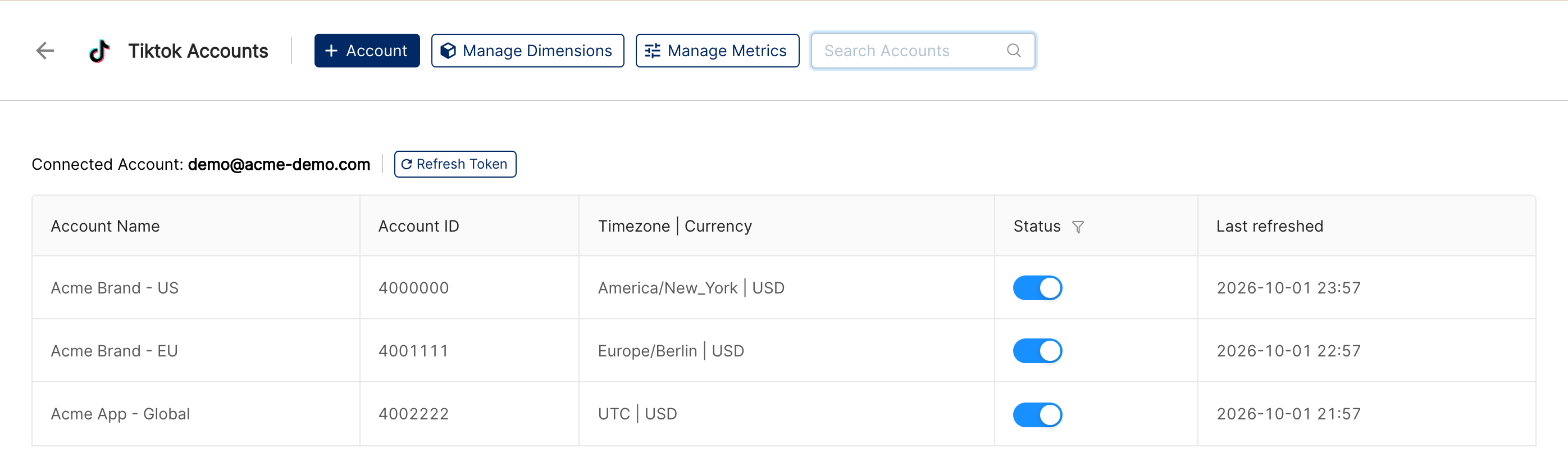
Connected accounts are listed on the Tiktok Accounts page with a Status toggle to pause or resume each account, a Last refreshed time, and a Refresh Token button to re-authorize the connection.
Verify the connection
On the Integrations page, open Tiktok under Manage connected channels. Each account you selected should be listed with its Status toggle switched on.
Data appears after the next scheduled refresh; the Last refreshed column shows when each account was last updated. Ask support if you need older history backfilled.
Quick start: in a report, click Create Widget and add Account, Campaign, Impressions, Clicks and Cost.
Data available
Hierarchy
How TikTok’s native levels map to the standard Clarisights levels:
Native level (TikTok) | Clarisights level |
Advertiser (Ad Account) | Account |
Campaign | Campaign |
Ad Group | Ad Group |
Ad | Ad |
Dimensions
Dimension | Level |
Account | Account |
Account ID | Account |
Account Balance | Account |
Account Country | Account |
Campaign | Campaign |
Campaign ID | Campaign |
Campaign Status | Campaign |
Campaign Objective | Campaign |
Advertising Objective | Campaign |
Campaign Budget | Campaign |
Campaign Budget Mode | Campaign |
Campaign Start Date | Campaign |
Campaign Type | Campaign |
Smart Performance Status | Campaign |
Campaign Product Source | Campaign |
Ad Group | Ad Group |
Ad Group ID | Ad Group |
Ad Group Budget | Ad Group |
Ad Group Budget Mode | Ad Group |
Ad Group Optimize Goal | Ad Group |
Ad Group Status | Ad Group |
Ad Group Billing Event | Ad Group |
Ad Group Bid | Ad Group |
Ad Group Bid Type | Ad Group |
Ad Group Deep Bid Type | Ad Group |
Ad Group Pace | Ad Group |
Ad Group Placement Type | Ad Group |
Ad Group Placement | Ad Group |
Ad Group Language | Ad Group |
Ad Group Operating System | Ad Group |
Ad Group Create Date | Ad Group |
Ad Group Start Date | Ad Group |
Ad Group End Date | Ad Group |
Ad Group Optimization Event | Ad Group |
Catalog ID | Ad Group |
Ad | Ad |
Ad ID | Ad |
Ad Status | Ad |
Ad Image Mode | Ad |
Ad Format | Ad |
Ad Start Date | Ad |
Ad text | Ad |
Video Id | Ad |
Call To Action | Ad |
Landing Pages | Ad |
Vertical Video Strategy | Ad |
ACO Status | Ad |
Ad Preview | Ad |
Smart+ Ad ID | Ad |
Smart+ Creative Name | Ad |
Campaign Automation Type | Ad |
Landing Pages shows the ad’s destination URL as host and path (without the query string), so you can compare performance by landing page across channels.
Breakdown dimensions
Breakdowns split campaign-level metrics by an audience or delivery attribute. They are reported at the Campaign level and are enabled per company: contact support to turn on the ones you need.
Breakdown | Description |
Age (Breakdown) | Audience age bucket |
Gender (Breakdown) | Audience gender |
Country Code (Breakdown) | Country where the ad was served |
Metro Area (Breakdown) | US metro area (DMA) where the ad was served, shown by name; Unknown when TikTok cannot attribute a metro area |
Platform (Breakdown) | Device platform (for example iOS or Android) |
Placement (Breakdown) | Placement where the ad ran |
Audience Language (Breakdown) | Language of the audience |
Audience Network (Breakdown) | Network connection type of the viewer (for example Wi-Fi or 4G) |
Metrics
Spend
Metric | Description |
Cost | Total spend converted to reporting currency |
Cost (Local Currency) | Spend in the account’s native currency (shown without a currency symbol) |
Cost Charged by Cash / Cost Charged by Voucher | Cash- and voucher-funded portions of spend, in both reporting and local currency |
Core delivery
Metric | Description |
Impressions / Gross Impressions | Total ad impressions and pre-filtering gross impressions |
Clicks / Clicks (All) | Click-through count, plus any-engagement clicks |
Reach | Unique users reached |
Result / Real-time Result / Secondary Goal Result | Optimization-event results |
Conversions / Real-time Conversions | Total conversions and intra-day real-time count |
Video engagement
Metric | Description |
Video Views | Total video plays |
2-Second / 6-Second Video Views | Threshold-based view counts (continuous variants available) |
Video Views at 25% / 50% / 75% / 100% | Quartile completion counts |
6-second / 15-second Focused Views | Engaged-view variants |
Video Average Watch Time Per Video View / Per Person | Average watch duration |
Total Video Watch Time / Total Video Play Per Person Watch Time | Aggregate watch time |
Social engagement (paid)
Metric | Description |
Paid Likes / Comments / Shares / Follows | Engagements driven by ad spend |
Profile Visit | Visits to the brand profile |
Music Clicks / Duet Clicks / Stitch Clicks / Sound Usage Clicks | TikTok-specific creator-action clicks |
Anchor Clicks / Clicks on Hashtag Challenge | Anchor and challenge interactions |
Engaged View-Through Conversions | Conversions attributed to engaged views |
Calculated metrics
Metric | Description |
CPC / CPM / CTR | Cost per click, cost per 1,000 impressions and click-through rate |
Cost per 1,000 people reached | Cost per 1,000 unique users reached |
CPA / CVR / Real-time CPA / Real-time CVR | Cost per conversion and conversion rate, including the intra-day real-time versions |
Cost Per Result / Result Rate (%) / Real-time Cost Per Result / Real-time Result Rate (%) | Cost and rate for the optimization-event result |
Cost per Secondary Goal Result / Secondary Goal Result Rate (%) | Cost and rate for the secondary goal |
Profile Visit Rate (%) | Profile visits divided by clicks |
App events (in-app)
Metric | Description |
App Install / Real-time App Install | App installs and intra-day count |
Registration / Login / Subscribe / Start Trial / Search / Rate | Standard app events with Total / value variants |
Purchase / Add to Cart / Checkout / View Content / Add Payment Info / Add to Wishlist | Commerce-funnel events with Total / value variants |
Launch App / Complete Tutorial / Achieve Level / Generate Lead | Onboarding and lead-gen events with Total / value variants |
Day 2 Retention | Next-day open count |
In-App Ad Click / In-App Ad Impression | For apps that monetise via ads, with Total / value variants |
Create Group / Join Group / Create Role / Spend Credit / Unlock Achievement / Loan Apply / Loan Approval / Loan Disbursement | Gaming and finance app events with Total / value variants |
Custom App Event / Total Custom App Event Value | Customer-defined app events |
Web events (pixel)
Metric | Description |
Page View / Total Page View / Total Landing Page View | Page-load events |
Click Button / Submit Form / Download / Search / Contact / Complete Registration | Standard web events with value variants |
View Content / Add to Cart / Add to Wishlist / Initiate Checkout / Add Payment Info / Place an Order / Subscribe / Complete Payment | Commerce-funnel web events with value variants |
Custom Page Event / Total Custom Page Event Value | Customer-defined web events |
On-site Shop / Live
Metric | Description |
Total Purchases / Total Initiate Checkout / Total Product Details Page View | TikTok Shop on-site funnel events with value variants |
Total Add to Cart / Total Add to Wishlist / Total Add Billing | On-site cart events with value variants |
Total Form Submission / Total App Store Click / Total Destination Visit | On-site engagement events |
LIVE Views / LIVE Unique Views / Effective LIVE Views / LIVE Product Clicks | TikTok LIVE engagement metrics |
Playlist Page Visit | Visits to the brand’s playlist page |
Instant Experience & Add-ons
Metric | Description |
Instant Experience Video Component Views (25% / 50% / 75% / 100%) | Quartile views of Instant Experience videos |
Page Views / Outbound Clicks / Product Clicks (Instant Experience) | Instant Experience interactions |
Interactive Add-on Impressions / Destination Clicks / Activity Clicks | Add-on visibility and engagement |
Interactive Add-on Option A / Option B Clicks | Multi-option add-on choices |
Countdown Sticker Recall Clicks | Engagements with countdown stickers |
SKAN (iOS attribution)
Metric | Description |
App Install (SKAN) / App Installs (SKAN Privacy Withheld) | SKAN-attributed app installs and crowd-anonymised counts |
Conversions (SKAN) / Conversions (SKAN click time) | Total and click-time SKAN conversions |
Result (SKAN) / Registration / Purchase | Goal-event variants attributed via SKAN |
Conversions / App Install / Registration / Purchase (SKAN VTA & CTA) | View-through and click-through SKAN attribution |
Unique & Total SKAN events | Unique and total variants for Add to Cart, Checkout, View Content, Add Payment Info, Add to Wishlist, Launch App, Complete Tutorial, Achieve Level, Generate Lead, In-App Ad Click / Impression, Login, Rate, Search, Start Trial, Subscribe, Create Group, Join Group, Create Role, Spend Credit, Unlock Achievement, Loan Apply / Approval / Disbursement, with value variants |
View-through & click-through (non-SKAN)
Non-SKAN VTA / CTA variants are exposed for Conversions, App Install, Registration, and Purchase.
Offline events
For advertisers uploading offline conversion data, the following are exposed with value variants: Complete Payment, Contact, Subscribe, Submit Form, Add Payment Info, Add to Cart, Add to Wishlist, Click Button, Complete Registration, Download, Initiate Checkout, Place an Order, Search, View Content.
Custom events
Custom events you set up in TikTok Events Manager are reported in aggregate: Unique / Total Custom App Event and Total Custom App Event Value for app events, and Total Custom Page Event and Total Custom Page Event Value for web events. Individual custom events are not split into separate metrics.
Limitations & known constraints
Asset-level permissions: a Business Center Admin role does not automatically grant admin access to ad accounts or catalogs. If you connected the integration but some ad accounts are missing, verify the authorising user has admin access to each asset.
Catalog-driven dimensions: Catalog ID requires the authorising user to hold Catalog Management or Ad Promotion access on the relevant catalogs.
Reporting delay: TikTok metrics are typically available within 24 hours but can take up to 48 hours to fully reconcile, especially for SKAN and offline-conversion metrics.
SKAN postback windows: SKAN metrics arrive on TikTok’s postback schedule and may be partially populated for the most recent days.
Reservation TopView: reservation (TopView) campaigns are fetched separately from auction campaigns, and both appear in your reports.
Token revocation: if a user revokes Clarisights’ access in TikTok Business Center, the integration stops syncing until someone re-authorizes it with Refresh Token on the Tiktok Accounts page.
Ad previews: not available for Spark Ads. For ads in Smart Performance Campaigns, the preview is generated by TikTok and the actual ad may look different.
Operating notes
Refresh schedule: data is pulled twice a day at the account, campaign, ad group, and ad levels.
Lookback: each refresh covers the last 3 days, and a daily run re-pulls the last 30 days so late conversions are picked up. Older periods are refreshed only by a backfill, which support can run on request.
Ad Previews: Clarisights loads ad previews from TikTok when you view them. Previews are subject to the same access requirements as the underlying ad asset.
Adding new ad accounts: when a new advertiser account is granted to your TikTok user, click + Account on the Tiktok Accounts page, authorize again and select the new advertiser on TikTok’s consent screen. It is then listed under New Accounts, ready to connect.
Currency conversion: TikTok returns spend in the account’s native currency. Clarisights stores both the local-currency value and a converted value in your reporting currency.
Credential rotation: TikTok access tokens do not expire on their own. Click Refresh Token on the Tiktok Accounts page if a user’s TikTok password changes or an “invalid_token” error appears against an account.
Need help?
When contacting support from the in-app messenger, please include:
The integration name and account ID (shown on the Tiktok Accounts page)
The exact error message or screenshot
The step where the issue occurred
When the issue started