
Integrating Twitter Ads on Clarisights
X (formerly Twitter) Ads is X Corp's advertising platform for running Promoted Tweets, video, and conversion campaigns on the X timeline and the X Audience Platform. Connecting X Ads to Clarisights lets you blend social ad performance with your other paid channels to compare spend, engagement, video views, and downstream conversions side-by-side.
At a glance
| Authentication | OAuth 1.0a (sign in with X) |
| Permissions needed | Account Admin or Ad Manager role on each X Ads account; the X profile must be allowed to authorize third-party apps |
| Account discovery | Automatic after sign-in: every X Ads account the X user can access is listed for selection |
| Data freshness | Twice a day: a short refresh of the last 2 days and a full refresh of the last 8 days |
| Lookback window | Last 8 days on the full refresh; older periods are refreshed by a backfill (up to 30 days per run) |
| Backfill on connect | On request: contact support to backfill history (run in windows of up to 30 days) |
| Timezone | Account-level timezone configured in X Ads |
| Currency | Account native currency (auto-converted via Currency Conversion); conversion values returned in micro-currency are normalized on ingest |
| Levels supported | Account · Campaign · Ad Group (line item) · Promoted Tweet · Display Creative, plus a campaign-level Country breakdown |
| Limited rollout | No |
Prerequisites
An active X Ads account managed in X Ads Manager
A user role on the account: Account Admin or Ad Manager (Analyst is not sufficient because Clarisights pulls ad-object metadata in addition to reports)
Permission on your X profile to authorize third-party apps
For conversion reporting: web events configured via the X Pixel and/or mobile events configured via a measurement partner (Adjust, AppsFlyer, Branch, etc.)
Steps to Connect
Step 1: Open the Integrations page
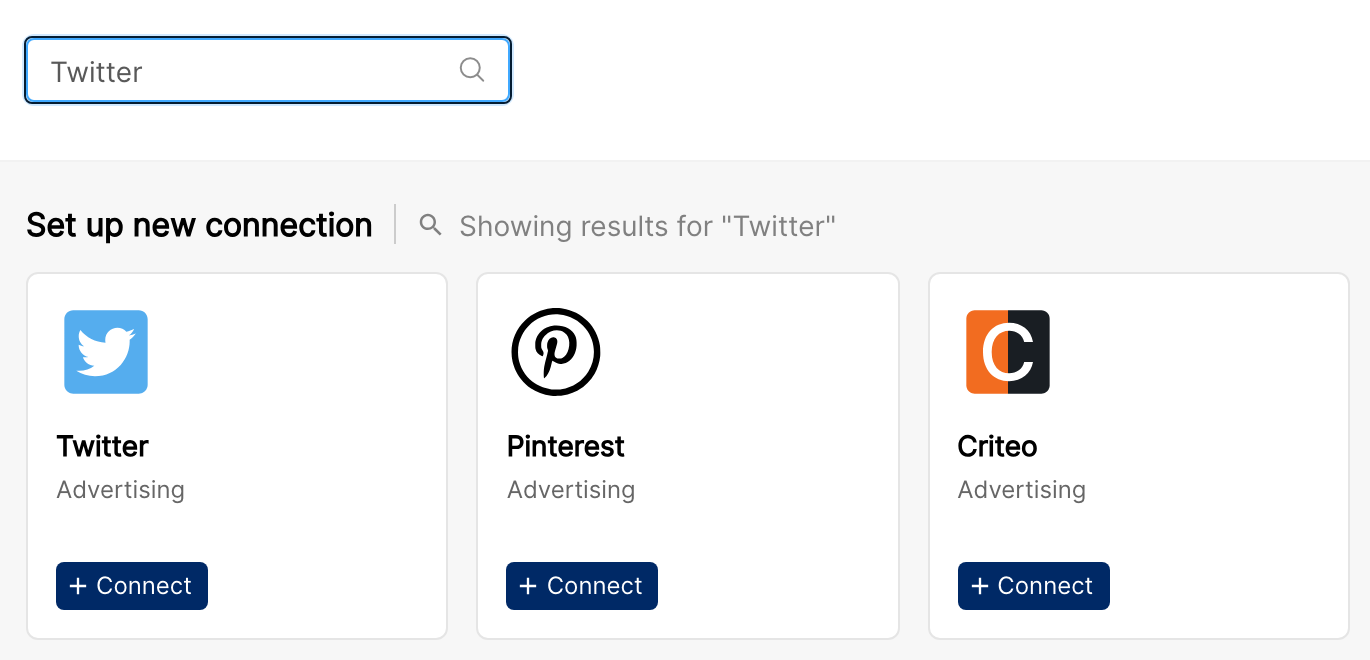
In Clarisights, go to Integrations, find Twitter, and click + Connect.
Step 2: Sign in with X
You'll be redirected to X to sign in. Use the X account that has Account Admin or Ad Manager access on the X Ads accounts you want to bring into Clarisights.
If you have trouble signing in to X, see X's guide: Help with logging in.
⚠ "You don't have permission to authorize this app." → The X profile being used has third-party app authorization disabled, or it lacks a qualifying role on the X Ads accounts. Re-attempt with an X user that has Account Admin or Ad Manager access.
Step 3: Authorize Clarisights
X will display a permissions screen listing the access Clarisights needs (read access on X Ads accounts, campaigns, line items, promoted tweets, and reporting). Click Authorize app.
Do not close or refresh this window. You will be redirected back to Clarisights automatically.
Step 4: Select accounts to connect
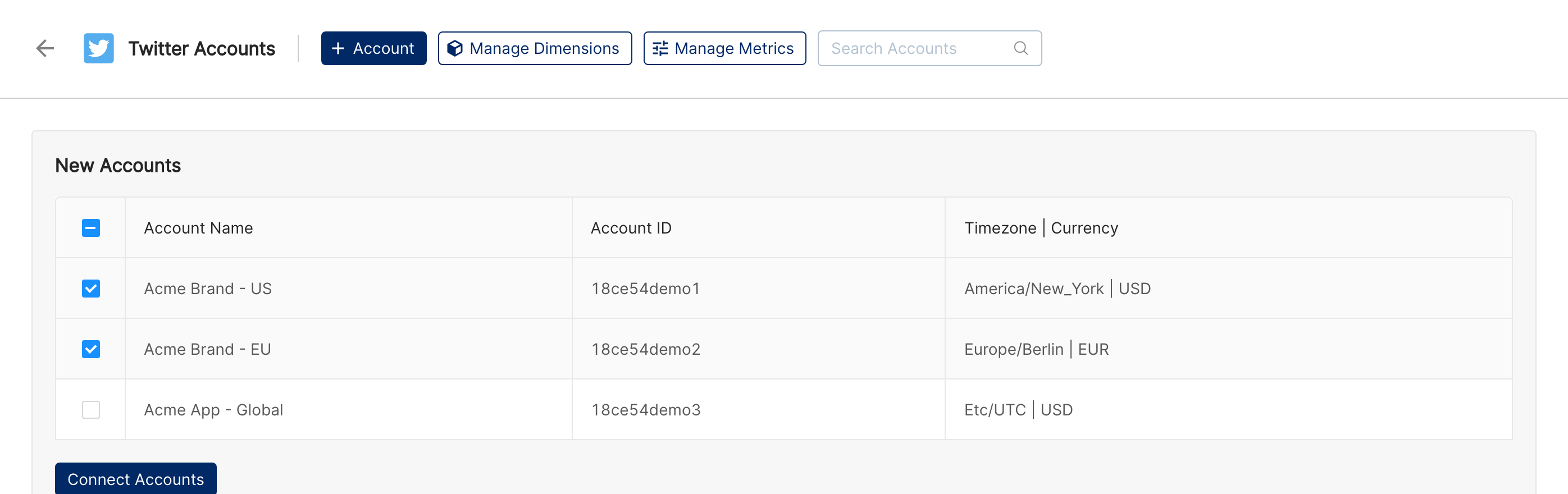
Once you're back in Clarisights, every X Ads account visible to your X user is listed under New Accounts on the Twitter Accounts page. Select the checkboxes for the accounts you want to bring into Clarisights and click Connect Accounts.
Verify the connection
On the Integrations page, open Twitter under Manage connected channels. Each connected X Ads account is listed with its Status toggle switched on. Use the toggle to pause or resume an account, and Refresh Token to re-authorize the connection.
Data appears after the next scheduled refresh; the Last refreshed column shows when each account was last updated.
Quick start: in a report, click Create Widget and add Account, Campaign, TW: Impressions, TW: Retweets and TW: Spend.
Data available
Hierarchy
How X Ads' native levels map to the standard Clarisights levels:
Native level (X / Twitter Ads) | Clarisights level |
Account | Account |
Campaign | Campaign |
Line Item | Ad Group |
Promoted Tweet (with Card attributes) | Promoted Tweet |
Media Creative (display creatives on the X Audience Platform) | Display Creative |
Note on Tweet text: we recommend using the Tweet Text dimension over the older Promoted Tweet dimension. Promoted Tweet may carry truncated values when the tweet copy is long; Tweet Text always returns the full copy.
Dimensions
Dimension | Level | Description |
Account | Account | X Ads account name |
Account ID | Account | X Ads account identifier |
Business Name | Account | Business name set on the X Ads account |
Campaign | Campaign | Campaign name |
Campaign ID | Campaign | X campaign identifier |
Campaign Start Date / Campaign End Date | Campaign | Scheduled start and end dates of the campaign |
Funding Instrument | Campaign | Payment instrument backing the campaign (credit card, IO, etc.) |
Campaign Status | Campaign | Active, Paused, or Archived |
Ad Group | Ad Group | Line item name |
Ad Group ID | Ad Group | X line item identifier |
Ad Group Status | Ad Group | Active, Paused, etc. |
Line Item Objective / Ad Group Objective | Ad Group | Campaign goal at the line-item level (Engagements, Website Clicks, App Installs, Video Views, etc.) |
Line Item Start Date / Line Item End Date | Ad Group | Scheduled start and end dates of the line item |
Optimization | Ad Group | Optimization preference set on the line item |
Bid Type | Ad Group | Target or Max, depending on the bidding strategy |
Bid Strategy | Ad Group | Bid strategy set on the line item |
Followers | Ad Group | Followers targeting set on the line item |
Placement Network | Ad Group | Placement networks selected (X-only, X Audience Platform) |
Placements | Ad Group | Specific placements (X Profile, X Timeline, etc.) |
Tailored Audiences | Ad Group | Tailored Audience targeting on the line item |
Custom Audiences | Ad Group | Custom audience targeting on the line item |
Interests | Ad Group | Interest targeting |
Keywords / Keyword Type | Ad Group | Keyword targeting and match type |
Locations | Ad Group | Geo targeting |
Gender | Ad Group | Gender targeting |
Languages | Ad Group | Language targeting |
Age Bucket | Ad Group | Age range targeting |
Platforms | Ad Group | OS / platform targeting |
Devices | Ad Group | Device targeting |
App Store Categories | Ad Group | App-store category targeting |
Events | Ad Group | Event targeting |
Promoted Tweet | Promoted Tweet | Tweet copy of the promoted tweet (may be truncated; use Tweet Text for the full copy) |
Promoted Tweet ID | Promoted Tweet | Promoted Tweet identifier |
Tweet ID | Promoted Tweet | Underlying tweet identifier |
Tweet Status | Promoted Tweet | Active or paused on the tweet |
Tweet Text | Promoted Tweet | Full tweet copy (recommended over Promoted Tweet) |
Tweet URL | Promoted Tweet | Direct URL to the tweet on x.com |
Card Name / Card ID / Card URI | Promoted Tweet | Twitter Card attached to the tweet |
Card Type | Promoted Tweet | Card format (Website, App, Video, etc.) |
Images | Promoted Tweet | Creative image used in the Card |
Video | Promoted Tweet | Creative video used in the Card |
Creative Size | Promoted Tweet | Pixel dimensions of the creative |
Creative Type | Promoted Tweet | Image, video, carousel, etc. |
Display Creative ID | Display Creative | Media creative identifier |
Display Creative Status | Display Creative | Status of the media creative |
Account Media ID | Display Creative | Identifier of the media used by the creative |
Breakdown dimensions
Country (Breakdown) splits campaign-level data by the country where the ad was served. It covers delivery, spend, video and media metrics and mobile conversions; web conversions are not available by country (an X limitation). Breakdowns are enabled per company: contact support to turn it on.
Metrics
Engagement & billing
Metric | Description |
TW: Impressions | Total impressions |
TW: Qualified Impressions | Impressions on tweets that loaded fully and were viewable |
TW: Engagements | Total engagements (clicks, retweets, replies, likes, follows, card engagements) |
TW: Billed Engagements | Engagements that were billed |
TW: Retweets | Total retweets |
TW: Replies | Total replies |
TW: Likes | Total likes |
TW: Follows | Follows attributed to the ad |
TW: Card Engagements | Engagements with the Twitter Card |
TW: Spend | Total spend (billed charge), converted to your reporting currency |
TW: Spend (Local Currency) | Spend in the X Ads account's own currency |
Clicks
Metric | Description |
TW: Clicks | Total clicks |
TW: App Clicks | Clicks on app-install / app-open CTAs |
TW: Url Clicks | Clicks on links inside the tweet |
Video & media
Metric | Description |
TW: Total Video Views | All video views |
TW: Video Views - 25% / 50% / 75% / 100% | Quartile completion counts |
TW: Video Views - 3s, 100% | Views of at least 3 seconds and 100% in-view |
TW: Video CTA Clicks | Clicks on the video CTA |
TW: Video Playback Starts | Video playback starts |
TW: Media Views | Total media views |
TW: Media Engagements | Engagements with the media |
Derived rates & cost ratios
Metric | Description |
TW: Cost per 1k Impressions | CPM |
TW: Cost per 1k Qualified Impressions | CPM over qualified impressions only |
TW: Cost per Link Click | Spend / URL clicks |
TW: Cost per App Click | Spend / app clicks |
TW: Cost per Video View | Spend / video views |
TW: Cost per 3s/100% Video View | Spend / 3s 100% video views |
TW: Click Rate | Clicks / impressions |
TW: Link Click Rate | URL clicks / impressions |
TW: App Click Rate | App clicks / impressions |
TW: Media View Rate | Media views / impressions |
Web conversions
Web conversions are tracked via the X Pixel. Each event is reported as a total plus Post Engagement, Post View and Assisted variants (for example TW WC: Purchases Post View).
Metric | Description |
TW WC: Purchases | Web purchase events |
TW WC: Signups | Web signup events |
TW WC: Downloads | Web download events |
TW WC: Site Visits | Web site-visit events |
TW WC: Conversion Custom | Custom web conversion events |
Mobile conversions
Mobile conversions are split by attribution: Post View (the user saw the ad), Post Engagement (the user clicked or otherwise engaged) and Assisted. All three variants, plus a total, are available for every event below (for example TW MC: Installs Post Engagement).
Metric | Description |
TW MC: Installs | App installs |
TW MC: Spent Credits | In-app spend events |
TW MC: Content Views | Content-view events |
TW MC: Add To Wishlists | Wishlist add events |
TW MC: Add To Carts | Cart add events |
TW MC: Checkouts Initiated | Checkout-start events |
TW MC: Payment Info Additions | Payment-info entry events |
TW MC: Purchases | Mobile purchase events |
TW MC: Reservations | Reservation events |
TW MC: Tutorials Completed | Tutorial-completion events |
TW MC: Achievements Unlocked | Achievement-unlock events |
TW MC: Levels Achieved | Level-up events |
TW MC: Searches | In-app search events |
TW MC: Site Visits | In-app site-visit events |
TW MC: Key Page Views | Key-page-view events |
TW MC: Re Engages | Re-engagement events |
TW MC: Shares | In-app share events |
TW MC: Sign Ups | Mobile signup events |
TW MC: Logins | Login events |
TW MC: Updates | App-update events |
TW MC: Rates | Rating events |
TW MC: Downloads | Mobile download events |
TW MC: Invites | Invite events |
Conversion value
For every web and mobile conversion event, Clarisights also reports the sale amount and the number of orders, each with Post Engagement and Post View variants:
Conversion value: TW WC Val and TW MC Val metrics (for example TW MC Val: Purchases Conversion Value Post Engagement), converted to your reporting currency
Orders: TW WC-O and TW MC-O metrics (for example TW WC-O: Purchases Orders Post View)
Limitations & known constraints
Backfill cap: a single backfill run can cover at most 30 days. Larger ranges are split into multiple runs.
Country breakdown: X supports country segmentation for mobile conversions but not web conversions, so web conversion metrics are not available with Country (Breakdown).
Placement merging: X exposes "All on Twitter" and "Publisher Network" stats via separate calls. Clarisights merges the two so you see one combined number per Promoted Tweet.
Truncated Promoted Tweet dimension: the older Promoted Tweet dimension carries the tweet copy and may be truncated; switch to Tweet Text for the full copy.
Token revocation: revoking Clarisights' access from your X settings stops sync until you re-authorize with Refresh Token on the Twitter Accounts page.
Operating notes
Refresh schedule: twice a day. A short refresh covers the last 2 days, and a full refresh covers the last 8 days to pick up late-arriving data.
Lookback: 8 days on the regular schedule; older periods are refreshed only by a backfill, which support can run on request.
Temporary X API errors: timeouts and temporary server errors from X are retried automatically, so a brief X outage usually does not need any action from you.
Currency conversion: spend and conversion values are returned by X in the account's native currency (with monetary fields delivered in micro-currency). Clarisights normalizes and converts them to your reporting currency.
Adding new ads accounts: when a new X Ads account is created on your X user, open the Twitter Accounts page, click + Account and sign in with X again. New accounts are listed under New Accounts, ready to connect.
Credential rotation: OAuth tokens persist until revoked. Click Refresh Token on the Twitter Accounts page if the token becomes invalid (for example, after a password reset).
Need help?
When contacting support from the in-app messenger, please include:
The integration name and account ID (shown on the Twitter Accounts page)
The exact error message or screenshot
The step where the issue occurred
When the issue started